0
:
30
0
0
:
30
0
500
500
1 x
8
)
)
)
)
)
)
)
)
)
)
)
)
)
)
)
)
)
)
)
)
)
)
)
)
)
)
)
)
)
)
8
:
88.
.
8
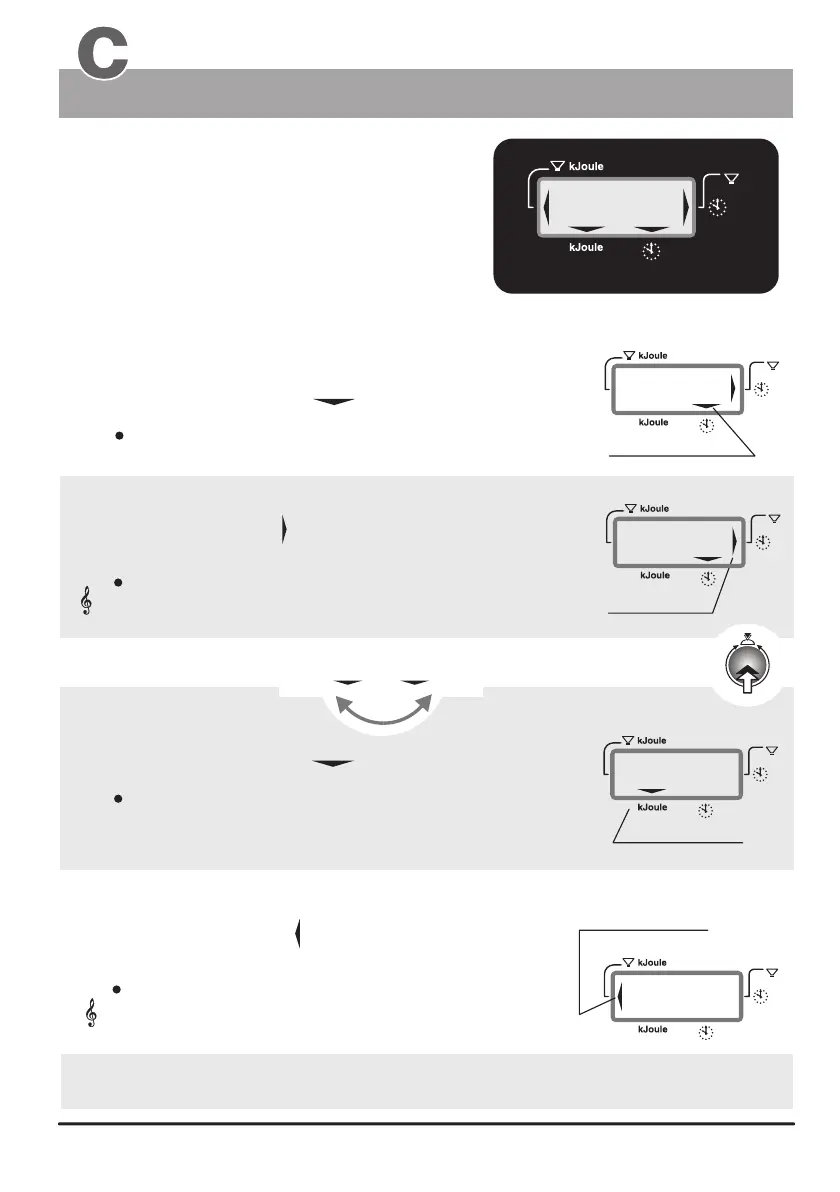
Window 2
Displays :
1. Training time
1a. Time limit
2a. kJoule limit
2. kJoule
(see also pages 14 - 17 / the section on training preparations “personal data / Alarm levels”
or entering the preset values and “Settings verification”)
Switching between the time and kJoule display using control button Nr. 6
Display example
Training duration of 30 minutes
kJoule
kJoule
Time Time
the actual training time
the preselected alarm time
the reaching of a time limit (time limit arrow)
the actual kjoule
the preselected kjoule limit
the actual clock time
When the selection arrow is pointing to the clock symbol:
When the selection arrow points to kJoule then:
the elapsed training time is displayed (max. 9 hr 59 min)
the energy spend in kJoule
Selection arrow
kJoule limit arrow
The time limit arrow is displayed when the preset time
limit is reached.
The kJoule limit arrow is displayed when the preset
kJoule limit is reached.
This arrows indicates that the preset time limit has
been reached or exceeded. Additionally the system
emits an acoustic signal.
This arrows indicates that the preset kJoule limit has
been reached or exceeded. Additionally the system
emits an acoustic signal.
is displayed.
Acoustic signal
Acoustic signal
Selection arrow
time limit arrow
Training time and kJoule
Window Nr. 2
(display in minutes/seconds)
(when the device is turned on and during training breaks /
see page 10 for setting the time)
The Dashboard


 To Next Page