15
1.
)
)
)
45
)
)
)
130
P
)
)
)
0
0
)
)
)
2.
dat
400
200
0
P
)
)
)
1 x
Press
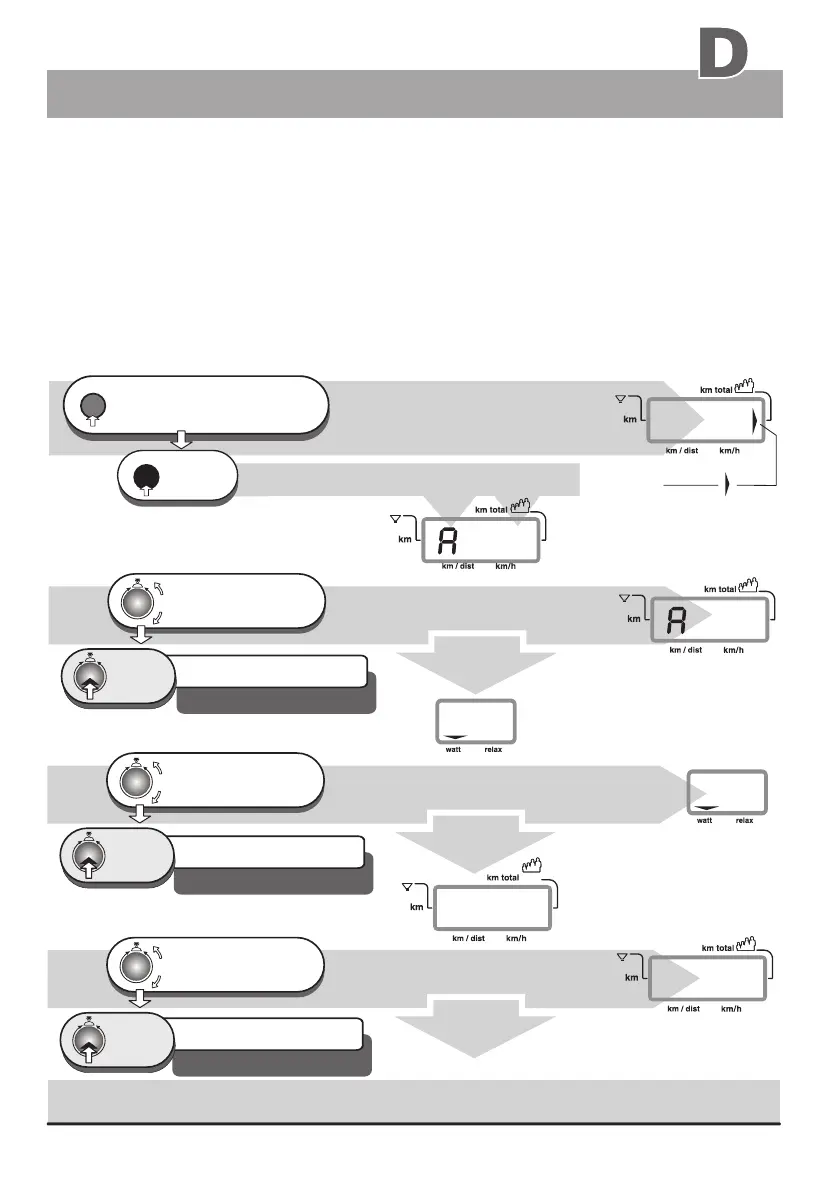
The dashboard of the ergo_bike permits the entry of personal alarm levels for pulse rate, upper watt limit,
training time, distance and burned KJoule. When an alarm level is reached during training, a beep signal is
sounded and the corresponding limit arrow is displayed. If you continue training, the beep signal stops, and
only the arrow indicates that the corresponding alarm has been reached.
2.0 Data entry and alarm levels set up
window no. 4 displays
arrow
!
window no. 4
If the alarm level of the pulse rate is reached or exceeded, the ergo_bike reduces automatically the braking
power in five watts per second increments until the actual pulse rate falls below the alarm level.
The entry of the age is mandatory for the display of the aerobic pulse zone for the user.
(see page 6)
The set up program goes automatically
to the Watt entry step
The set up program goes automatically
to the pulse rate entry step
The set up program goes automatically
to the time entry step
Setting up the personal data and alarm levels
Turn until the age
of the user (e.g. 45)
is correctly displayed
1 x
Press
1 x
Press
1 x
Press
The setting is confirmed
and saved
e.g. alarm level for the age 45 years
Default level / DF = 40 years
e.g. alarm level 200 Watt
Default level / DF = 400 Watt
e. g. alarm level 130 beats
Default level / DF = 220 beats
press repeatedly,
until the km total arrow is
displayed in window no. 4 (right side)
reset
2.1 Age entry
2.2 Watt entry
2.3 Pulse rate entry
window no. 4 displays
window no. 4 displays
window no. 4 displays
window no. 4
window no. 4
window no. 5 displays
window no. 5 displays, e. g.
turn until the alarm level for
the pulse rate (e. g. 130)
is correctly displayed
Turn until the upper Watt limit
is correctly displayed
between 25 and 400 Watt max.
The manual program must be selected before the entry of the data or alarm levels, otherwise
the entry of the pulse rate level will be skipped.
2.4 Time entry
Continuation
Entering an alarm level of “0” deactivates
the corresponding “alarm”
0km only the first time
the unit is turned on
Preparing for training
The setting is confirmed
and saved
The setting is confirmed
and saved


 To Next Page