watt
)
)
)
)
)
)
00
13
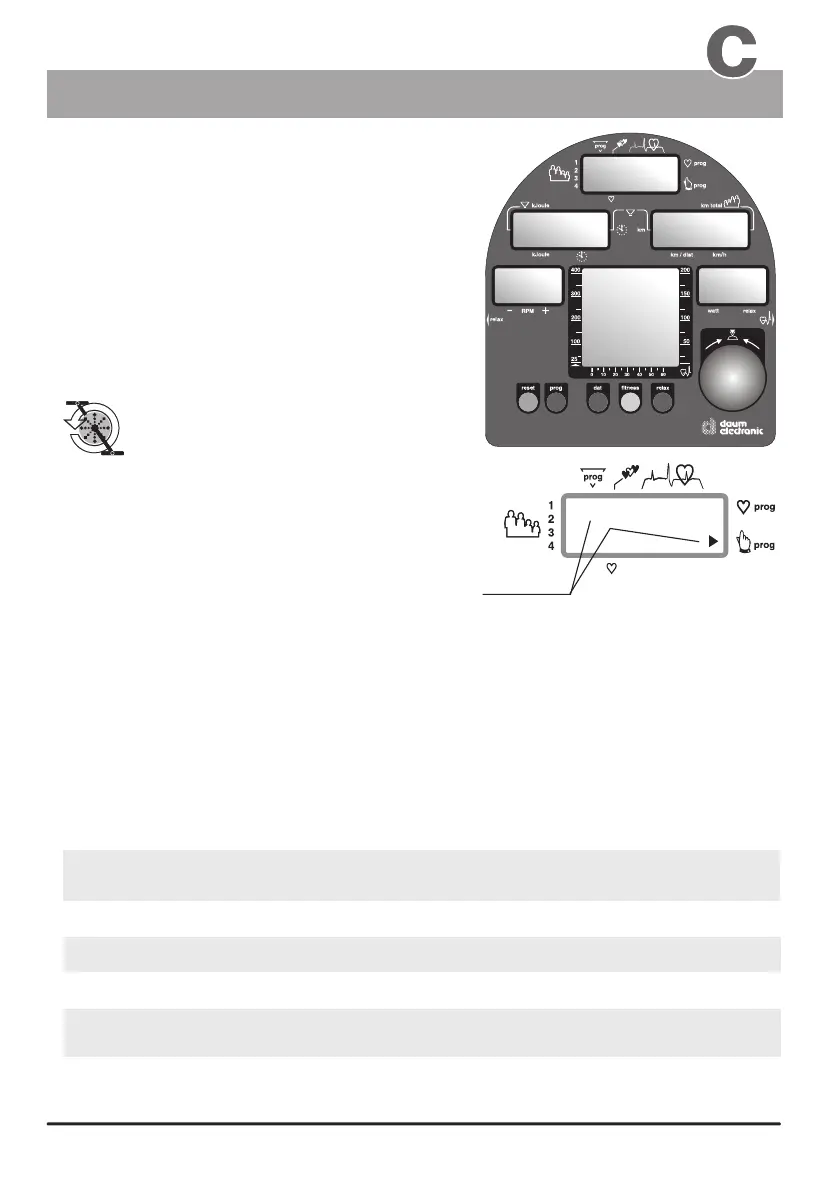
Window no. 4
Window no. 5
Window no. 1
Window no. 2
Window no. 3
Window no. 6
“the graphical
display is not
available on the
cardio 2002 pc
model”
Manual setting “0”
When the ergo_bike is switched on (using
the power switch), or when the “SLP” state
(sleep mode) is canceled using control
button No. 6, it goes into ready state.
You can directly start training without
the need to do any particular setting!
Window no. 2
Window no. 3
Window no. 4
Window no. 5
Window no. 6
the actual theoretical velocity (km/h)
the actual load setting (in Watt)
and the Relax levels
the elapsed time since the beginning of the training.
RPM the actual speed of the pedals in revolutions per min.
The following symbols/numbers in display
window no. 1 mean that the ergo_bike is set
in manual mode for the indicated user number,
and without the entry of any personal alarm values:
This symbol means start
operating / turning the
pedals.
Basic set up
Display windows
Heart pulse rate
Window no. 1
(this value is only displayed if the pulse sensor
Values displayed in the dashboard windows during a training session:
When you start moving the pedals display windows no. 2,
4 and 5 show the actual training values.
The smallest load value for a training with the ergo_bike is 25 Watts.
You can increase or decrease the load in five Watts increments by turning the
control button no. 6.
(ear clip) or the Cardio Sensor chest band is connected and functional)
The pulse frequency will be displayed in window no. 1 when the pulse sensor (ear clip),
or the Cardio Sensor chest band, is connected and functional or when both hands are laid
on the hand pulse sensors on the handle.
Window no. 1
Symbols
graphical representation of the target heart pulse rates
The Dashboard


 To Next Page