4
watt
)
)
)
)
)
)
9
10
11
12
13
17
8
6
7
18
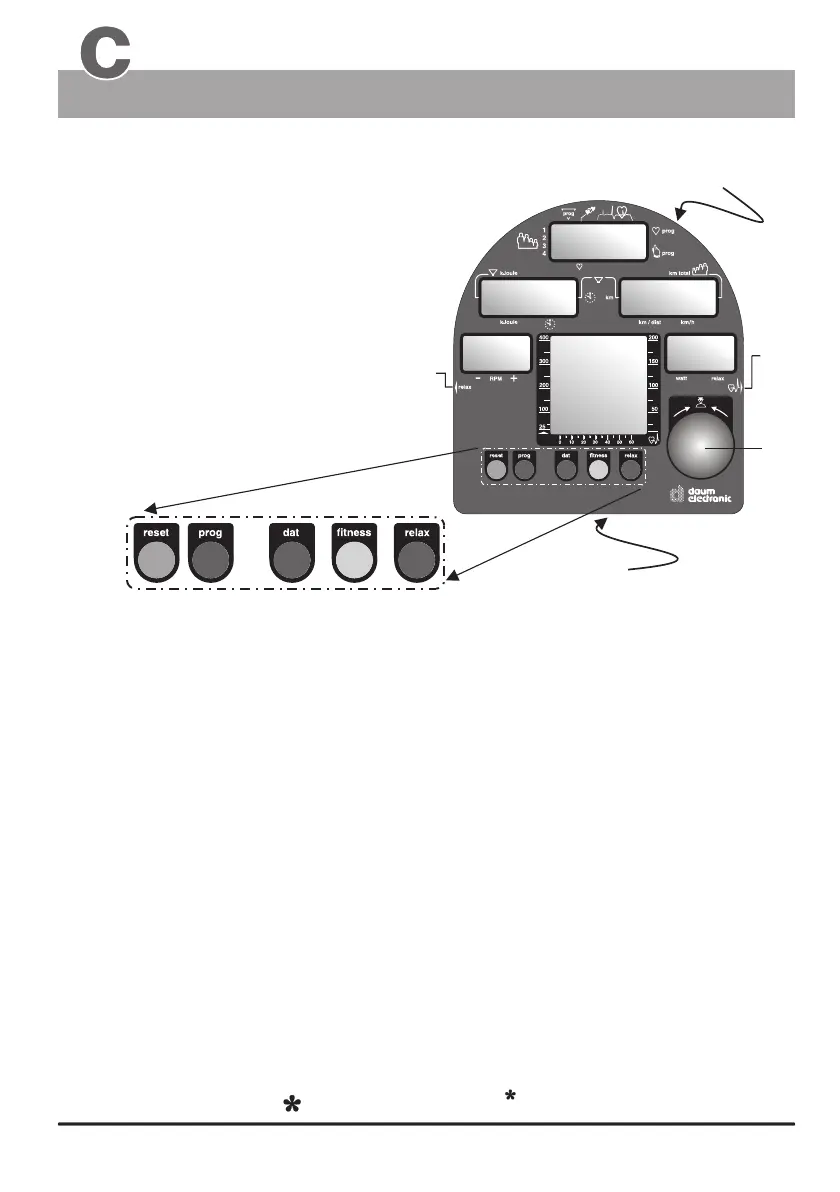
7. Connector of the relax sensor
6. Control button
1. - 5. LCD Displays
8. Connector of the pulse sensor
used to connect the relax sensor.
(see page 23 / "to relax" )
used to connect the pulse sensor /
earclip (see page 11)
9. fitness - key
10. reset - key
13. relax - key
11. dat- key
12. prog - key
Resets the display windows.
allows the entry of personal data that will be
used to determine the alarm values to be monitored
during training sessions
This key is used to recall the programmed training
sessions. (see page 26)
Starts the relax program used with the relax
sensor (accessory).
Control elements of the dashboard
(has 2 functions)
1.
2.
Recalls a fitness mark
Recalls the values of the last training session
(see page 21)
(see page 22)
17. Connector
PC-interface
The PC interface (connector) is located on the
underside of the dashboard within the square
opening (see page 12)
4
Displays / Function keys / Input connectors
The Dashboard
Window no. 2
Window no. 4
Window no. 1
Window no. 3
Window no. 5
Display windows no. 1 to 5
(below)
(see page G3 )
18. RESET - key (recessed)
for the dashboard
computer
The RESET key is located on the underside of the
dashboard, above the protective plate and is intended
to be used in the case of a failure of the internal
computer software.
what if...?
(below)


 To Next Page