16
15
)
)
)
0
)
)
)
0
0
:
:
25
00
0
350
0
0
)
)
)
)
)
)
)
)
)
)
)
)
)
)
)
)
)
)
)
)
)
)
)
)
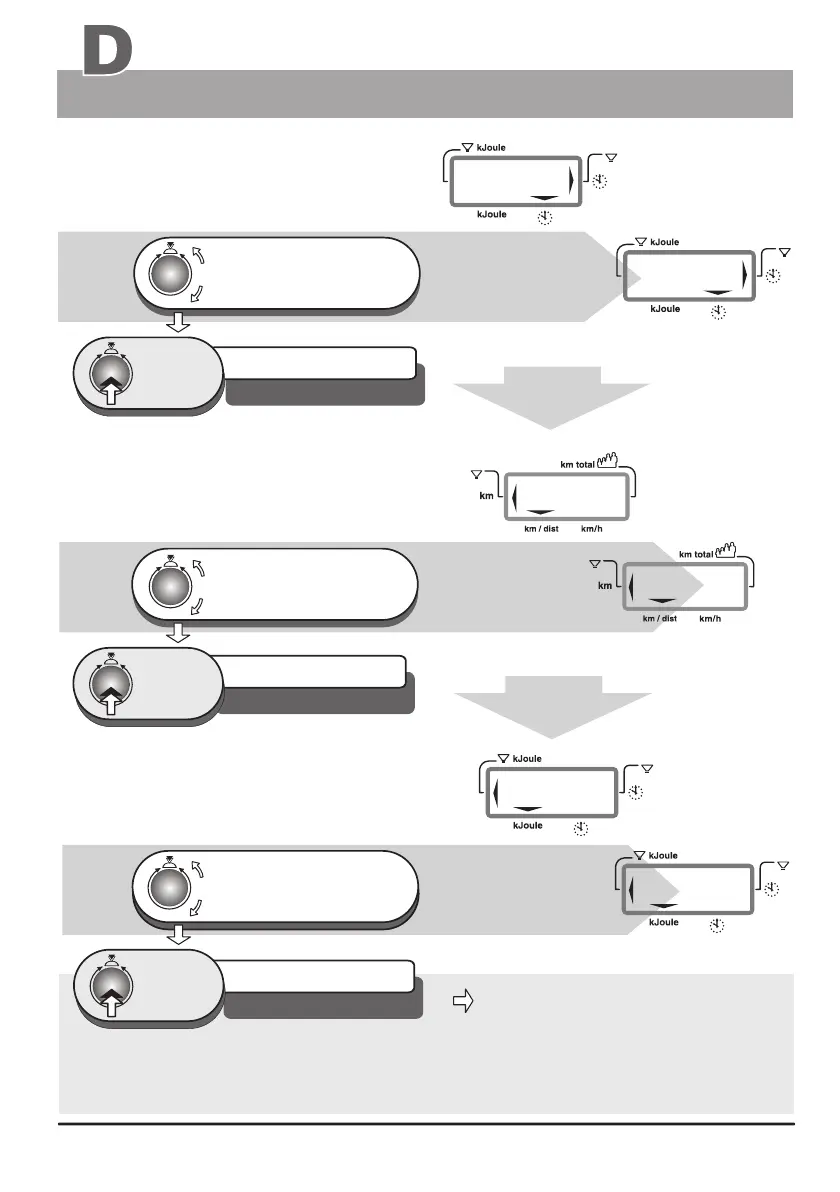
e. g. Time alarme level 25:00 Min
Default level / DF = 00:00 Min
e. g. Distance alarm level 15km
Defaul level / DF = 0 km
e. g. alarm level 350 kJoule
Defaul level / DF = 0 kJoule
The alarm values entered remain stored when the is turned off. If you should need to
change one or more of the alarm values, you can overwrite the corresponding pld alarm value with
the new one (using the same procedure described above).
ergo_bike
2.4 Time entry
2.5 Distance entry
2.6 kJoule entry
Window no. 2
Window no. 4
Window no. 2
steps to window No. 4
in setting verification mode
2.2 Pulse rate entry
Continued
from
The set up program goes
automatically to the distance
entry step
The set up program goes
automatically to the kJoule
entry step
Personal settings
Training
turn, until the required
training duration (e.g. 25 min.)
is correctly displayed
1 x
Press
turn, until the required length
for the training circuit
(e.g. 15 km) is displayed
1 x
press
Turn until the value of the
required value of the
(e.g. 350) is displayed
kJoule
burning
Automatic
A
1 x
press
Preparing for training
The setting is confirmed
and saved
The setting is confirmed
and saved
The setting is confirmed
and saved


 To Next Page