1 x
10
)
)
)
15
60
400
150
180
)
)
)
)
)
)
8
:
88
8
Window 5
5 sec
Selection arrow
Window 2
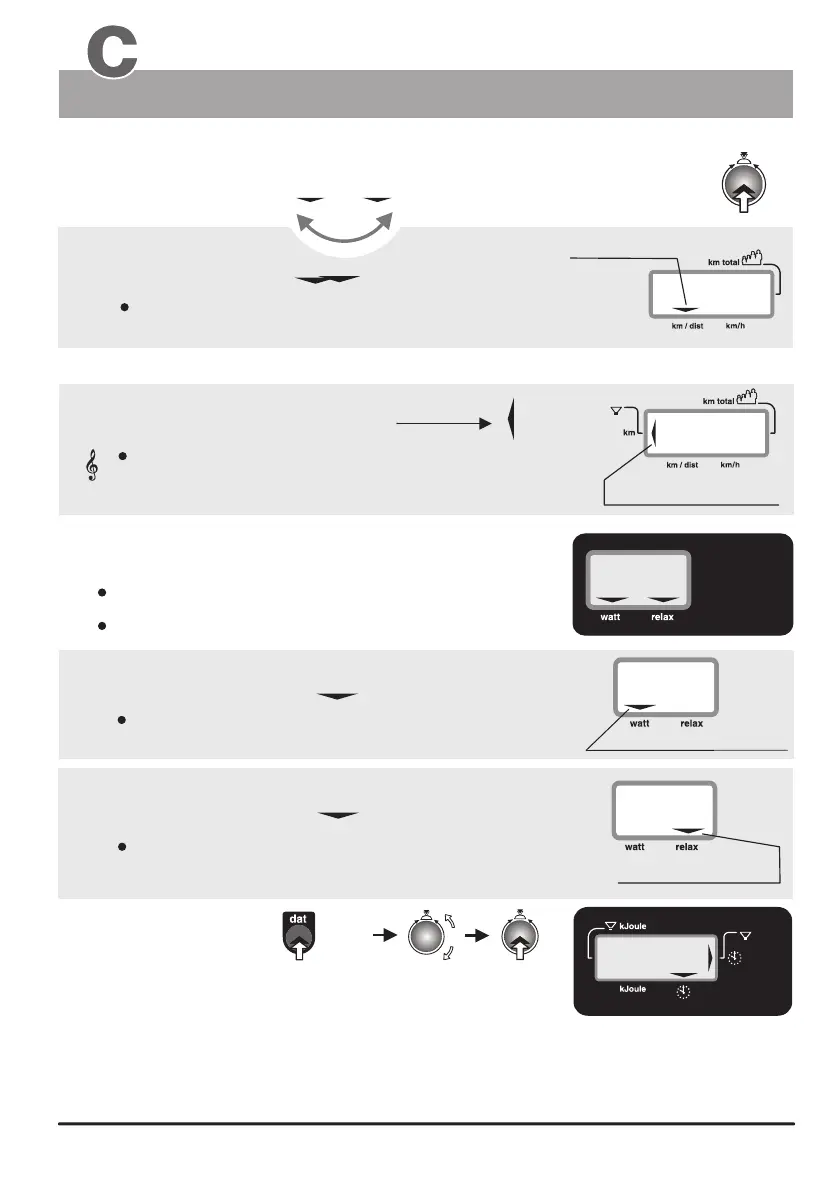
3. Distance
Distance km/h
Distance km/h
Switching between the km/h and distance display using button Nr. 6
When the selection arrow is pointing to the km/dist:
the distance in km covered during the present training session
is displayed.
Selection arrow
Distance limit arrow
1010
3a. Limit ( km )
acoustic signal
The distance limit arrow is displayed when the preset
distance limit is reached.
This arrows indicates that the preset distance limit has
been reached or exceeded. Additionally the system
emits an acoustic signal.
Displays:
1. Watt
2. Relax
the braking power in Watt
When the selection arrow is pointing to the Watt:
When the selection arrow is pointing to the Relax:
a Relax level, between 0 and 255
the breaking power in Watt (25 to 400 Watts)
is displayed.
is displayed.
Distance/Watt & Relax / Clock Time
Windows No. 4, No. 5 and No. 2
Distance and reaching of a distance limit
Setting the time
Selection arrow
a Relax level
Switch on the ergo_bike while pressing the dat key (Nr. 11), and keep the
dat key pressed for 5 more seconds until numbers are displayed on the
LCD windows. Window Nr. 2 will now display the actual hour setting (and windows Nr. 3 and Nr. 5 will display the software
version number). Adjust the hour setting to the correct clock hour (in 24h format) by turning the control button (6). When
you confirm the hour setting by pressing the control button the system will display the minute value, and the seconds
value successively. Each of which can be set to the correct value by turning the control button, and confirmed by pressing
the same button (6). As soon as the seconds value is confirmed the clock starts running at the set time in normal
operation mode.
Follow the procedure described below to set the correct clock time:
The Dashboard


 To Next Page