PRELIMINARY
REMOVING THE TRANSFORMER
CAUTION: Make sure that the cooktop compo-
nents are cool before you begin.
1. Turn off the gas and disconnect power to
the cooktop.
2. Remove the cooktop (see page 26 for the
procedure).
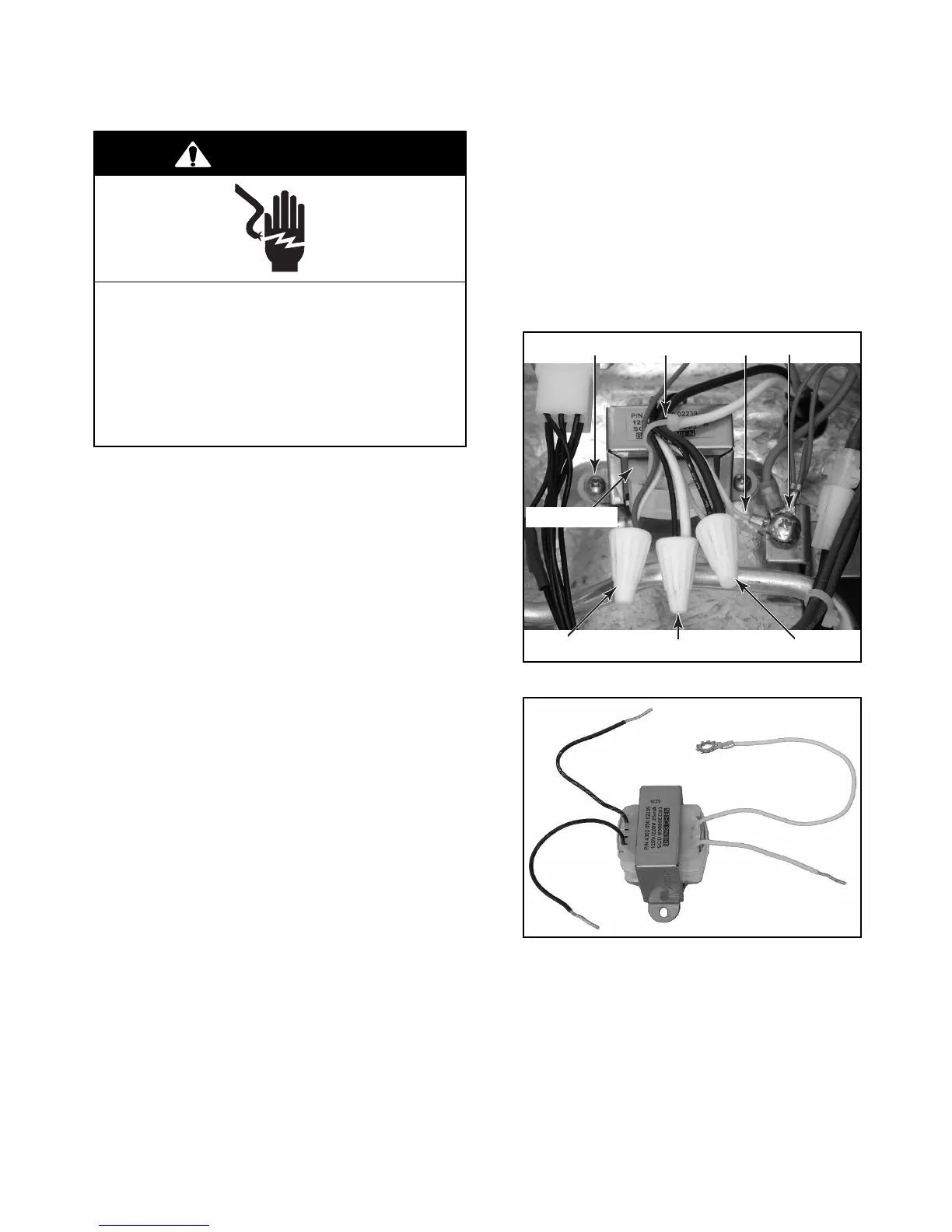
3. Untwist the three ceramic wire nuts from
the primary and secondary transformer
wires.
4. Cut the wire tie that is around the trans-
former wires.
5. Untwist the bare wire ends and separate the
following transformer wires:
a) Black (primary) wire from the black
power cord lead.
b) Black (primary) wire from the white
power cord lead.
Electrical Shock Hazard
Disconnect power before servicing.
Replace all parts and panels before
operating.
Failure to do so can result in death or
electrical shock.
WARNING
White & Red Black & White Black & Black
Screw (1 of 2) Wire Tie White Gnd Screw
Transformer
Transformer
c) White (secondary) wire from the red ig-
nition switch wire.
d) White (secondary) wire ring connector
from the ground screw.
6. Remove the two transformer screws, and
remove the transformer and two felt wash-
ers below the transformer bracket from the
unit.
Wire
Nut
Wire
Nut
Wire
Nut
White (Gnd)
Black -
White
Black -
Black
Primary
Secondary
White -
Red



 To Next Page