dCS Vivaldi DAC User Manual Software Issue 2.0x
November 2016
Vivaldi DAC Manual v2_0x Page 17 English version
Using a Master Clock in a CD/SACD system
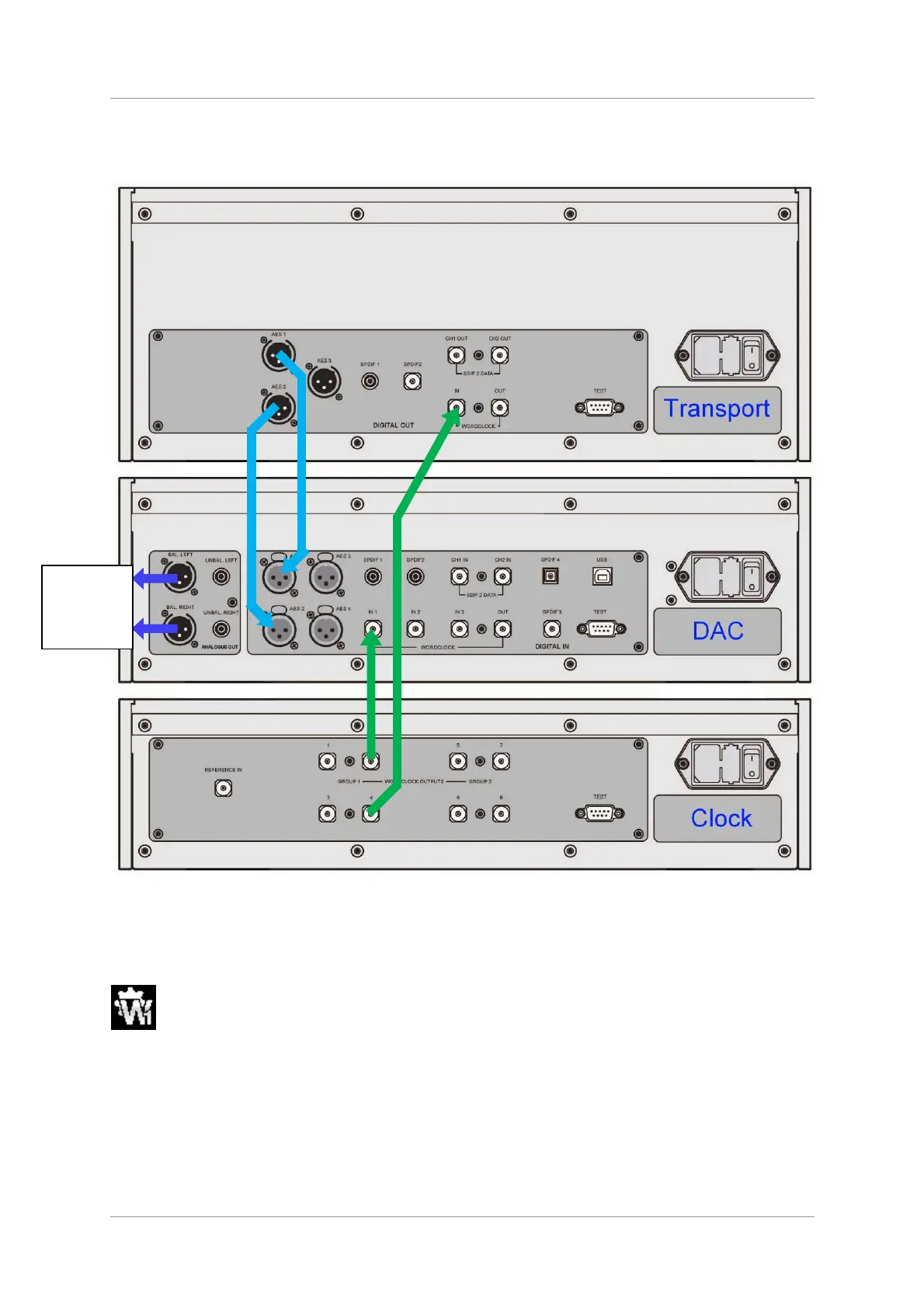
The performance can be improved further by adding a Vivaldi Clock to the system as shown below.
Figure 4 – Using the Vivaldi Transport, DAC and Clock together
• Connect one of the Clock’s Word Clock Group 1 Outputs to the Word Clock Inputs of the
Transport and DAC.
• Use the Clock’s Freq1 button to set the Group 1 Outputs to 44.1kHz, to suit the CD Transport.
To sync the DAC to Word Clock 1, open the menu, navigate to the Settings > Sync Mode
menu page. The button sequence is: Menu, ►, Menu, and then use the Menu button to
select the Word Clock 1 icon.
The system will re-lock and un-mute.
Please consult the Vivaldi Clock manual for more information on using a Master Clock.
Please consult the Upsampler manual if your system includes a Vivaldi Upsampler.
The next step is crucial – sit back and enjoy the music.
Analogue
outputs
to
m
lifier



 To Next Page