dCS Vivaldi DAC User Manual Software Issue 2.0x
November 2016
Vivaldi DAC Manual v2_0x Page 22 English version
Details of the menu displays are shown in the Menu section on page 28.
To avoid unnecessary display wear, we recommend switching off or setting the unit to
Sleep mode at the end of the listening session.
Power Button
To switch on, ensure the rear panel switch is set to I and press the Power button (C) on the front
panel once. Note that the unit cannot be turned on from the remote control.
To set the unit to sleep mode, press the Power button once. The main display will turn off, the LED
(D) beside the button will light, and the analogue outputs will mute, but the unit will remain close to
running temperature. Press again to return to normal operation.
To switch off, hold down the Power button for about 3 seconds until Switching Off appears on the
display, then release it.
When the menu is open, press the Power button to close the menu.
Menu Button
Press the Menu button (E) to open the menu, select menu pages and change settings. See the Menu
section on page 28 for information on using the menu features.
Filter Button
Use the Filter button (F) to select your preferred filter. This is a personal preference and is best done
by ear. The choice of filter may depend on the type of music you are listening to.
In PCM mode, the first 4 filters give different trade-offs between the Nyquist image rejection and the
phase response. Filter 1 has the best rejection of (unwanted) Nyquist images and the sharpest roll-off,
resulting in the poorest transient response of the four. Filters 2, 3 and 4 have progressively more
relaxed image rejection and progressively better transient response. Filter 2 is often preferred for
orchestral music, while Filter 3 and Filter 4 are often used for rock music.
If the source data rate is 176.4, 192, 352.8 or 384kS/s, two extra filters are available. Filter 5 has a
Gaussian response (which has no overshoot on transients, with a relaxed roll-off) and Filter 6 is an
asymmetrical type (which features almost no pre-ringing).
There are 2 extra filters for 44.1kS/s operation. Filter 5 is an asymmetrical design with non-linear
phase and no pre-ringing. Filter 6 is a new sharp filter which has linear phase and pre-ringing. Try
them and decide for yourself which you prefer.
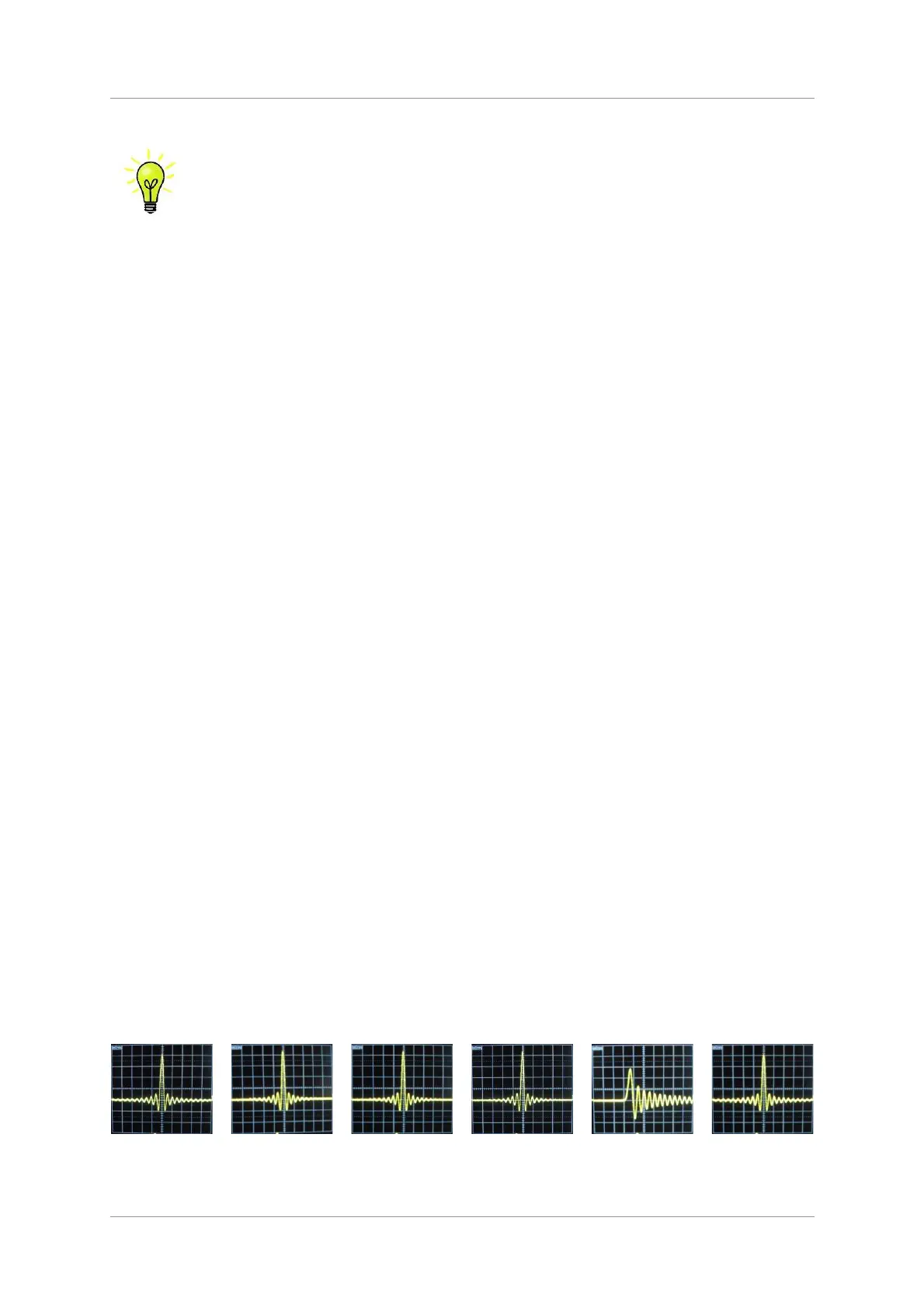
The impulse responses for the six 44.1kS/s filters are shown below. (The filters for other sample rates
will have different pulse responses.) The horizontal or time axis is graduated at 100 microseconds per
division.
Filter 1
Filter 2
Filter 3
Filter 4
Filter 5
Filter 6



 To Next Page