EasyManua.ls Logo

DCS Vivaldi DAC - The Menu System

DCS Vivaldi DAC
42 pages
Print Icon
To Next Page IconTo Next Page
To Previous Page IconTo Previous Page
Loading...
dCS Vivaldi DAC User Manual Software Issue 2.0x
November 2016
Vivaldi DAC Manual v2_0x Page 28 English version
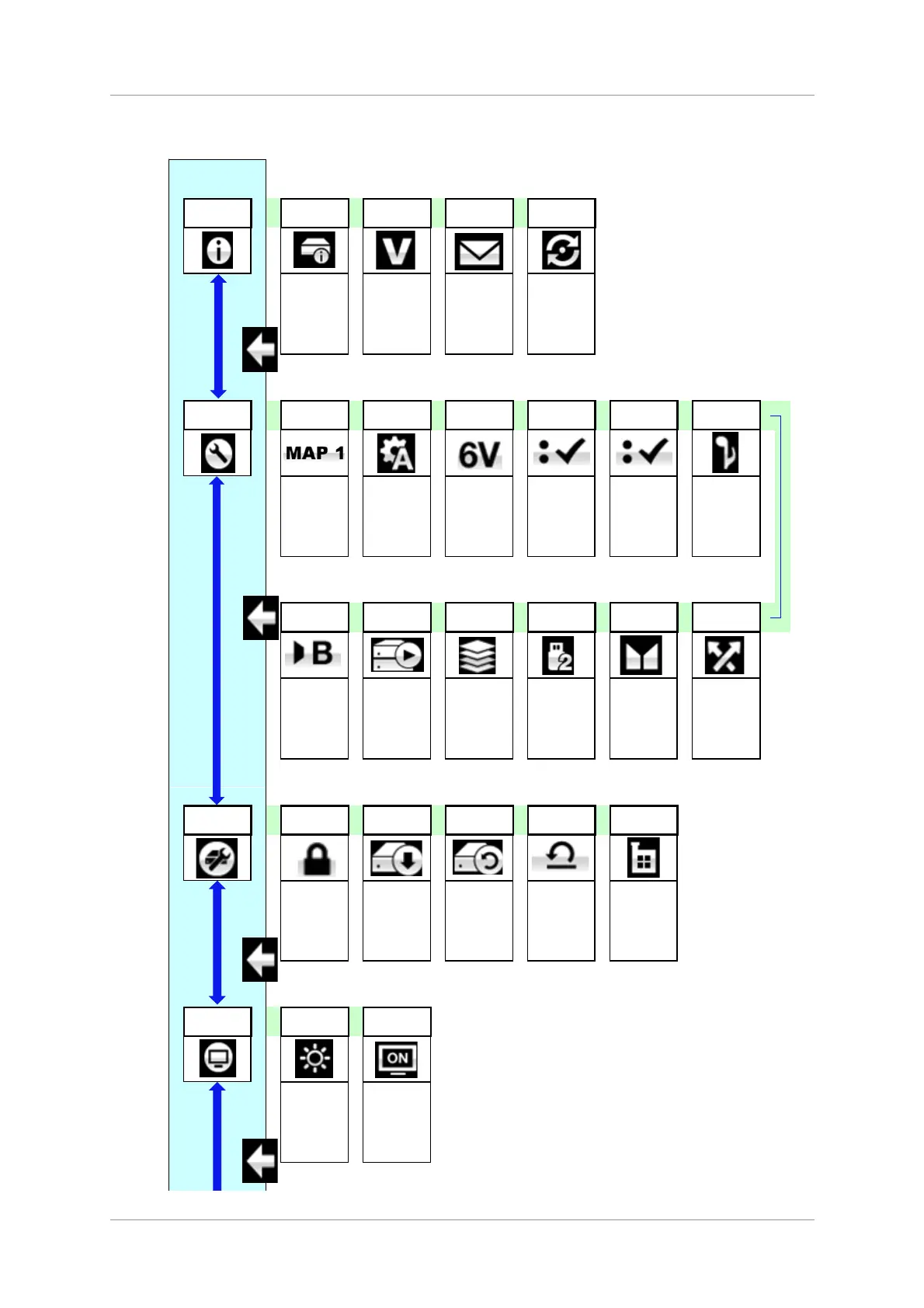
THE MENU
MENU
Information
Unit Status
Version
Contact
Update
DAC
Settings
Mapper
Sync Mode
Output
Level
Dual
AES1+2
Dual
AES3+4
Phase
Sets the
mapping
system for the
Ring DAC.
Sets the clock
source for the
selected input.
Sets the
analogue
output levels.
Enables Dual
AES operation
Enables Dual
AES operation
Changes the
output phase
for both
channels.
RS232
Mode
EasyPlay
Buffer
USB Class
Balance
Channel
Swap
Select RS232
Text Mode or
Binary Mode.
Auto selects
the input to suit
the disc loaded
in the
Transport.
Buffers the
data to reduce
clicks when
the input rate
changes.
Selects USB
Class 1
(24/96) or
Class 2
(24/384)
Allows Balance
adjustment by
rotary control
Reverse the
Left and Right
outputs
Displays the
unit status.
Displays the
software
issues.
Displays dCS
contact details.
Loads new
software from
a dCS CD.
Config
Lock
Save
Restore
Reset
Names
Factory
Reset
Locks some
important
settings.
Saves the
current config
to memory.
Loads the
previously
saved config
from memory.
Resets the
user-selected
input names to
standard.
Restores
standard
factory
settings.
Display
Settings
Brightness
Display
On/Off
Sets the
display
brightness.
Turns the main
display on/off.

Table of Contents

Related product manuals