Alignment and Troubleshooting
4-1
Service Manual
4.1 Alignment and Adjustments
This chapter describes the main functions for servicing the equipment, such as the product maintenance
method, image quality proper repair procedures, jam removal procedures, and so on.
4.1.1 Control Panel
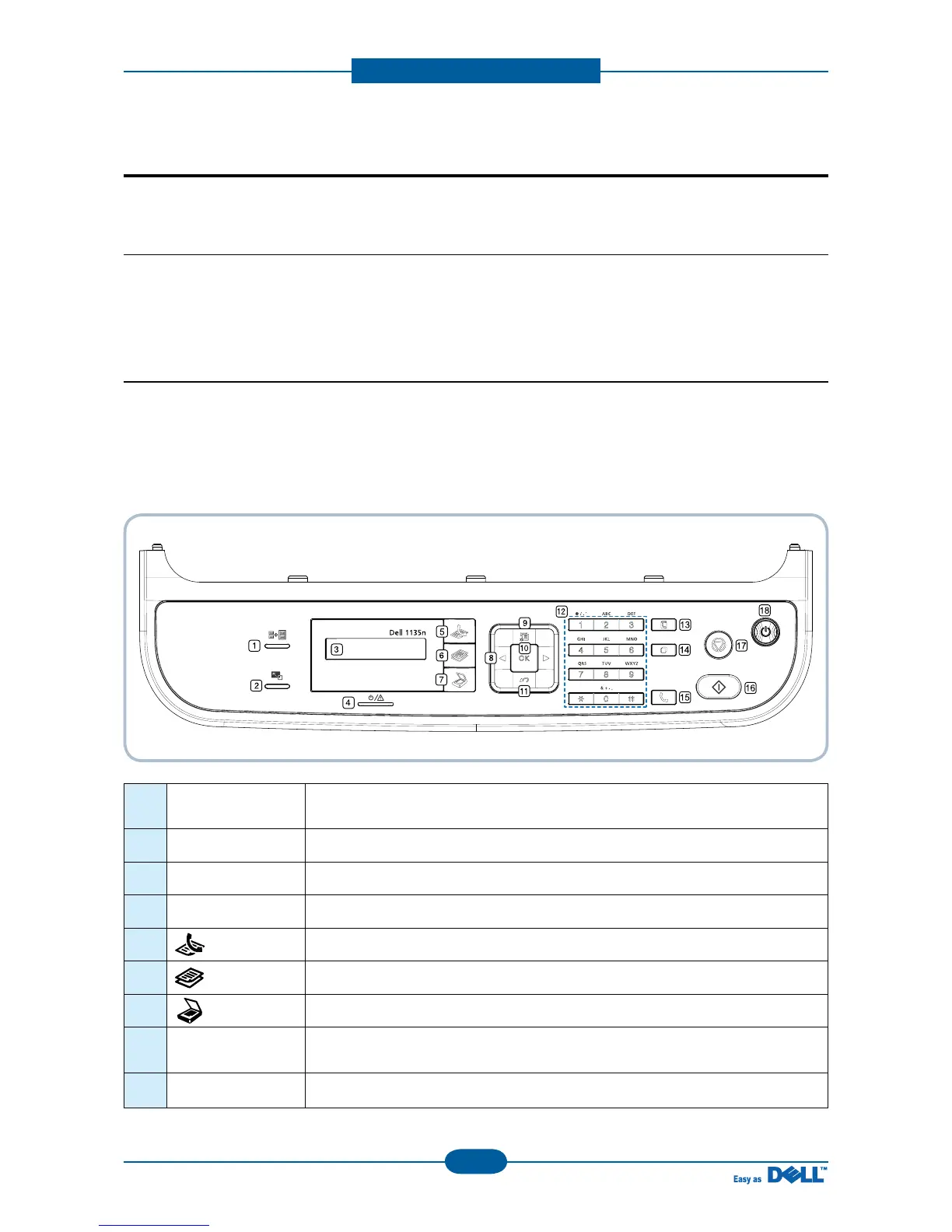
■ Dell 1135n
This control panel may differ from your machine depending on its model.
4. Alignment and Troubleshooting
1 ID Copy
You can copy both sides of the ID Card like a driver’s license to a single side of
paper.
2 Reduce/Enlarge Makes a copy smaller or larger than the original.
3 Display Shows the current status and prompts during an operation.
4 Status Shows the status of your machine.
5
(Fax) Activates fax mode.
6
(Copy) Activates copy mode.
7
(Scan) Activates scan mode.
8 Arrow
Scroll through the options available in the selected menu, and increase or
decrease values.
9 Menu Enters Menu mode and scrolls through the available menus.



 To Next Page