Entering Values
When Using the Operator Panel
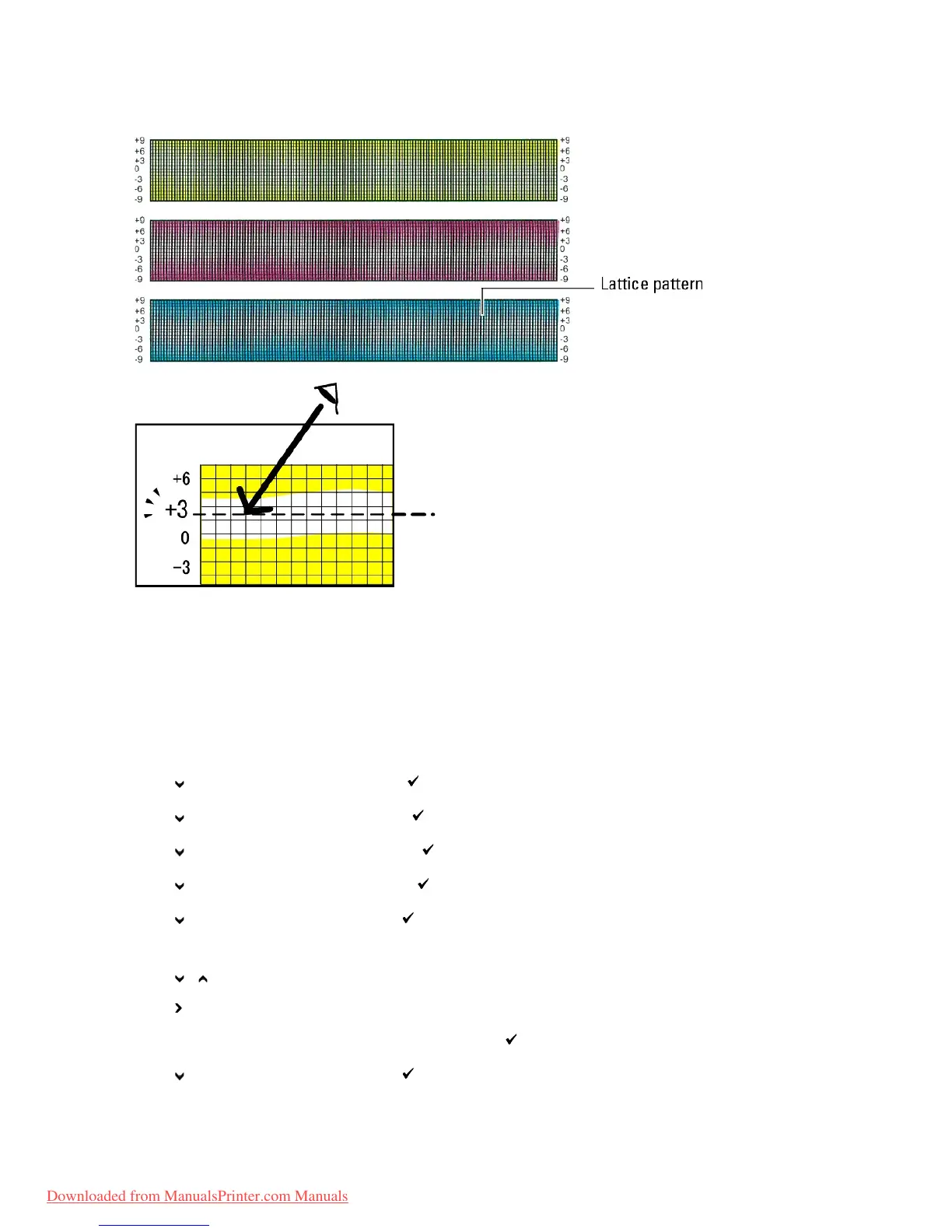
Using the operator panel, enter the values that you found in the color registration chart to make adjustments.
1. Press Menu button.
2. Press button until Admin Menu appears, and then press (Set) button.
3. Press button until Maintenance appears, and then press (Set) button.
4. Press button until Color Reg Adj appears, and then press (Set) button.
5. Press button until Enter Number appears, and then press (Set) button.
6. Press button until Fast Scan appears, and then press (Set) button.
The cursor is located at the first digit of the Fast Scan.
7. Press or button until you reach the value (for example, +3) displayed on the chart.
8. Press button once and move the cursor to the next value.
9. Repeat steps 7 and 8 to enter all of the digits of the Fast Scan, and then press (Set) button.
10. Press button until Slow Scan appears, and then press (Set) button.
The cursor is located at the first digit of the Slow Scan.



 To Next Page