EasyManua.ls Logo

Dell 2130CN - Page 72

Dell 2130CN
204 pages
Print Icon
To Next Page IconTo Next Page
To Previous Page IconTo Previous Page
Loading...
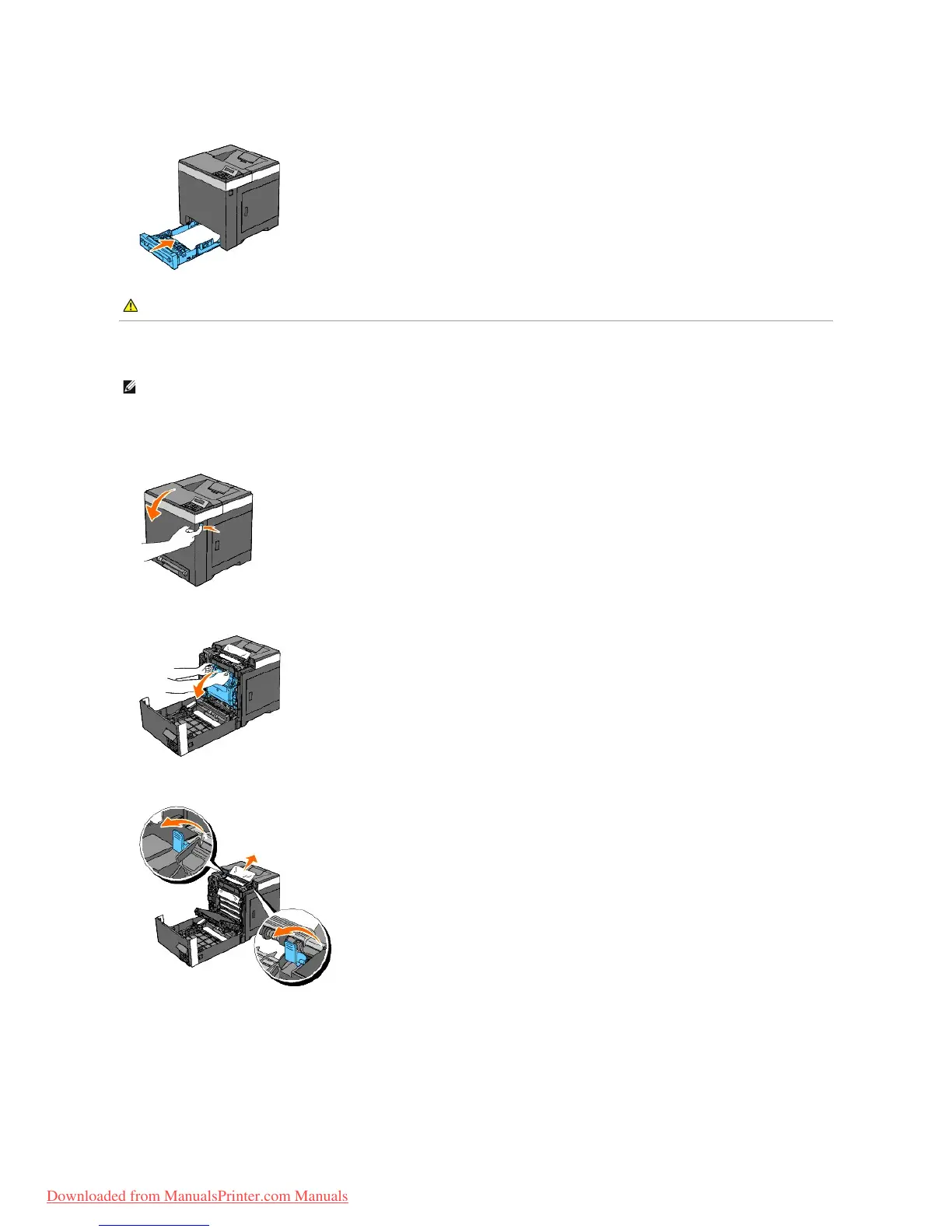
8. Insert the tray into the printer, and push until it stops.
Removing Print Jams From the Fuser
1. Wait for 30 minutes.
2. Push the side button and open the front cover.
3. Open the belt unit until it stops.
4. Lift the levers at both ends of the fuser, and remove the jammed paper. If any jammed paper cannot be found, go to the next step.
The fuser is hot. Do not touch it, doing so may cause burns.
5. Open the cover of the fuser and remove the jammed paper.

CAUTION: Do not use excessive force on the tray. Doing so could damage the tray or the inside of the printer.
NOTE: To resolve the error displayed on the operator panel, you must clear all print media from the print media path.
Downloaded from ManualsPrinter.com Manuals

Table of Contents

Other manuals for Dell 2130CN

Related product manuals