NOTE: Depending on the configuration ordered, your computer may support either 2230 solid-state drive or 2280 solid-
state drive in M.2 slot one.
NOTE: A thermal shield is required for optimal heat dissipation if the capacity of the solid-state drive is 512 GB or higher.
If a higher configuration solid-state drive is installed after you purchase the computer, contact Dell support to purchase a
thermal shield.
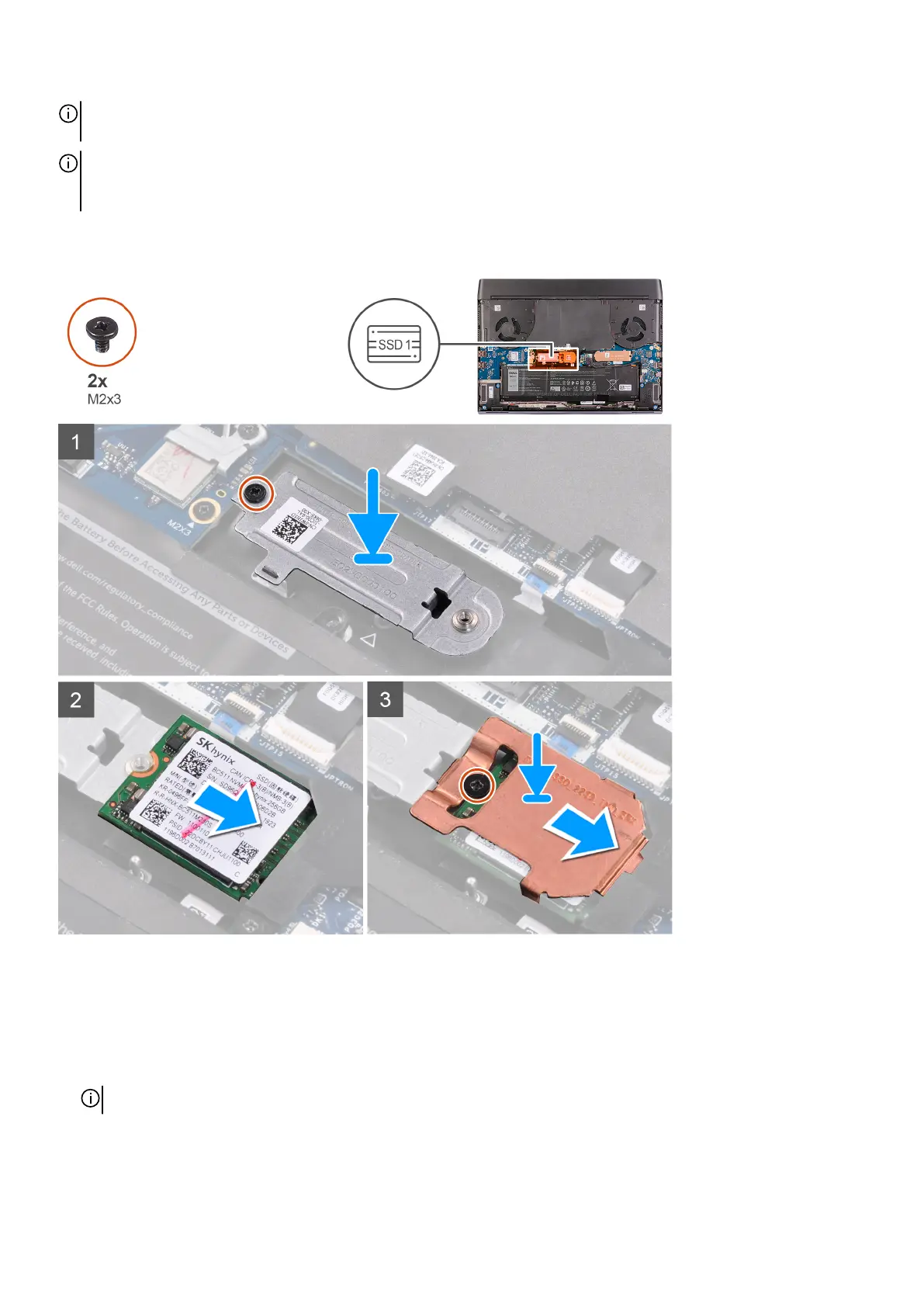
The following image indicates the location of the 2230 solid-state drive that is installed in M.2 slot one and provides a visual
representation of the installation procedure.
Steps
1. Place and align the M.2 2230 mounting bracket on the palm-rest assembly.
2. Replace the screw (M2x3) that secures the M.2 2230 mounting bracket to the palm-rest assembly.
3. Align the notch on the M.2 2230 solid-state drive with the tab on the M.2 card slot on the system board.
4. Slide the M.2 2230 solid-state drive into the M.2 card slot on the system board.
5. Slide the solid-state drive thermal shield on the M.2 2230 solid-state drive.
NOTE: The next step is only applicable if the capacity of the solid-state drive is 512 GB or higher.
6. Replace the screw (M2x3) that secures the M.2 2230 solid-state drive and the solid-state drive thermal shield to the M.2 2230
mounting bracket.
18













 To Next Page