Alienware Command Center (AWCC)
│
19
Key features
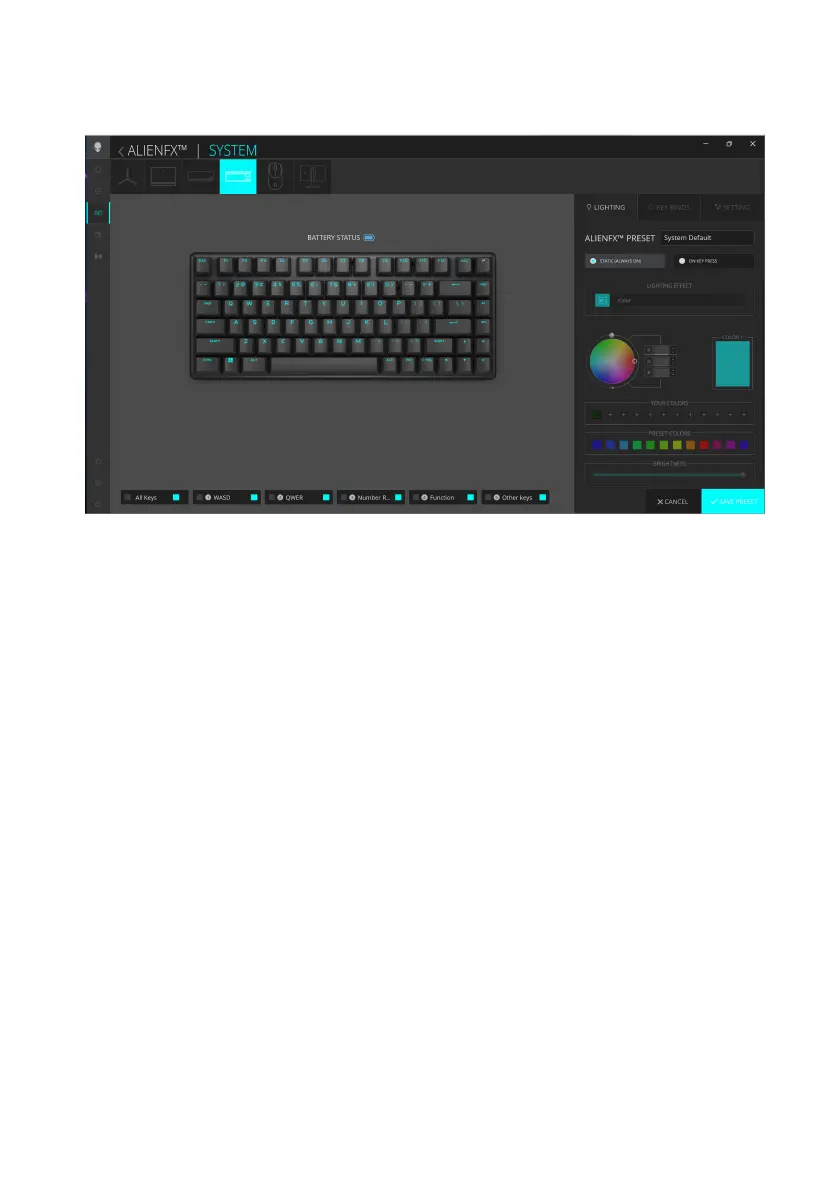
1. Click the Pro Wireless Gaming Keyboard image on the DASHBOARD to
go to ALIENFX.
2. In the SYSTEM tab, select ALIENFX PRESET. You can perform the
following functions:
a. LIGHTING: Configure the lighting of the keyboard.
b. KEY BINDS: Reassign the function of keys.
c. SETTING: Configure the device settings.
Battery level indicator –The battery level and the battery level indicator
icon are shown in the keyboard image upon hovering the mouse pointer
over the battery icon. The indicator is shown in blue color when the
battery level is Normal. The indicator turns yellow color when the battery
level is low and red color when the battery level is critically low.
Charging indicator – The battery level indicator is overlaid with a lightning
symbol during battery charging.
3. Click SAVE PRESET to save your changes.
Alienware Command Center (AWCC)



 To Next Page