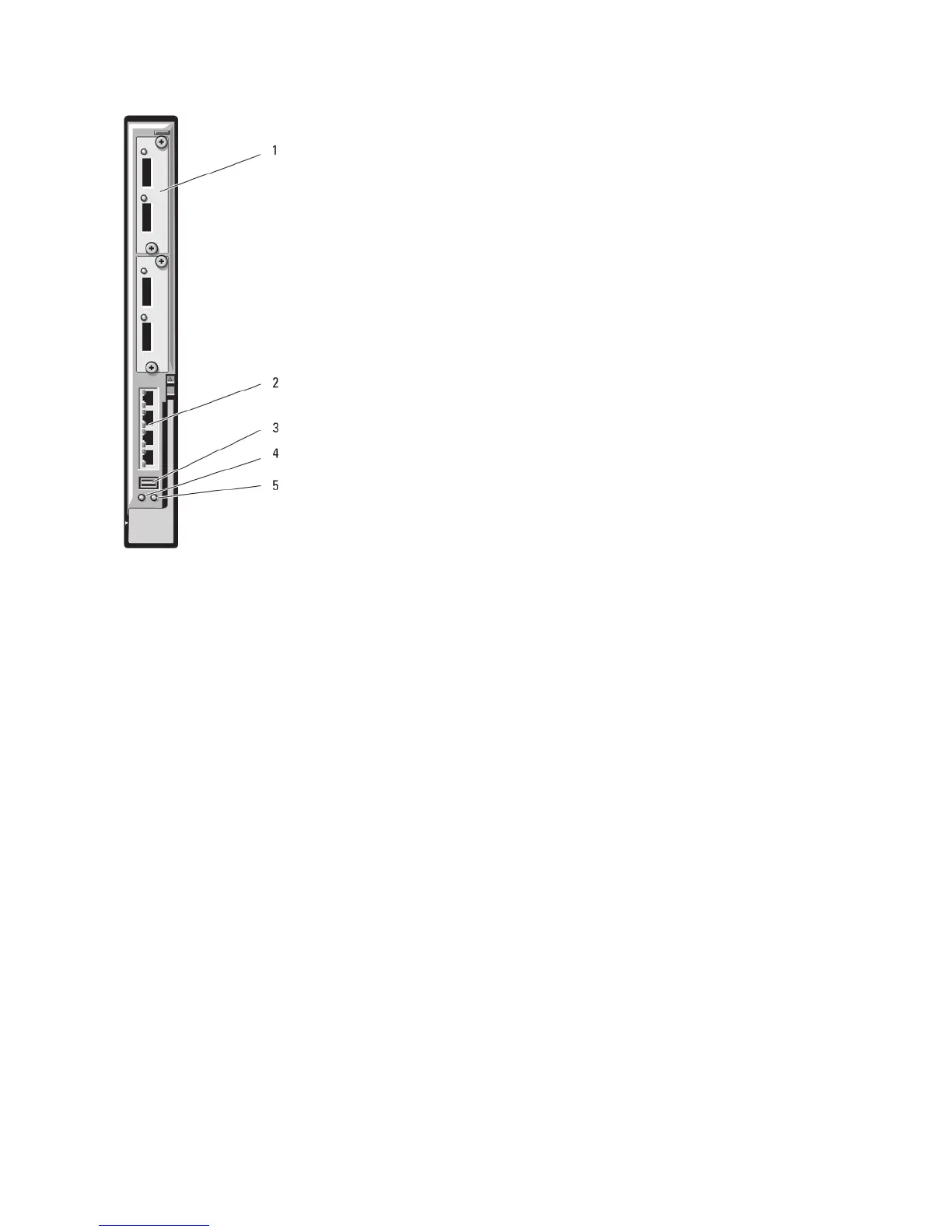
Figure 28. PowerConnect M6220 Ethernet Switch I/O Module
1. optional modules (2) (dual 10 Gb Ethernet uplink module shown)
2. standard 10/100/1000 Mb Ethernet connectors (4)
3. serial connector (USB type-A form factor)
4. power indicator
5. status/identification indicator
Dell PowerConnect M8024 10 Gb Ethernet Switch I/O Module
The PowerConnect M8024 switch module incorporates two optional bays that support the following modules:
• A 10 Gb Ethernet module with four optical SFP+ connectors
• A 10 Gb Ethernet module with three copper CX4 uplinks
• A 10 Gb Ethernet module with two copper 10GBASE-T uplinks
The modules can be used in any combination and are sold separately.
You can initially configure the switch using either of two methods:
• Connect an external management system to the switch using an optional USB type-A form factor serial cable,
and configure the switch using a terminal application.
• Use the iKVM CMC console (“17th blade”) and the connect switch-n CMC CLI command. For more information,
see the CMC User’s Guide at support.dell.com/manuals.
Once an IP address is assigned to the management VLAN or interface and the switch is connected to a management
network, both Telnet and http are available through the network.
60














 To Next Page