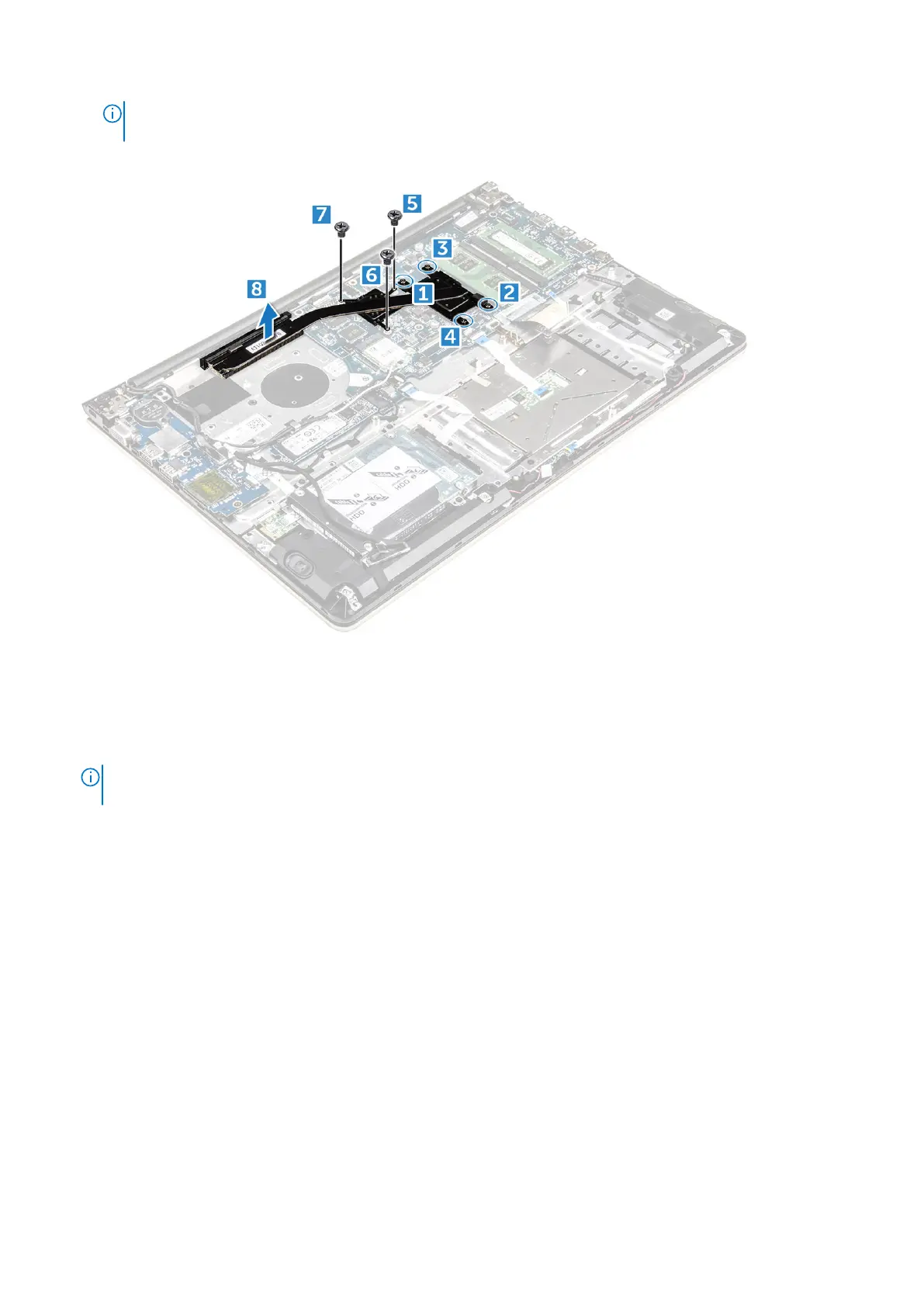
NOTE: Loosen the screws in the order of the callout numbers [1, 2, 3, 4, 5, 6, 7]. Except for screws [5,6,7] the rest
of the screws are retention screws and cannot be fully removed
b. Remove the heatsink module from the slot on the system board [8].
Installing the heatsink
1. Place the heatsink module into its slot on the system board.
2. Tighten the screws to secure the heatsink module to the computer.
NOTE:
Secure the screws in the order of the callout numbers [1, 2, 3, 4] as seen on the heatsink module. Tighten the
rest of the screws.
3. Install the:
a. system fan
b. battery
c. back cover
4. Follow the procedure in After working inside your computer
Removing the LED board
1. Follow the procedure in Before working inside your computer.
2. Remove the:
a. back cover
b. battery
3. To remove the LED board:
a. Lift the tab to disconnect the LED board connector cables from the system board [1].
b. Remove the screw that secures LED board to the computer chassis [2].
c. Remove the LED board from the computer [3].
28
Removing and installing components



 To Next Page