EasyManua.ls Logo

Dell Precision M2800 - Removing the VGA Board; Installing the VGA Board

Dell Precision M2800
79 pages
Print Icon
To Next Page IconTo Next Page
To Previous Page IconTo Previous Page
Loading...
Removing the VGA Board
1. Follow the procedures in Before Working Inside Your Computer.
2. Remove:
a. SD card
b. ExpressCard
c. battery
d. keyboard
e. display-hinge cap
f. base cover
g. base-corner covers
h. palmrest assembly
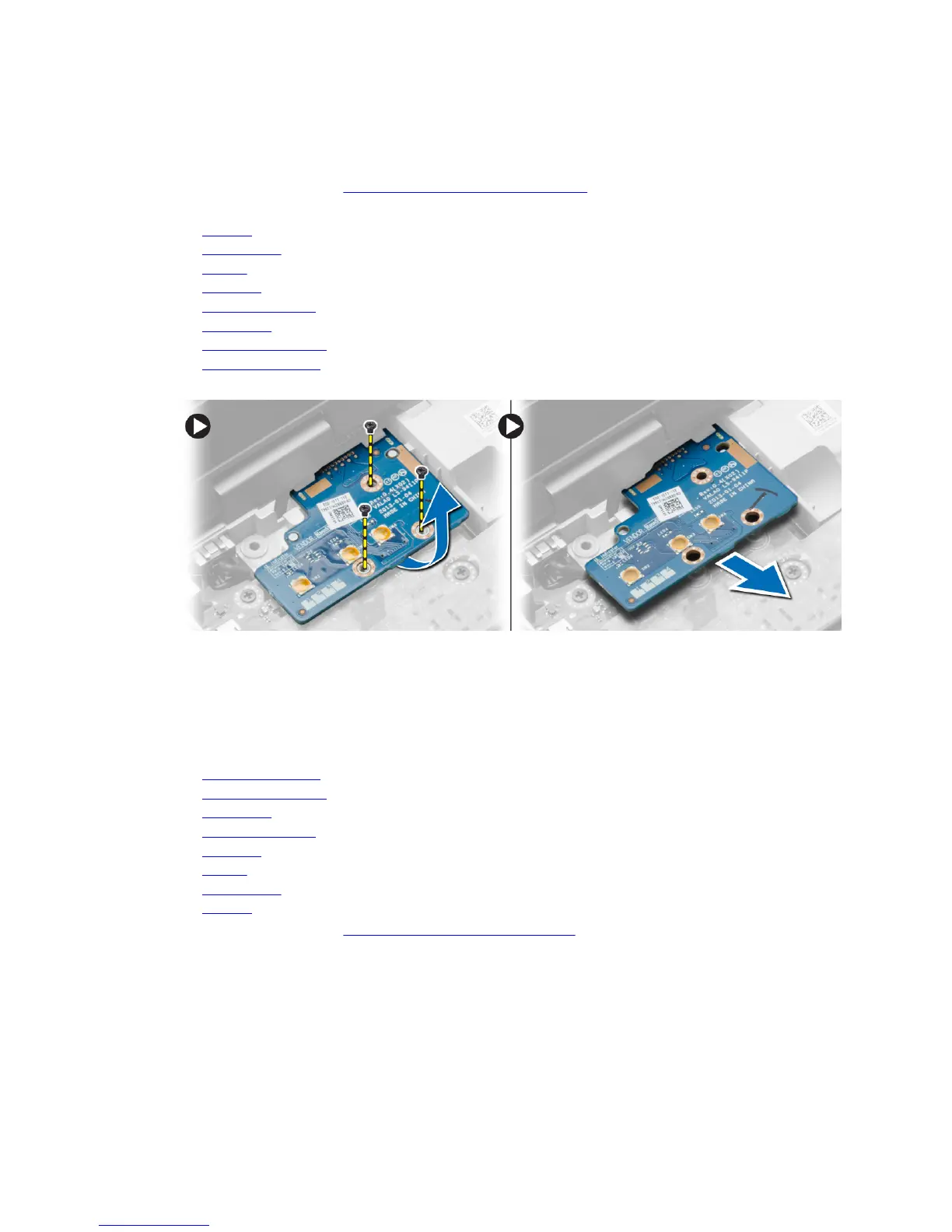
3. Remove the screws that secure the VGA board to the computer and remove it from its connector.
Installing the VGA Board
1. Insert the VGA board in its slot
2. Tighten the screws to secure the VGA board to the computer.
3. Install:
a. palmrest assembly
b. base-corner covers
c. base cover
d. display-hinge cap
e. keyboard
f. battery
g. ExpressCard
h. SD card
4. Follow the procedures in After Working Inside Your Computer.
35

Table of Contents

Related product manuals