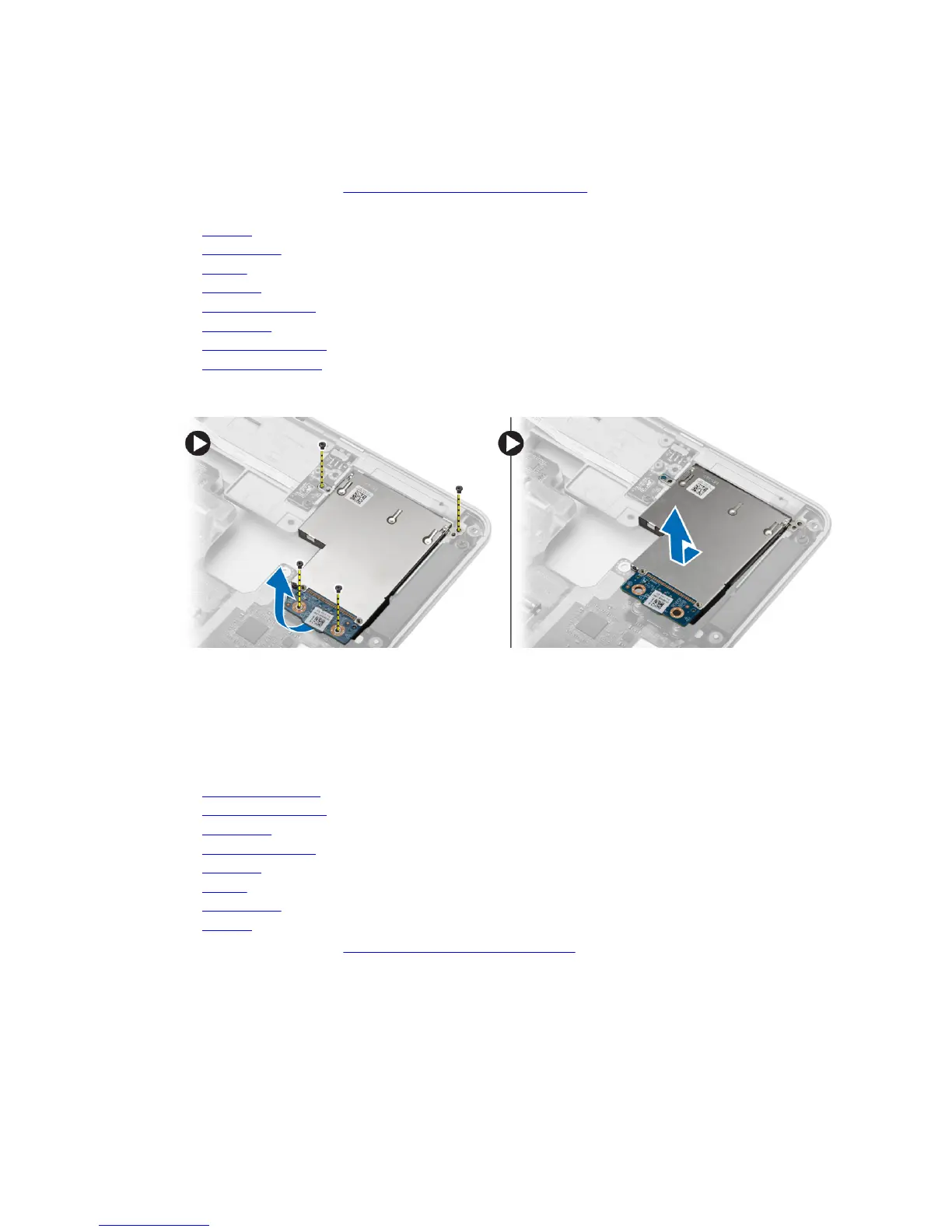
Removing the ExpressCard Cage
1. Follow the procedures in Before Working Inside Your Computer.
2. Remove:
a. SD card
b. ExpressCard
c. battery
d. keyboard
e. display-hinge cap
f. base cover
g. base-corner covers
h. Palmrest Assembly
3. Remove the screws that secure the ExpressCard cage to the computer. Remove the ExpressCard
cage from the computer.
Installing the ExpressCard Cage
1. Place the ExpressCard cage in its slot.
2. Tighten the screws to secure the ExpressCard cage to the computer.
3. Install:
a. palmrest assembly
b. base-corner covers
c. base cover
d. display-hinge cap
e. keyboard
f. battery
g. ExpressCard
h. SD card
4. Follow the procedures in After Working Inside Your Computer.
36












 To Next Page