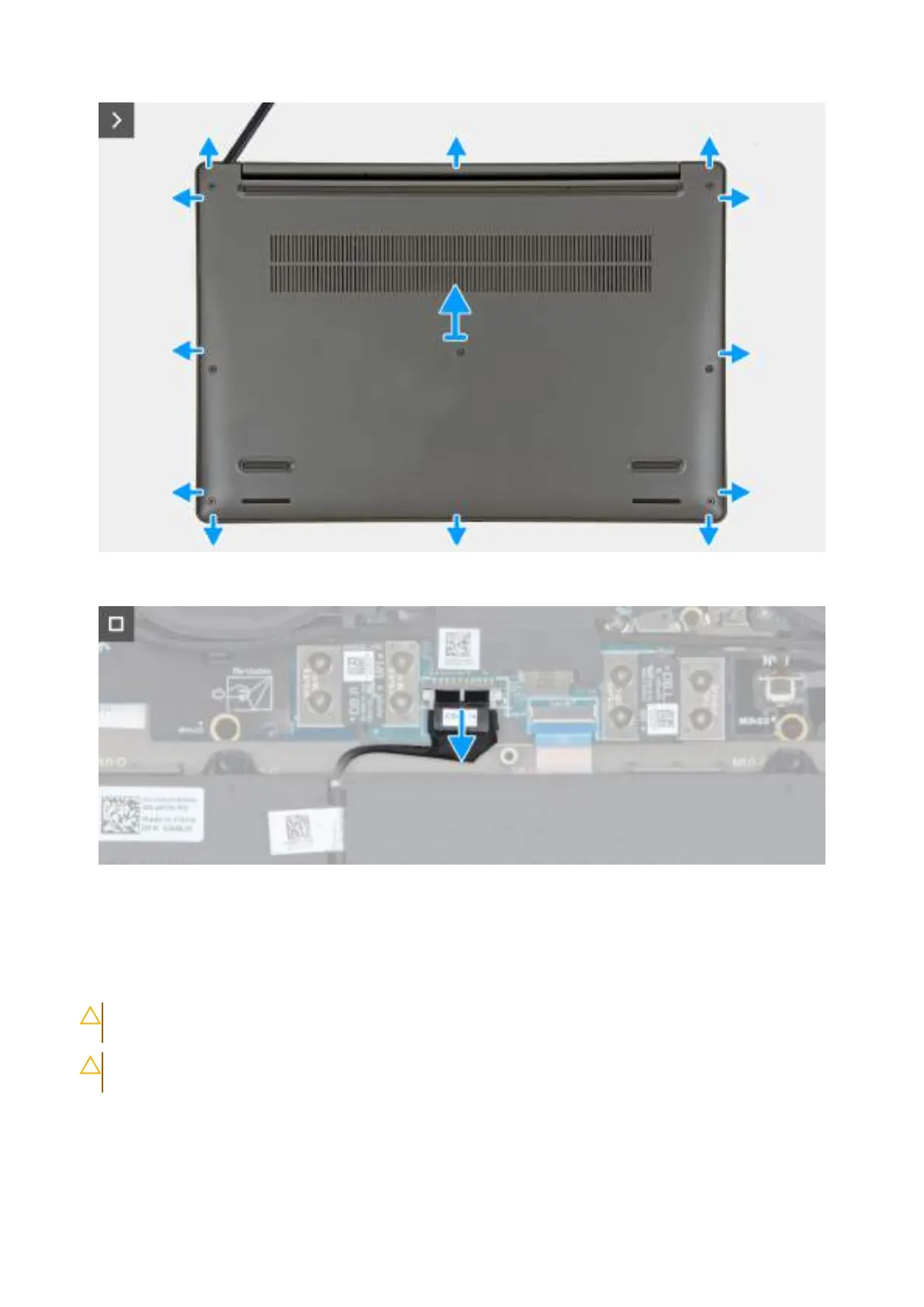
Obrázek 15. Removing the base cover
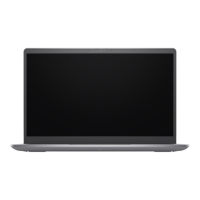
Obrázek 16. Disconnect the battery cable from the system board
Kroky
1. Loosen the seven captive screws that secure the base cover to the palm-rest and keyboard assembly.
2. Using a plastic scribe, pry open the base cover starting from the recesses, which are located in the U-shaped indents at the top edge
of the base cover, near the hinges.
VÝSTRAHA:
Do not slide the scribe through the edge of the top side of the base cover as it damages the latches
inside the base cover.
VÝSTRAHA: Do not pry upwards from the edge near the vents, at the top side of the base cover, as it damages the
base cover.
3. Pry open the top side of the base cover and continue working on the left, right and, bottom sides to open the base cover.
4. Lift the base cover from the left and right sides and remove the base cover off the palm-rest and keyboard assembly.
5. Disconnect the battery cable from the system board.
Demontáž ainstalace jednotek vyměnitelných zákazníkem (CRU)
47







 To Next Page