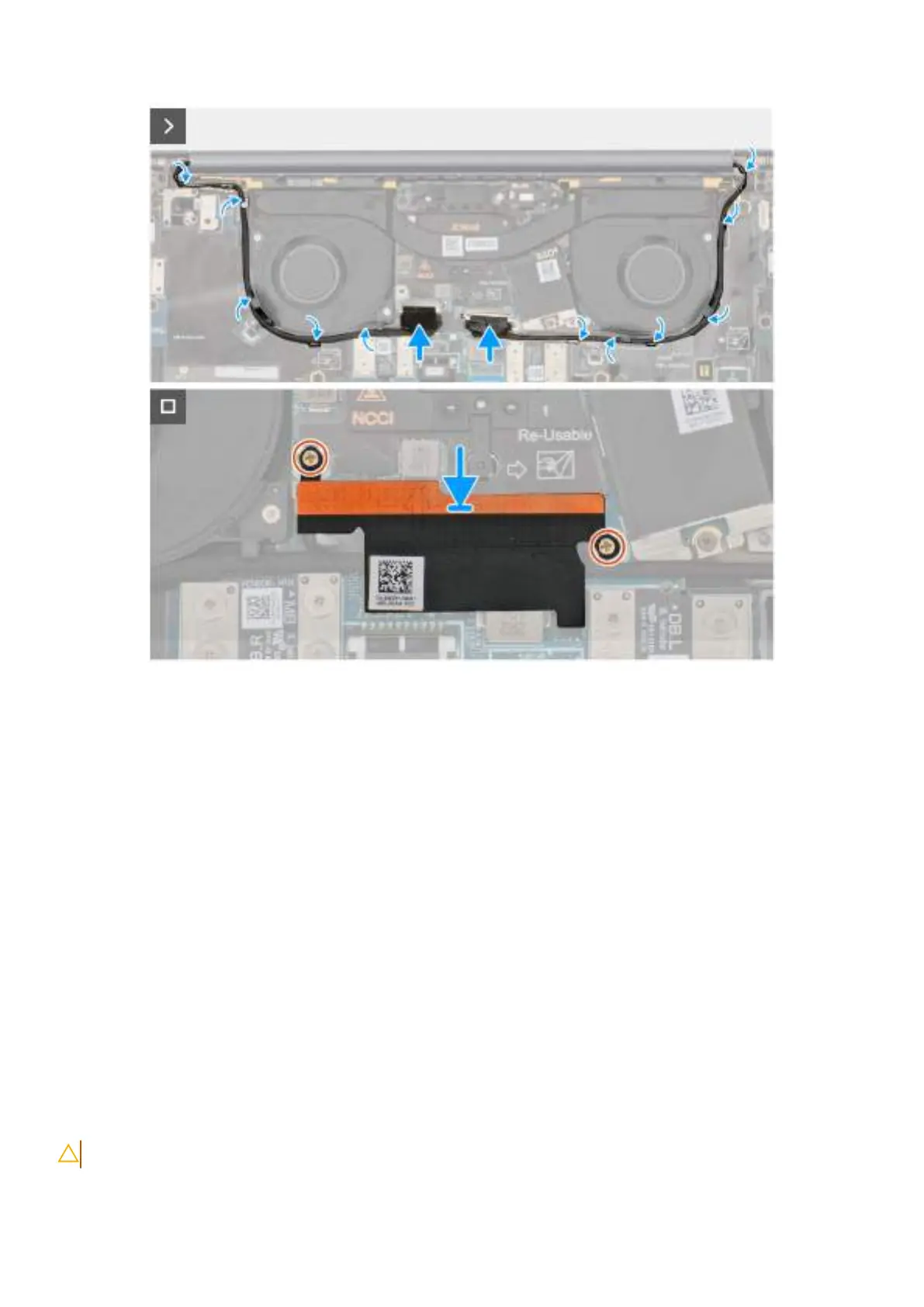
Obrázek 63. Connecting the display and camera cables
Kroky
1. Place the display assembly on a flat surface.
2. Slide the base assembly at an angle and gently press down on then hinges to align the screw holes on the display hinges with screw
holes on the system board.
3. Replace the six screws (M2.5x5) that secure the display assembly on the palm-rest and keyboard assembly.
4. Route the display cable and camera cable from the routing channels on the bottom side of the fans and the top side of the system
board.
5. Connect the display cable and camera cable to the system board.
6. Place and align the display-cable bracket on the system board.
7. Replace the two captive screws that secure the display-cable bracket on the system board.
Další kroky
1. Install the base cover.
2. Follow the procedure in After working inside your computer.
Základní deska
Removing the system board
VÝSTRAHA: The information in this section is intended for authorized service technicians only.
Demontáž ainstalace jednotek vyměnitelných vterénu (FRU) 95







 To Next Page