Disk SSD
Removing the M.2 2230 solid state drive
Požadavky
1. Follow the procedure in Before working inside your computer.
POZNÁMKA: Solid state drives are fragile. Exercise care when handling the solid state drive.
POZNÁMKA: To avoid data loss, do not remove the solid state drive while the computer is in sleep or on state.
2. Remove the base cover.
O této úloze
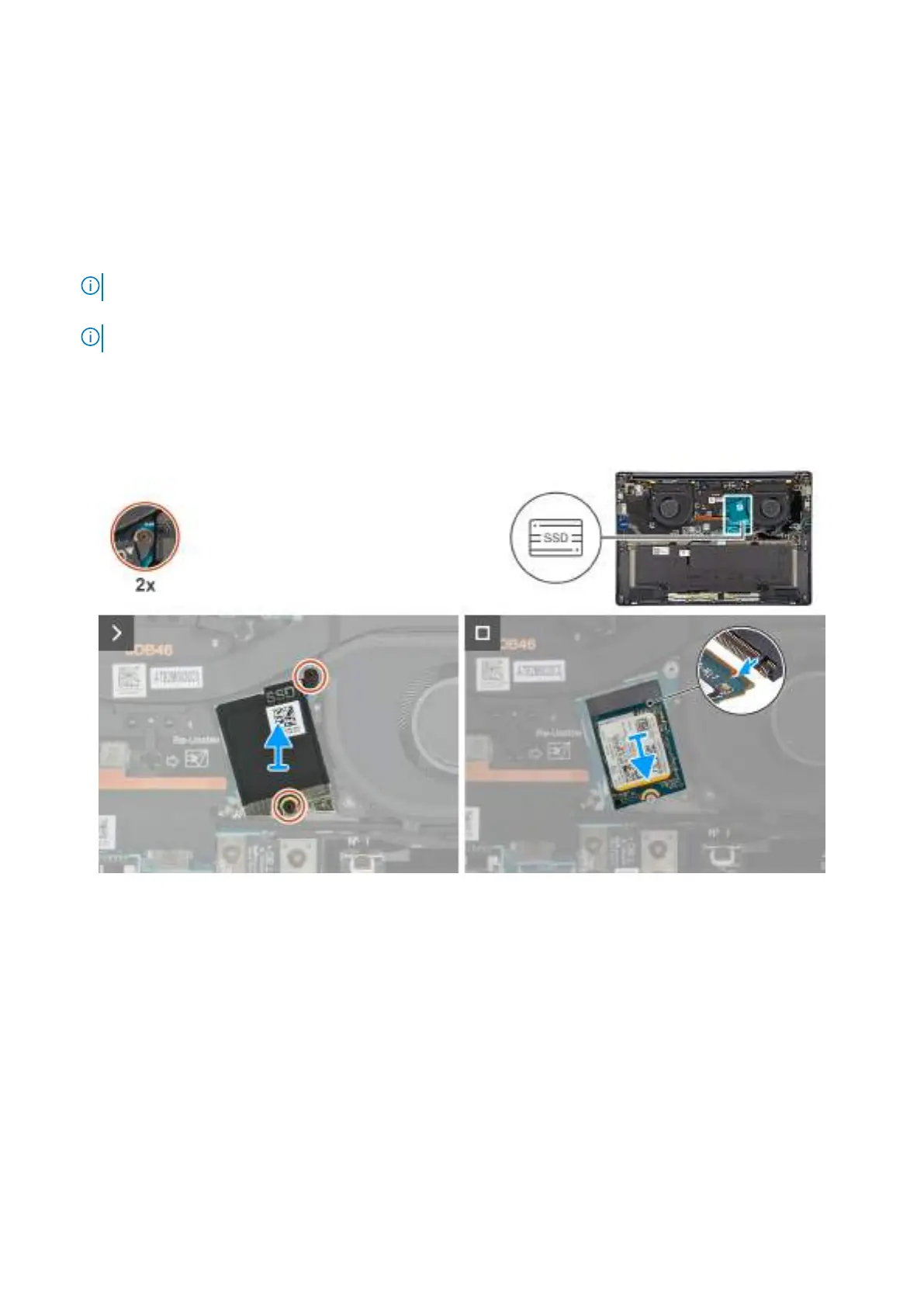
The following image indicates the location of the M.2 2230 SSD and provides a visual representation of the removal procedure.
Obrázek 23. Removing the SSD
Kroky
1. Loosen the two captive screws that secure the SSD shield cover from the system board.
2. Remove the SSD shield cover from the computer.
3. Slide and remove the SSD from the SSD slot on the system board.
Installing the M.2 2230 solid state drive
Požadavky
Jestliže nahrazujete určitou komponentu, vyjměte před montáží stávající komponentu.
Demontáž ainstalace jednotek vyměnitelných zákazníkem (CRU)
53







 To Next Page