O této úloze
POZNÁMKA: This procedure is applicable only for computers that are shipped without the optional fingerprint reader.
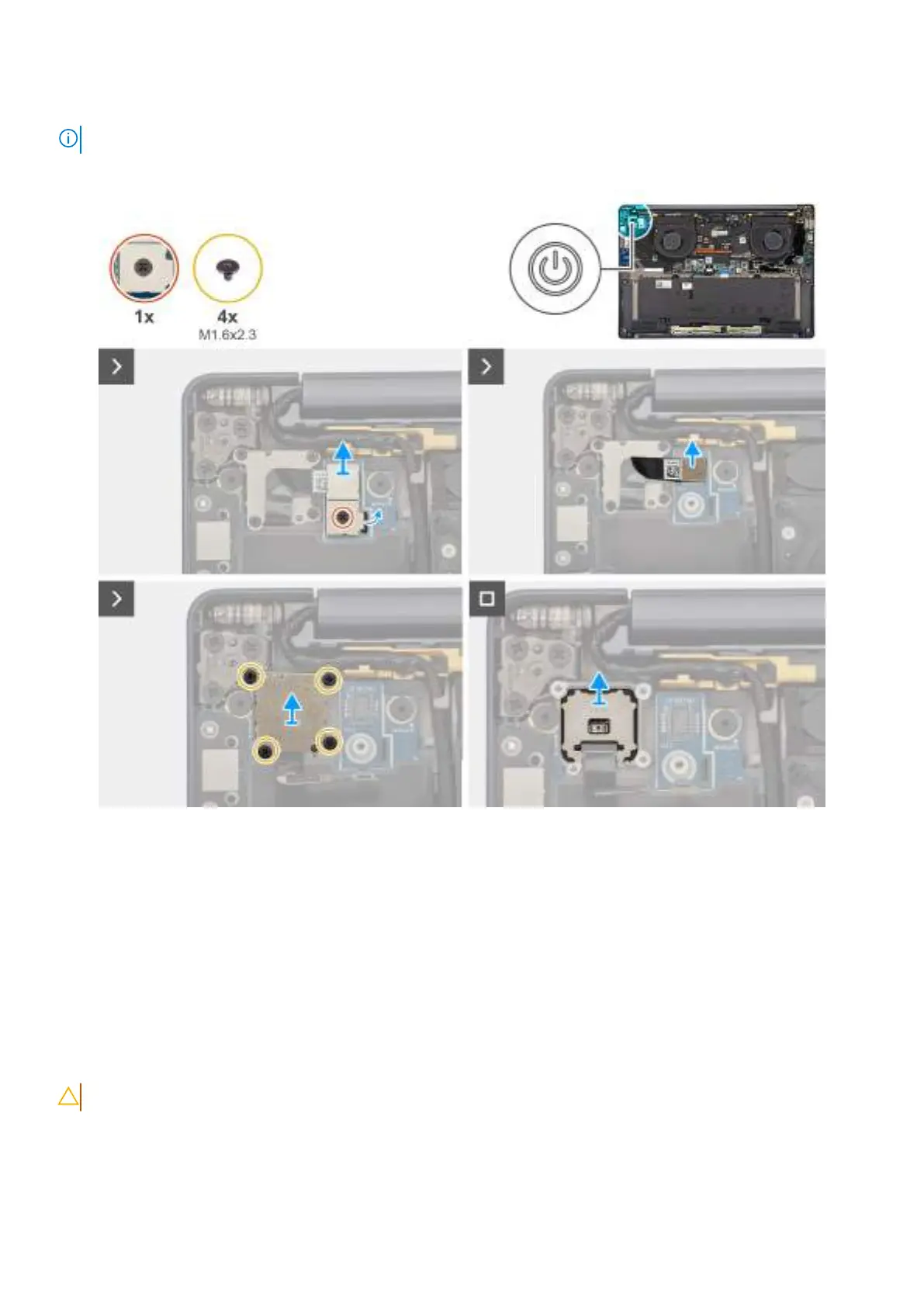
The following image indicates the location of the power button and provides a visual representation of the removal procedure.
Obrázek 57. Removing the power button
Kroky
1. Loosen the single captive screw that secures the power-button bracket.
2. Remove the power-button bracket from the computer.
3. Disconnect the power-button cable from the right I/O-board.
4. Remove the four screws (M1.6x2.3) that secure the power button bracket with power button cable.
5. Remove the power button bracket with power button cable from the computer.
6. Lift and remove the power button from the computer.
Installing the power button
VÝSTRAHA: The information in this section is intended for authorized service technicians only.
Požadavky
If you are replacing a component, remove the existing component before performing the installation procedure.
Demontáž ainstalace jednotek vyměnitelných vterénu (FRU)
89









 To Next Page