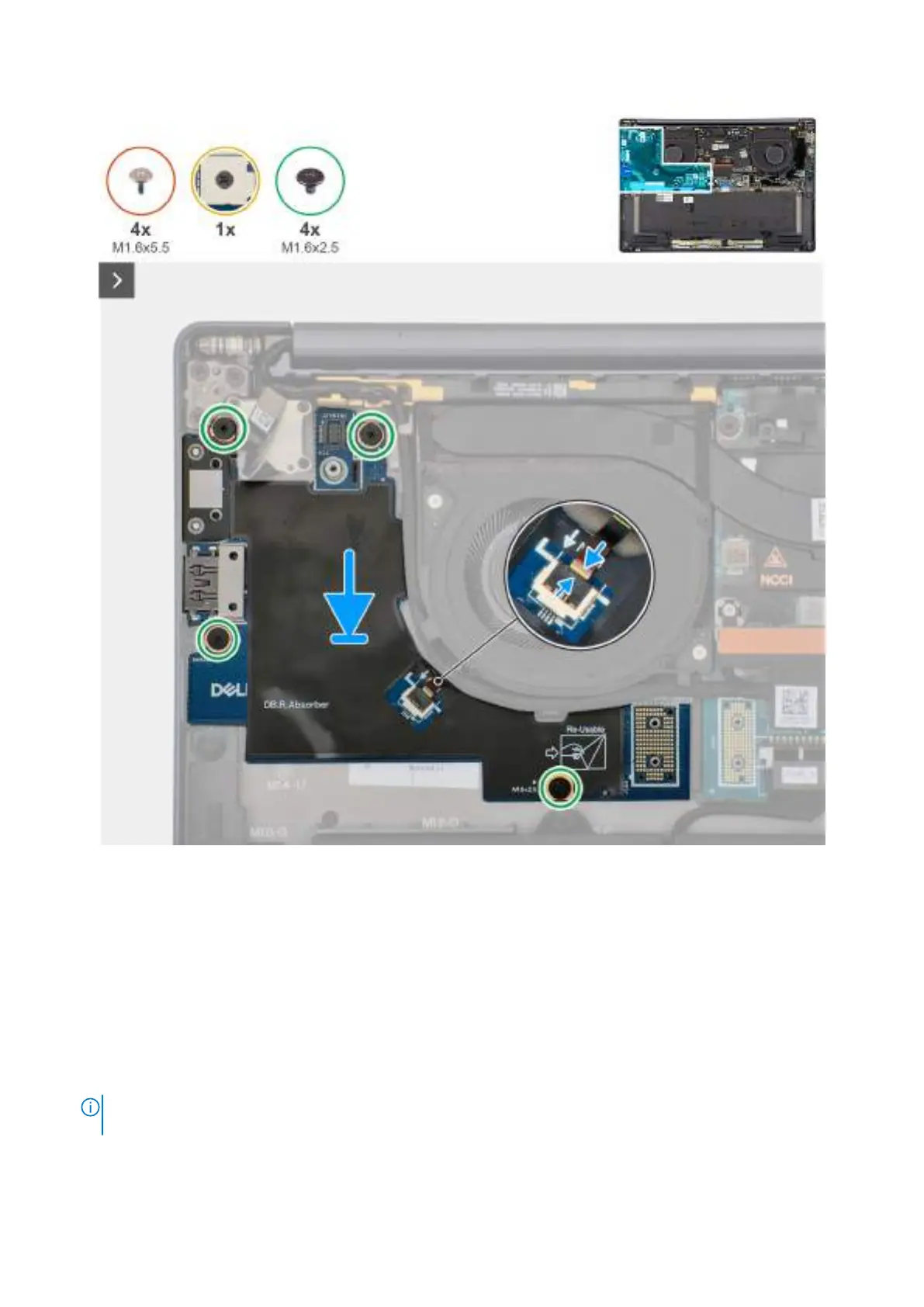
Obrázek 45. Installing the right I/Oboard (without WWAN antennas)
Kroky
1. Place the right I/O-board on the palm-rest and keyboard assembly.
2. Align the screw holes on the right I/O-board with the screw holes on the palm-rest and keyboard assembly.
3. Replace the four screws (M1.6x2.5) that secure the right I/O-board on the palm-rest and keyboard assembly.
4. Connect the right-fan cable connector to the right I/O-board.
5. Replace the right I/O-board connector to the system board.
6. Replace the power-button connector bracket on the system board.
7. Tighten the single captive screw that secures the power button connector bracket on the palm-rest and keyboard assembly .
8. Replace the two interposer boards from the right-I/O board and system board.
POZNÁMKA:
The pins on the interposer board are fragile. Avoid contact with the pins on the board, instead handle the board by
lifting and holding from the edges or the sides.
Demontáž ainstalace jednotek vyměnitelných vterénu (FRU) 77








 To Next Page