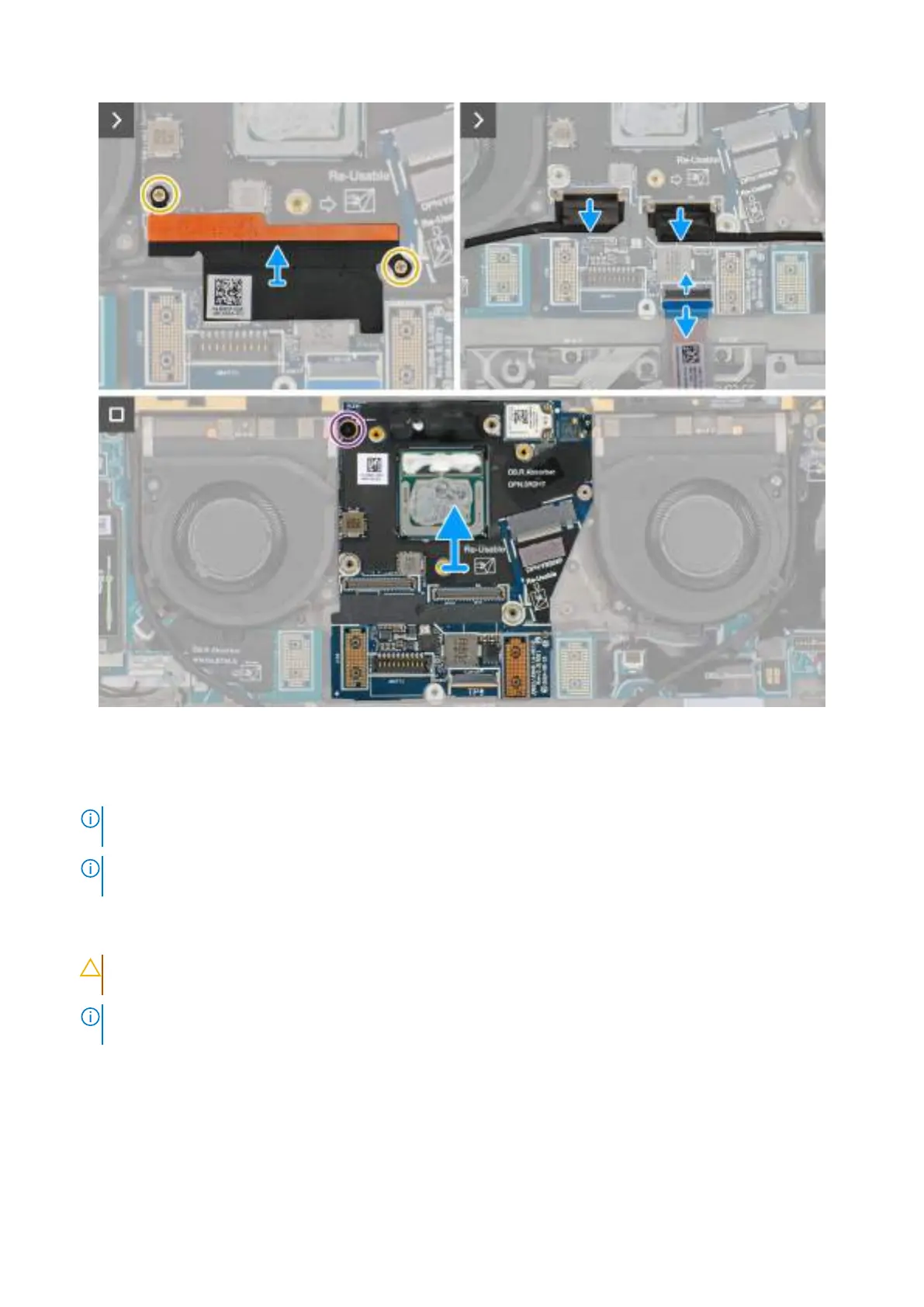
Obrázek 66. Removing the system board
Kroky
1. Remove the eight screws (M1.6x5.5) that secure the right I/O-board and left I/O-board cable connectors to the system board.
POZNÁMKA:
When reinstalling the right I/O-board cable connectors, align the connector so that the side labeled 'MB' is
connected to the system board, and the side labeled DB-R is connected to the right I/O-board.
POZNÁMKA: When reinstalling the left I/O-board cable connectors, align the connector so that the side labeled 'MB' is
connected to the system board, and the side labeled DB-L is connected to the left I/O-board.
2. Remove the right I/O-board and left I/O-board cable connectors from the system board.
3. Remove the interposer boards from the right I/O-board, left I/O-board, and system board.
VÝSTRAHA:
Technicians must remove the interposer board immediately after removing the I/O board cable
connectors to prevent the board from falling out of the system during subsequent removal procedures.
POZNÁMKA: The pins on the interposer board are fragile. Avoid contact with the pins on the board, instead handle the board by
lifting and holding from the edges or the sides.
98 Demontáž ainstalace jednotek vyměnitelných vterénu (FRU)







 To Next Page