EasyManua.ls Logo

Delta ASD-A2-5523 Series - User Manual

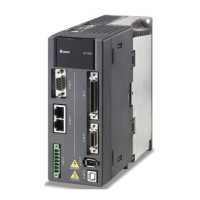
Delta ASD-A2-5523 Series
721 pages
Print Icon
To Next Page IconTo Next Page
Loading...
V5.1
DELTA_IA-ASDA_A2_UM_EN_20170209

Table of Contents

Other manuals for Delta ASD-A2-5523 Series

Questions and Answers

  • E
    Eric FergusonAug 31, 2025
    What causes overspeed in Delta Servo Drives?
    • B
      Bill AdamsAug 31, 2025
      Overspeed in Delta Servo Drives can be triggered by: * Unstable speed input command (too much fluctuation). If this is the case, ensure that input command frequency is stable (not fluctuate too much) and activate filter function. * Defective over-speed parameter setting. If this is the case, correctly set over-speed parameter setting (P2-34).
  • G
    gallagherdawnAug 25, 2025
    What causes undervoltage in Delta Servo Drives and how to fix it?
    • B
      brianna91Aug 25, 2025
      Undervoltage in Delta Servo Drives can be caused by: * The main circuit voltage being below its minimum specified value. If this is the case, reconfirm voltage wiring. * No input voltage at the main circuit. If this is the case, reconfirm the power switch. * Incorrect power input. If this is the case, use the correct power supply, a stabilizing power supply, or a series transformer.
  • D
    Diane CoffeySep 23, 2025
    How to fix An error occurs when loading CANopen data in Delta ASD-A2-5523 Servo Drives?
    • P
      petersonyvonneSep 23, 2025
      To fix an error occurs when loading CANopen data in Delta Servo Drives, when an error occurs when loading data via EEPROM, use DI.ARST, CANopen 0x1011 Restore default parameter.
  • M
    Michael NguyenSep 5, 2025
    What to do if CANopen PDO object does not support PDO on Delta Servo Drives?
    • K
      Kimberly RochaSep 5, 2025
      If the specified object in the message does not support PDO, NMT Maser send “Reset node“ command to its slave or reset the fault by sending the control word (0x6040) through CAN communication (the value of CANopen object 0x6040 should be reset).
  • S
    Shelly FisherSep 9, 2025
    What to do if Delta ASD-A2-5523 Servo Drives show abnormal pulse command?
    • W
      weeksericSep 9, 2025
      If your Delta Servo Drives are showing an abnormal pulse command, it could be because the pulse command frequency is higher than the rated input frequency. Correctly set the input pulse frequency.
  • D
    david60Sep 2, 2025
    How to resolve a serial communication timeout on Delta ASD-A2-5523 Servo Drives?
    • P
      Patrick DuranSep 2, 2025
      A serial communication timeout on Delta Servo Drives can occur if: * The setting value in the timeout parameter is not correct. If this is the case, correctly set P3-07. * Communication command is not being received for a long time. If this is the case, tighten the communication cable, make sure the communication cable is not damaged and ensure all wiring is correct.
  • A
    Adam FletcherAug 29, 2025
    What to do if index error occurs when accessing CANopen object on Delta ASD-A2-5523 Servo Drives?
    • D
      David WhitakerAug 29, 2025
      If the specified Index in the message does not exist, NMT Maser send “Reset node“ command to its slave or reset the fault by sending the control word (0x6040) through CAN communication (the value of CANopen object 0x6040 should be reset).
  • J
    Judith MccoySep 12, 2025
    What to do if Delta ASD-A2-5523 Servo Drives show Encoder voltage error or the internal of the encoder is in error?
    • B
      Benjamin JohnsonSep 12, 2025
      If your Delta Servo Drives are showing encoder voltage error or the internal of the encoder is in error: * Battery voltage is too high: According to the procedure of Over voltage to check. When corrective actions are done, AL.028 will be cleared automatically. * The internal encoder is in error: If the situation is not improving, please send the drive back to the distributors or contact with Delta.
  • R
    Ricardo MooreSep 7, 2025
    How to fix over current in Delta ASD-A2-5523 Servo Drives?
    • M
      Michael GriffinSep 7, 2025
      If your Delta Servo Drive is showing an over current error, there are several potential causes and solutions: * A short circuit in the drive output: Eliminate the short circuit, ensuring no metal conductors are exposed. * Incorrect motor wiring: Rewire the motor following the wiring instructions in the user manual. * A faulty IGBT: Send the drive back to the distributors or contact Delta. * Incorrect control parameter settings: Reset to the default settings and then gradually adjust the values. * Unreasonable command: Use a less steep command or apply a filter to smooth the command.
  • S
    Steven TaylorAug 27, 2025
    What causes CANbus error on Delta Servo Drives?
    • C
      Caitlin PrinceAug 27, 2025
      A CANbus error on Delta Servo Drives is caused by CANbus off or Error Rx/Tx Counter exceeding 128. NMT Maser send “Reset node“ command to its slave or restart the servo drive.

Summary

Chapter 1 Inspection and Model Explanation

1.1 Inspection

Check the product for damage, loose screws, and ensure correct wiring before use.

1.2 Product Model

Details on naming conventions for ASDA-A2 series servo drives and ECMA series servo motors.

1.3 Servo Drive and Corresponding Servo Motor

Specifications and model compatibility between ASDA-A2 servo drives and ECMA series servo motors.

Chapter 2 Installation

2.3 Ambient Conditions of Installation

Guidelines for installing and operating the servo drive and servo motor in suitable environments.

2.5 Specification of Circuit Breaker and Fuse

Recommended circuit breakers and fuses for 220V and 400V series servo drives, recognized by UL/CSA.

Chapter 3 Wiring

3.1 Connections - 220 V series

Information on wiring ASDA-A2 series products for 220V systems.

3.2 Connections - 400 V series

Information on wiring ASDA-A2 series products for 400V systems.

3.4 I;O Signal (CN1) Connection

Details on the CN1 connector for I/O signals, including programmable digital outputs and inputs.

3.5 CN2 Connector

Details on the CN2 connector for motor encoder connection, including quick and military connectors.

3.12 Standard Connection Example - 220 V series

Example wiring diagrams for 220V series servo drives in various control modes.

3.13 Standard Connection Example - 400 V series

Example wiring diagrams for 400V series servo drives in various control modes.

Chapter 4 Panel Display and Operation

4.2 Parameter Setting Procedure

Step-by-step guide on switching modes and operating within Monitor, Parameter, and Alarm modes.

Chapter 5 Trial Operation and Tuning

5.1 Inspection without Load

Procedure for inspecting the servo motor and drive without load, checking for damage and correct wiring.

5.2 Applying Power to the Servo Drive

Instructions for correctly wiring the motor to the servo drive and applying power.

5.6 Tuning Procedure

Steps for tuning the servo drive, including inertia ratio estimation, auto tuning, and manual tuning.

Chapter 6 Control Mode of Operation

6.1 Selection of Operation Mode

Description of available operation modes: Position, Speed, Torque, Dual, and Multi modes.

Chapter 7 Motion Control

7.1 Motion Control Functions of ASDA-A2

Overview of motion control functions including Single-axis motion controller, Capture/Compare, and E-Cam.

7.10 Parameter Settings

Overview of PR parameters related to target speed, accel/decel time, pause time, and PR definition.

Chapter 8 Parameters

8.1 Parameter Definition

Definition of parameter groups (0-7) and control mode descriptions (PT, PR, S, T, DMC).

8.2 List of Parameters

Comprehensive list of Monitor and General Output parameters with their functions, defaults, and control modes.

Chapter 9 Communications

9.1 RS-485 & RS-232 Communication Hardware Interface

Details on RS-485 and RS-232 communication, including wiring descriptions and configuration.

Chapter 10 Troubleshooting

10.1 Alarm of Servo Drive

List of servo drive alarms, their descriptions, corresponding DO, and servo status.

10.2 Alarm of CANopen Communication

Troubleshooting for CANopen communication alarms, including causes and corrective actions.

10.4 Causes and Corrective Actions

Detailed causes and corrective actions for common servo drive alarms such as over current, over voltage, and encoder errors.

10.5 Corrective Actions after the Alarm Occurs

Step-by-step corrective actions for various alarms like Over current, Over voltage, and Encoder errors.

Chapter 11 Specifications

11.1 Specifications of Servo Drives

Detailed specifications for ASDA-A2 series servo drives, including 220V and 400V series.

11.2 Specifications of Servo Motors (ECMA Series)

Specifications for ECMA series servo motors, including 220V and 400V series, and medium/high inertia models.

Chapter 12 Absolute System

12.1 Backup Battery Boxes

Safety precautions and specifications for backup battery boxes, including single and dual types.

12.3 System Initialization Procedure and Operation

Procedure for system initialization, including coordinate acquisition and parameter settings.

12.7 Alarms for Absolute System

List of alarms related to absolute systems, including encoder errors and communication issues.

12.7.1 Causes and Corrective Actions

Troubleshooting guide for absolute system alarms, detailing causes and corrective actions.

Delta ASD-A2-5523 Series Specifications

General IconGeneral
SeriesASD-A2
ModelASD-A2-5523
CategoryServo Drives
Rated Output Power5.5 kW
Applicable Motor Capacity5.5 kW
Rated Power5.5 kW
Rated Current23 A
Main Circuit Control MethodPWM control
Control ModePosition, Speed, Torque
Communication InterfaceRS-485, CANopen
FeedbackIncremental encoder, Absolute encoder
Power Supply3-phase 200 to 230 VAC
Input Voltage3-phase 200 to 230 VAC
Speed Command SourceAnalog voltage
Torque Command SourceAnalog voltage
Protection FeaturesOvercurrent, Overvoltage, Overload

Related product manuals