14
Amplon N Series
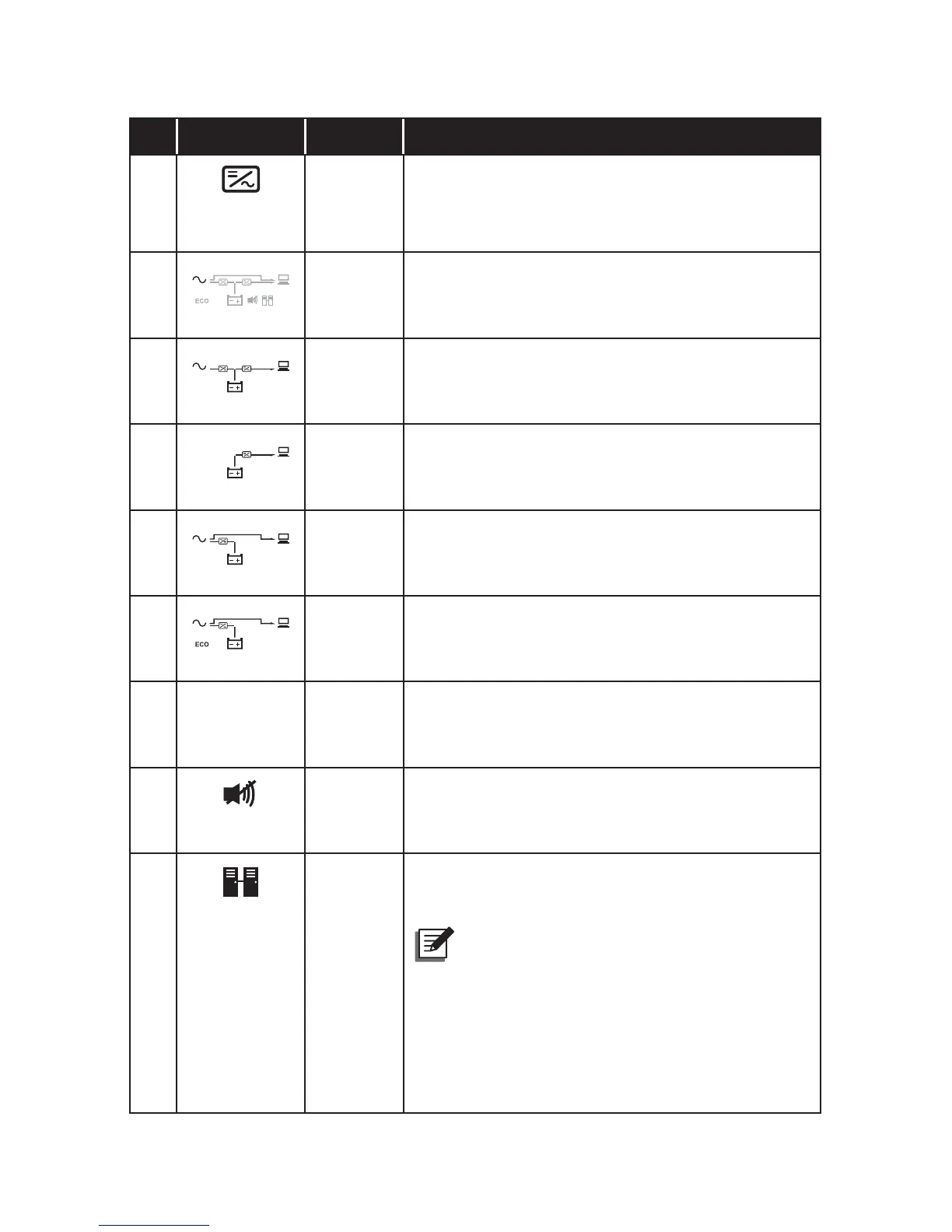
No. Icon Naming Description
5
Inverter
Icon
Indicates the inverter status.
1. ON: The inverter is running.
2. OFF: The inverter is not running.
6
Standby
Mode
Graph
Illuminates when the UPS is operating in stand-
by mode.
7
Online
Mode
Graph
Illuminates when the UPS is operating in on-
line mode.
8
Battery
Mode
Graph
Illuminates when the UPS is operating in bat-
tery mode.
9
Bypass
Mode
Graph
Illuminates when the UPS is operating in by-
pass mode.
10
ECO
Mode
Graph
Illuminates when the UPS is operating in ECO
mode.
11 ECO ECO
Mode
Illuminates when the UPS is operating in ECO
mode. It is bypass to supply power to the con-
nected loads in ECO mode.
12
Buzzer
Off
Icon
Illuminates when the buzzer is disabled.
13
Parallel
Icon
1. ON: The UPS is in parallel mode.
2. OFF: The UPS is in single mode.
NOTE :
1. You can parallel at maximum four UPS
units. To enhance parallel reliability,
please adopt the Daisy Chain method
to execute parallel configuration.
Please note that parallel UPSs cannot
share common batteries.




 To Next Page