ADJUSTMENT
Adjusting Idling Current
1. Preparation
(1) Prepare a DV voltmeter.
(2) Place the unit in normal usage conditions, away from highly ventilated areas such as next to an air conditioning
machine or electric fan.
The set requires an ambient temperature of 15
℃
to 30
℃
and standard humidity.
(3) Settings of This Unit
• POWER (Power source switch) STANDBY
• SPEAKER (Speaker terminal) No load
( Do not connect equipment such as speakers or dummy resistors. )
2. Adjustment Procedure
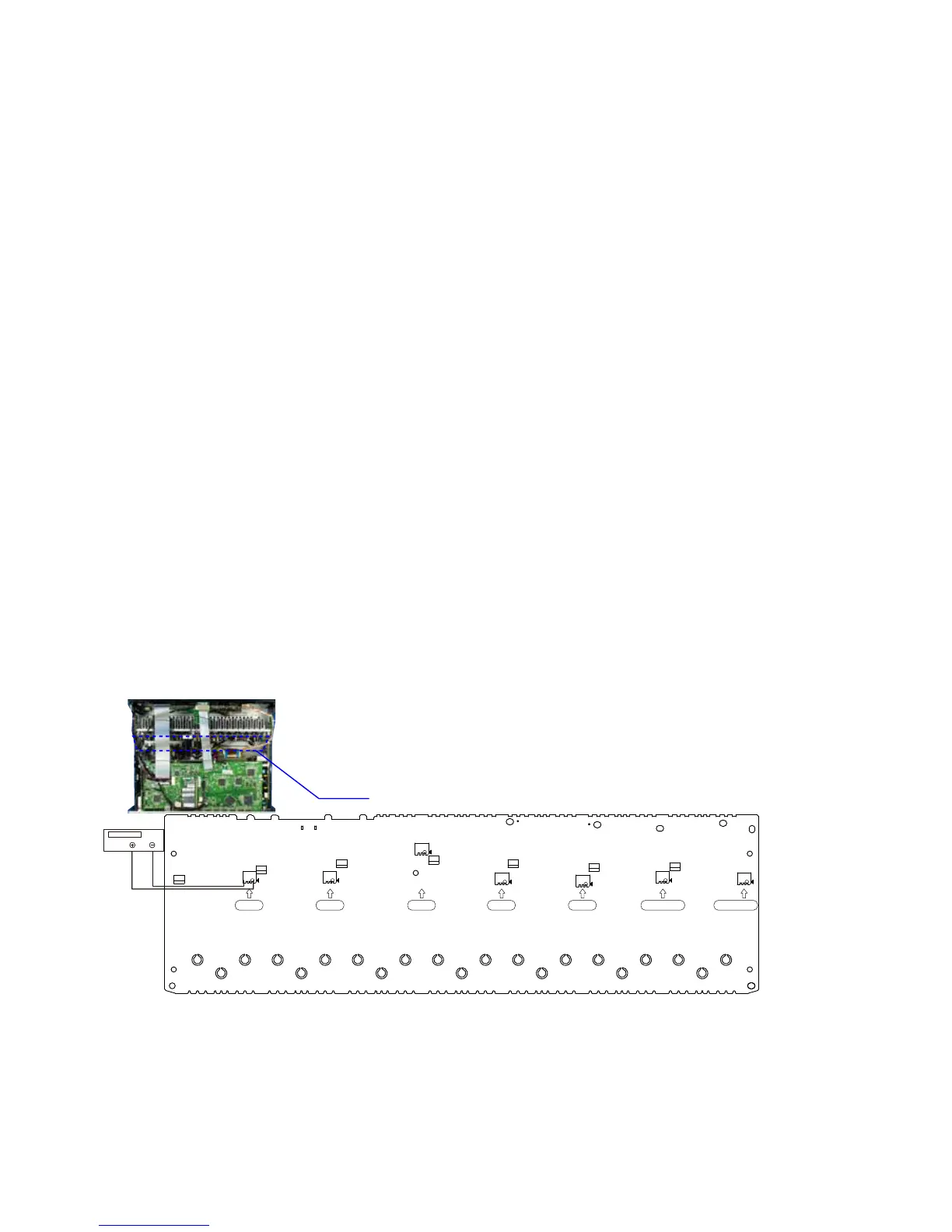
(1) Remove the top cover and turn VR714, VR724, VR734, VR744, VR754, VR764, VR774 of the AMP UNIT as far
anticlockwise(
c
) as possible.
(2) Connect the DC Voltmeter test points.
FRONT-Lch
:
CN715
FRONT-Rch
:
CN725
CENTER ch
:
CN735
SURROUND-Lch
:
CN745
SURROUND-Rch
:
CN755
SURROUND-BACK Lch
:
CN765
SURROUND-BACK Rch
:
CN775
(3) Connect the power cord to an outlet. Next, press the power button to turn on the power.
(4) Set this unit as follows.
MASTER VOLUME
:
"---" anticlockwise (
c
min.)
SPEAKER (Speaker terminal)
:
No load
( Do not connect equipment such as speakers or dummy resistors. )
MODE
:
MCH STEREO
FUNCTION
:
DVD
(5) Turn VR714 clockwise (
x
) and adjust the voltage of the test point to "
6.5mV ± 0.5mV DC
" within 2 minutes.
(6) 10 minutes after the preliminary adjustment, turn VR714 and set the voltage as "
8.0mV ± 0.5mV DC
".
(7) Adjust the variable resistance of each channel using the same method.
CN775
CN765
CN755
CN745
CN725
CN715
VR774
VR764
VR724
VR754
CN735
VR734
VR714
VR744
FL-CH
SL-CH
C-CH SR-CH
FR-CH
SBL-CH
SBR-CH
F Lch S Lch F RchC ch S Rch S Back Lch S Back Rch
AMP UNIT
DC Voltmeter
86


 To Next Page
 Loading...