42
ENGliSh
GWireless LANH
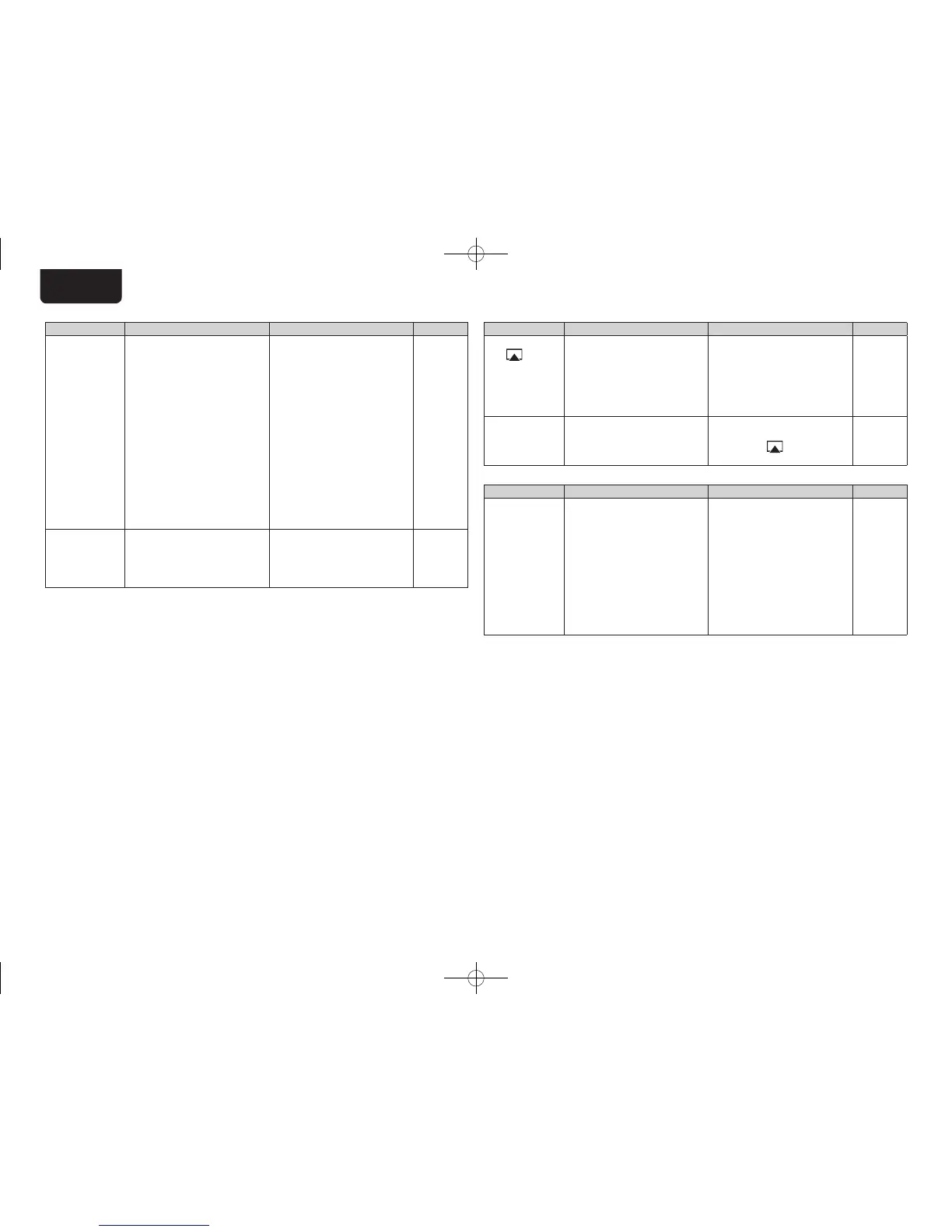
Symptom Cause Countermeasure Page
Cannot connect
to network.
•The settings of the SSID
and network key (WEP) are
incorrect.
•The reception is poor and the
signals cannot be received.
•There are multiple networks and
the usable channels overlap.
•The router power is off.
•Match the network settings
with this unit settings.
•Shorten the distance from the
wireless LAN’s access point,
remove any obstacles and
otherwise improve visibility,
then try reconnecting. Also
install away from microwave
ovens and the access points of
other networks.
•Set the access point’s channel
settings away from the channels
used for other networks.
Alternatively, connect using a
network cable.
•Turn on the router power.
22, 23
–
–
–
Played sound is
interrupted or
sound cannot be
played.
•There are multiple networks and
the usable channels overlap.
•Set the access point’s channel
settings away from the channels
used for other networks.
Alternatively, connect using a
network cable.
–
GAirPlayH
Symptom Cause Countermeasure Page
The AirPlay
icon
is not
displayed in
iTunes or on
the iPhone/iPod
touch.
•This unit and the computer
or iPhone/iPod touch are not
connected to the same network
(LAN).
•iTunes or the iPhone/iPod touch
do not have firmware that
supports AirPlay installed.
•Connect the computer or
iPhone/iPod touch to the same
network as this unit.
•Update to the latest firmware.
3
28
No sound. •This unit is not selected in the
screen that is displayed when
iTunes or the iPhone/iPod touch
is started.
•Start iTunes or switch on the
iPhone/iPod touch, click the
AirPlay icon
in the displayed
screen, and select this unit.
23
GRemote controlH
Symptom Cause Countermeasure Page
Set does not
work properly
when remote
control operated.
•Batteries are worn.
•You are operating outside of the
specified range.
•Obstacle between main unit and
remote control.
•The batteries are not inserted
in the proper direction, as
indicated by the polarity marks
in the battery compartment.
•The set’s remote control sensor
is exposed to strong light (direct
sunlight, fluorescent light, etc.).
•Replace with new batteries.
•Operate within the specified
range.
•Remove the obstacle.
•Insert the batteries in the
proper direction, following the
polarity marks in the battery
compartment.
•Move the set to a place in which
the remote control sensor will
not be exposed to strong light.
3
3
–
3
3
1.DNP720AEE2_ENG_Final_0727.indd 42 2011/07/30 8:39:29



 To Next Page