16
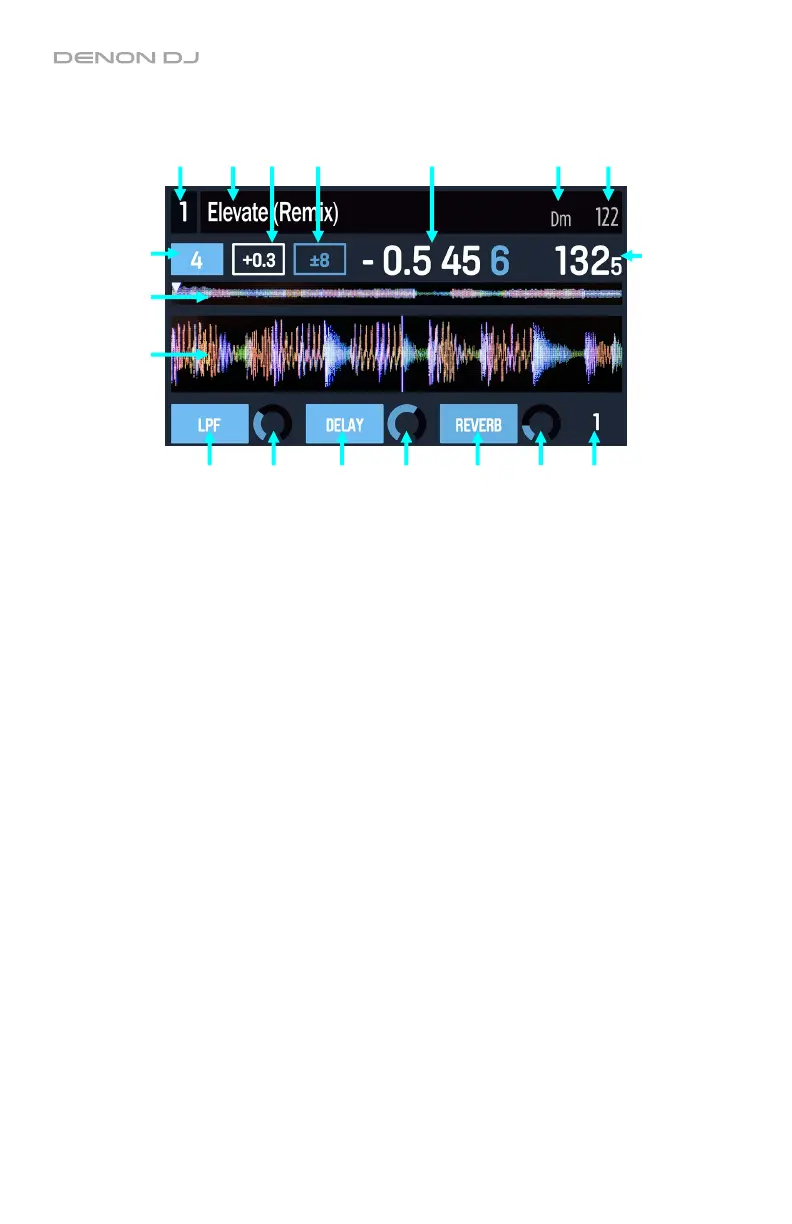
The Performance View includes the following items:
1. Deck: This is the currently selected deck in the software, which is controlled by the left or
right deck on MCX8000. Press the Deck button to switch between the layers. The left deck
on MCX8000 controls Deck 1 or 3 in the software; the right deck controls Deck 2 or 4.
2. Title: This field shows the track’s title.
3. Key: This field shows the track’s key.
4. Original BPM: This field shows the track’s original BPM, unaffected by any pitch adjustment.
5. Current BPM: This field shows the track’s current BPM, which includes any current pitch
adjustment.
6. Time: This field shows the current time position of the audio playhead in the track. This will
show the Remaining or Elapsed time, depending on the current time mode. Press the Time
button to switch between Remaining or Elapsed.
7. Pitch Range: This field shows range of the deck’s pitch fader. Press and hold Shift and
use the Pitch Bend –/+ buttons to cycle through the options.
8. Pitch Adjustment: This field shows the track’s current pitch adjustment. This is the
difference between its original BPM and current BPM.
9. Track Overview: This smaller waveform represents the entire current track. You can use
the Needle Drop strip to jump to a specific point in the track.
• The waveform color-coding indicates the frequency of the audio signal:
o Red represents low-frequency (bass) content.
o Green represents mid-range-frequency content.
o Blue represents high-frequency (treble) content.
• The audio playhead (the current track position) is represented by a white triangle
pointing downward ().
11
1 2 8 7 6 3 4
5
9
10
12 13 12 13 12 13 14


 To Next Page