39
Performance View
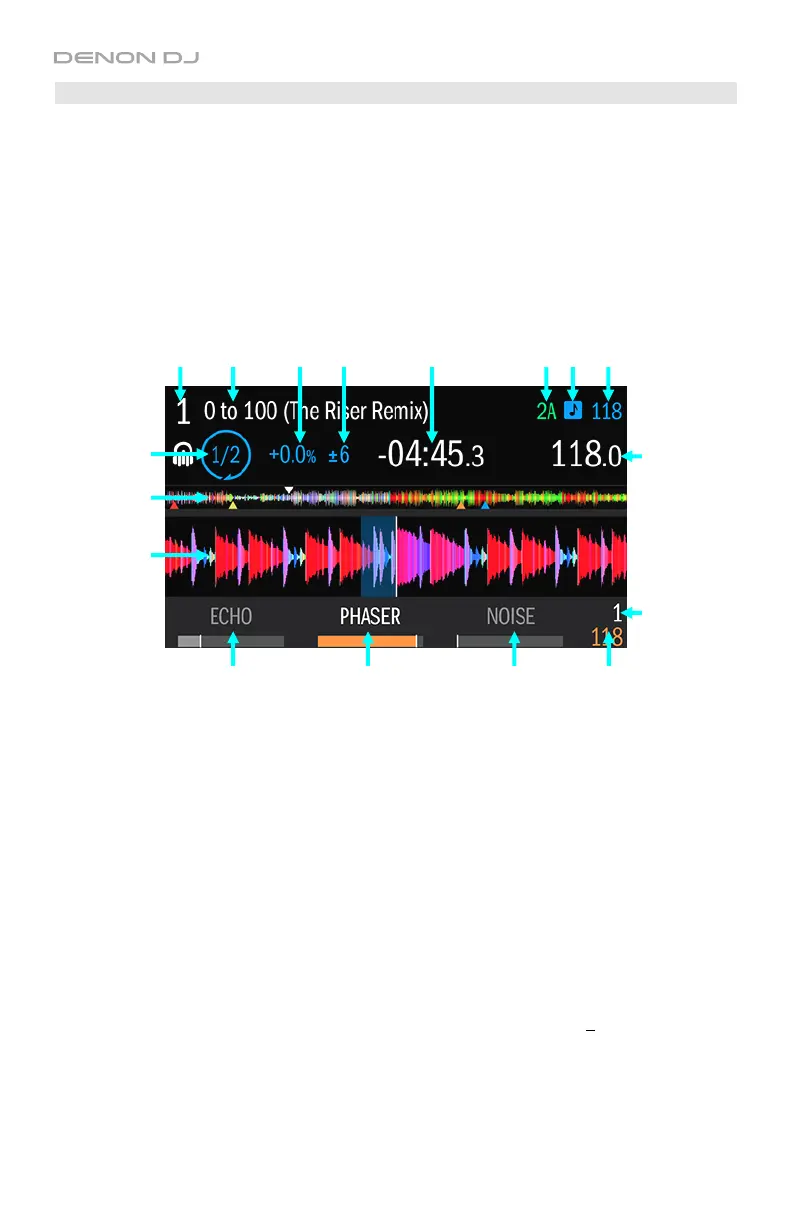
The Performance View lets you view the currently loaded track’s information, monitor its
playback, and control its effects. This section explains the different parts of the Performance
View and how to DJ with Engine while in this view.
To show Performance View in the display, press View so it is not showing the track list.
The Performance View includes the following items:
1. Deck Number: This field indicates which deck on MCX8000 you are viewing, 1 or 2.
2. Title: This field shows the track’s title.
3. Key: This field shows the track’s key. It will be empty if the track does not have a key ID3 tag.
4. Key Lock: This icon indicates whether Key Lock is on (blue) or off (grey).
5. Original BPM: This field shows the track’s original BPM, unaffected by any pitch
adjustment. It will be empty if the track does not have a BPM ID3 tag.
6. Current BPM: This field shows the track’s current BPM, which includes any current pitch
adjustment. It will be empty if the track does not have a BPM ID3 tag.
7. Pitch Adjustment: This field shows the track’s current pitch adjustment shown as a
percentage. This is the difference between its original BPM and current BPM. It will be
empty if the track does not have a BPM ID3 tag.
8. Pitch Fader Range: This field shows range of the deck’s pitch fader: +6, 10, 16, or 100%.
Press and hold Shift and use the Pitch Bend –/+ buttons to cycle through the options.
9. Time: This field shows the current time position of the audio playhead in the track. This will
show the Remaining or Elapsed time, depending on the current time mode. Press the Time
button to switch between Remaining or Elapsed.
10
1 2 7 8 9 3 4 5
6
11
12
13 13 13 15
14


 To Next Page