28
Sampler Mode
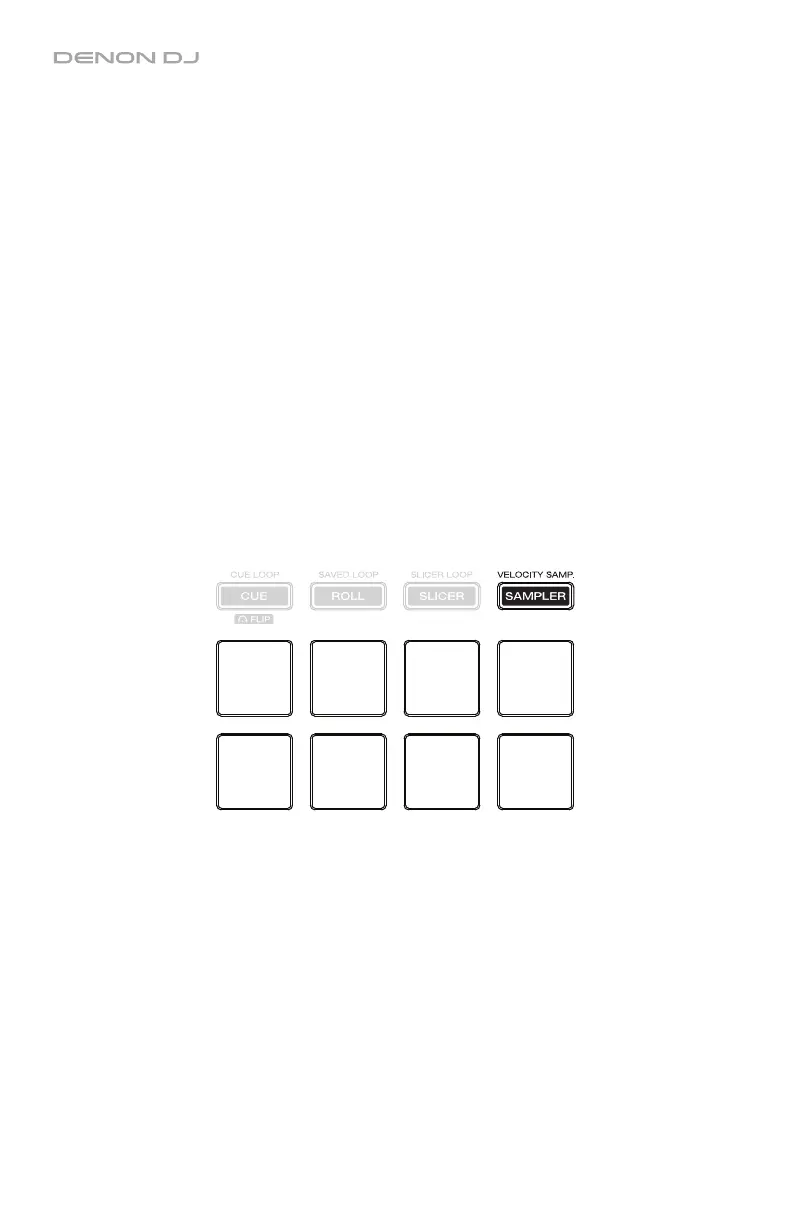
In Sampler Mode, the pads will control the SP-6 sampler within the software. Pads 1–6 each
trigger a sample at a specified volume (you assign both the sample and its volume in the
software).
To enter Sampler Mode, press Sampler / Velocity Samp. so that it lights purple.
To assign a sample and its volume, use the software. See the Serato DJ manual to learn
more about using samples.
To play a sample, press a lit pad (1–6). The pad will flash as the sample plays.
To stop playback of a sample, press and hold Shift and then press the corresponding
flashing pad (1–6).
To cycle through the sample banks, use the / buttons.
To activate or deactivate Sampler Player Repeat for a sample, press and hold Pad 7 and
then press the corresponding lit pad (1–6). See the Serato DJ manual to learn more about
looping samples.
To cycle through the play modes for a sample, press and hold Pad 8 and then press the
corresponding lit pad (1–6). See the Serato DJ manual to learn more about sample play modes.
To cycle through the SP-6 outputs, press and hold Shift and then use the / buttons.
Sample 1
Sample 2
Sample 3
Sample 4
Sample 5
Sample 6
Sampler
Player
Repeat
Sample
Play
Mode


 To Next Page