43
Pad Modes
The pads on each deck of MCX8000 using Engine have different functions depending on the
current Pad Mode: Cue Mode, Roll Mode, and Slicer Mode. These modes are described on
the following pages.
Cue Mode
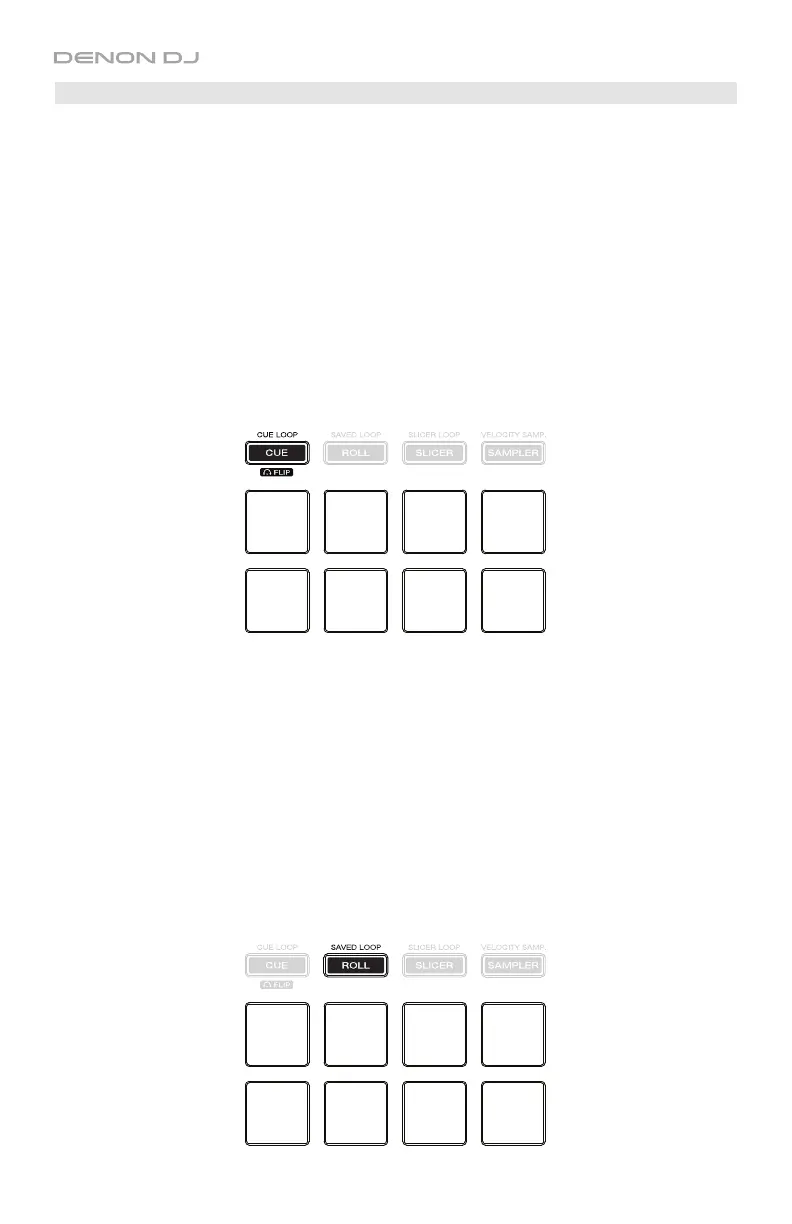
In Cue Mode, each pad assigns a hot cue point or returns the track to that hot cue point.
To enter Cue Mode, press Cue / Cue Loop / Flip so that it lights blue.
To assign a hot cue point, press an unlit pad at the desired point in your track. The pad will
light up when it is assigned.
To jump to a hot cue point, press a lit pad.
To delete an assigned hot cue point, press and hold Shift and press the corresponding pad.
Roll Mode
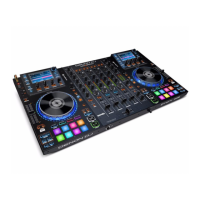
In Roll Mode, Pads 1–4 (the top row) trigger a momentary Loop Roll while Pads 5–8 (the
bottom row) will let you Beat Jump or adjust the Beat Jump Range.
To enter Roll Mode, press Roll / Saved Loop so that it lights aqua.
To trigger a Loop Roll, press the corresponding pad (1–4).
To perform a backward or forward Beat Jump, press Pad 5 or 8, respectively.
To halve or double the Beat Jump Range, press Pad 6 or 7, respectively. Alternatively,
press X1/2 or X2, respectively.
To shift the Loop Roll left or right, use the / buttons.
To perform a backward or forward Beat Jump, press and hold Shift and then press the or
button, respectively. You can move up to 4 seconds in either direction from the initial location.
Cue 1
Cue 2
Cue 3
Cue 4
Cue 5
Cue 6
Cue 7
Cue 8
1/8-beat
Loop Roll
1/4-beat
Loop Roll
1/2-beat
Loop Roll
1-beat
Loop Roll
Beat Jump
<<
Beat Jump
Range <<
Beat Jump
Range >>
Beat Jump
>>


 To Next Page