12 User Manual | Pedelec with centre motor
3.1.2 Mode buttons
You can speci the power-assist level using the Mode but-
tons. Each time you press a Mode button, the power assist
changes by one level.
If you require more assistance, press the Mode button that
points upwards. In the HIGH mode, if you press the Mode
button that points upwards, the power assist jumps down
to the LOW mode.
For less assistance, press the Mode button that points
downwards. In the LOW mode, if you press the Mode but-
ton that points downwards, it goes into the HIGH mode.
3.1.3 Power-assist mode
You can choose to relax and let the bike do the work, exert
yourself more physically, or simply get om A to B as fast
as possible. You can decide this yourself by choosing an
appropriate power-assist mode.
Display LEDS POWERASSIST MODE
HIGH This means the assistance is working
hard.
MID This means the assistance is working
with a medium level of eort.
LOW This means the assistance is working
with a low level of eort.
3.1.4 Battery charge state
Using a stylised battery divided into segments, it shows
the charge remaining in the battery. The lower the charge
state of the battery is, the fewer segments are displayed.
DISPLAY BATTERY CHARGE STATE
3 LEDs light up 70–100% or: All segments
light up for two seconds
when the power is switched
on.
2 LEDs light up 40-70%
1 LED lights up 10-40%
1 LED ashes slowly <10% The system shuts down
shortly aerwards.
1 LED ashes quickly ~0% The system shuts down.
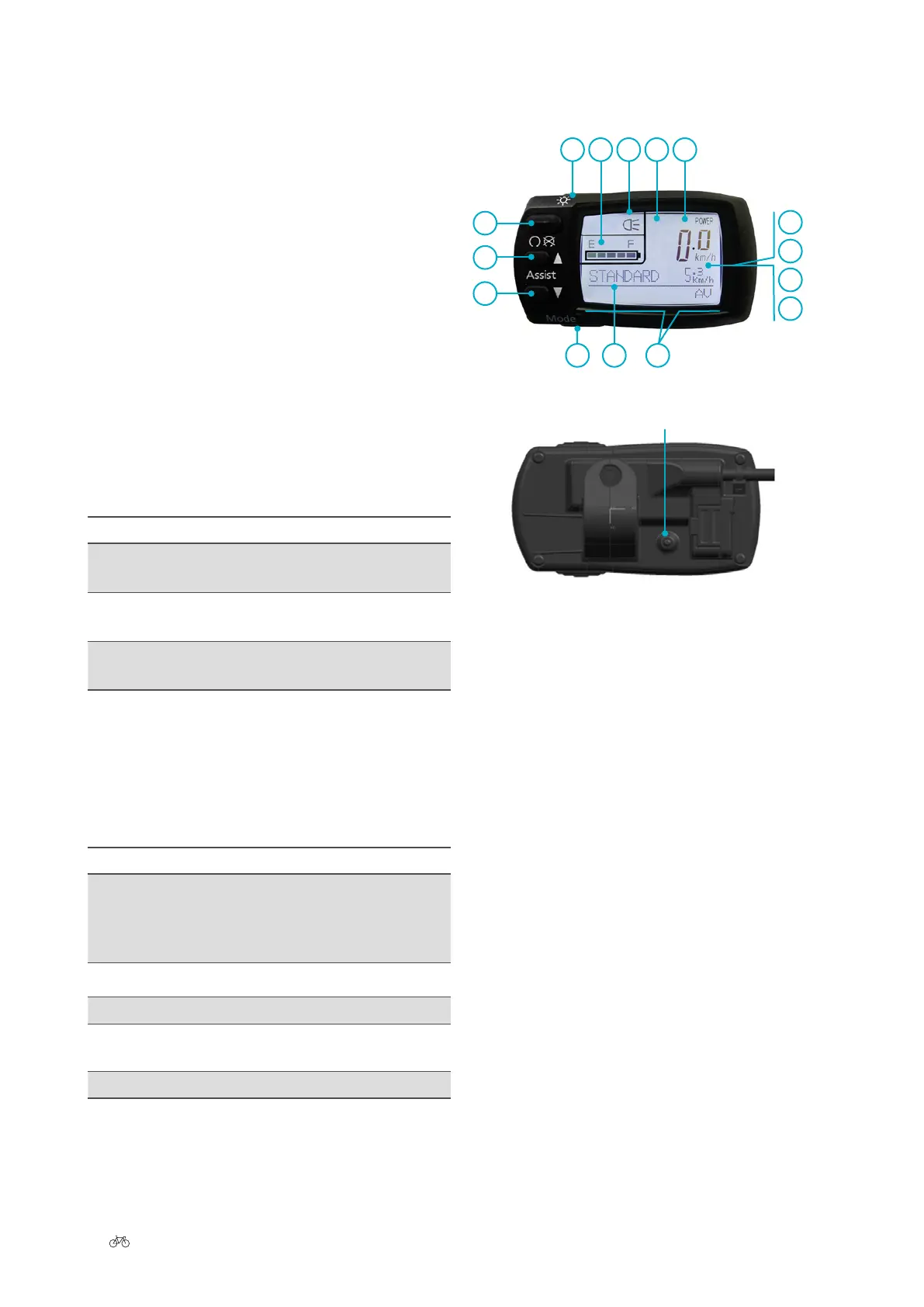
3.2 LCD control panel
2
1 87 9 10
12
13
14
15
65 11
4
3
Rear
delete all data
1 Light switch
2 On/O button
3 Upper Assist button
(less assistance)
4 Lower Assist button
(more assistance)
5 Mode button
6 Display panel
7 Battery charge state
8 Headlight
9 Power output indicator
10 Speed
11 Power-assist mode
12 Trip
13 Average speed
14 Top speed
15 Total journey length
• The light switch (1) is located at the top on the le. It
enables you to switch the back-lit display on and o.
• The On/O button (2) is located below the light
switch. This can be used to turn the system on and o.
• Below it are the upper (3) and lower (4) Assist but-
tons. They enable you to change the power-assist
level.
• The Mode button (5) enables you to change the
variables in the display panel (6).
• In the display eld (6), you can see the battery
charge state (7), the headlight (8), the motor out-
put power (9) (only when in motion), the speed
(10), the power-assist mode (11) and other vari-
ables (12).











 To Next Page