User Manual | Pedelec with centre motor 15
3.2.6.4 Settings section
To go om the normal display to the settings section,
press the Mode button and the lower Assist button togeth-
er for three seconds. To switch om one settings section
to another, press the upper or lower Assist button. Press
the light switch to apply the settings you have made.
Choose between:
• Language selection:
Press the Mode button to display the language
modes. Press the upper and lower Assist buttons
to access the dierent language modes. Once you
have decided, press the Mode button. This takes
you back to the language selection item.
• Set LCD contrast:
Press the Mode button to set the LCD contrast.
Press the upper and lower Assist buttons to access
the dierent LCD contrast modes. Once you have
decided, press the Mode button. This takes you
back to the set LCD contrast selection item.
• Set km/h or mph:
Press the Mode button to change the unit of speed.
Choose between km/h and mph. Once you have de-
cided, press the Mode button. This takes you back
to the selection item.
• Set wheel circumference:
Press the Mode button to set the wheel circumfer-
ence. Press the upper and lower Assist buttons to
set the wheel circumference. Once you have set the
h digit, press the Mode button to go to the next
digit and so forth. Once you have set the rst digit,
press the Mode button to return to the “Set wheel
circumference” item.
• Set journey length:
Press the Mode button to set the journey length.
Press the upper and lower Assist buttons to set the
journey length. Once you have set the sixth digit,
press the Mode button to go to the next digit and
so forth. Once you have set the rst digit, press the
Mode button to return to the “Set journey length”
item.
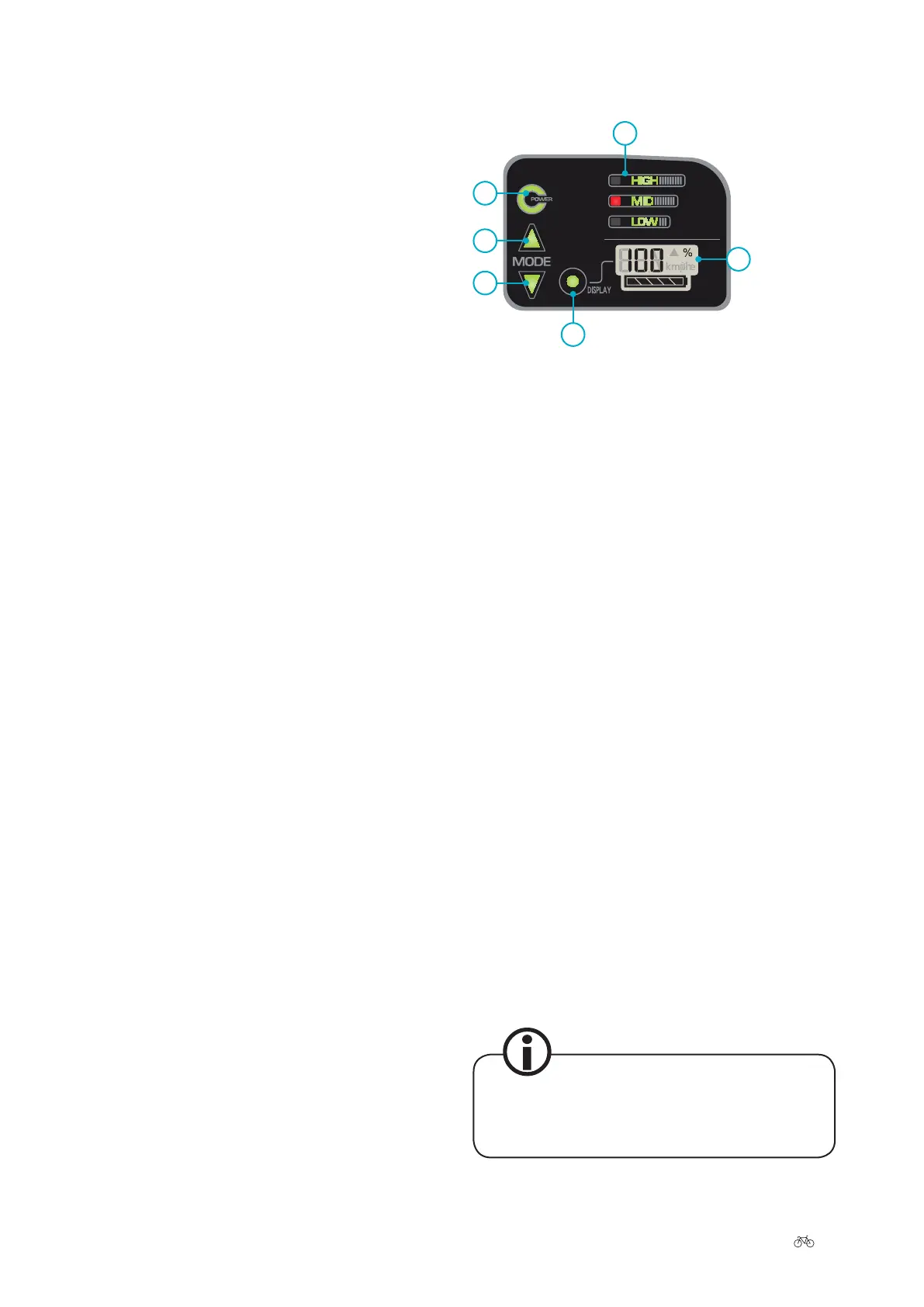
3.3 Hybrid control panel
6
4
1
2
2
5
1 Power button
2 Upper Mode button
3 Lower Mode button
4 Display button
5 Display panel
6 Assist modes
• On the le, you will nd the Power button (1). This
can be used to turn the system on and o.
• Below it are the upper (2) and lower (2) Mode but-
tons. They enable you to change the power-assist
level.
• The Display button enables you to change the vari-
ables in the display panel (5).
• In the display panel (5), you can see the battery
capacity, the speed, the trip and the remaining
distance.
3.3.1 Power button
Press the Power button to switch the system on. Wait for
two seconds before turning the pedals. The drive system
requires this time when no force is applied to the pedals
to adjust the power sensor correctly. The power-assist
modes light up red briey. Then they all go out except for
the medium power-assist mode. The battery charge state
and the information that was last set appear on the dis-
play.
Press the Power button again to switch the system o.
The display also lights up in the dark.











 To Next Page