EN - 32 SE-DV64-HE
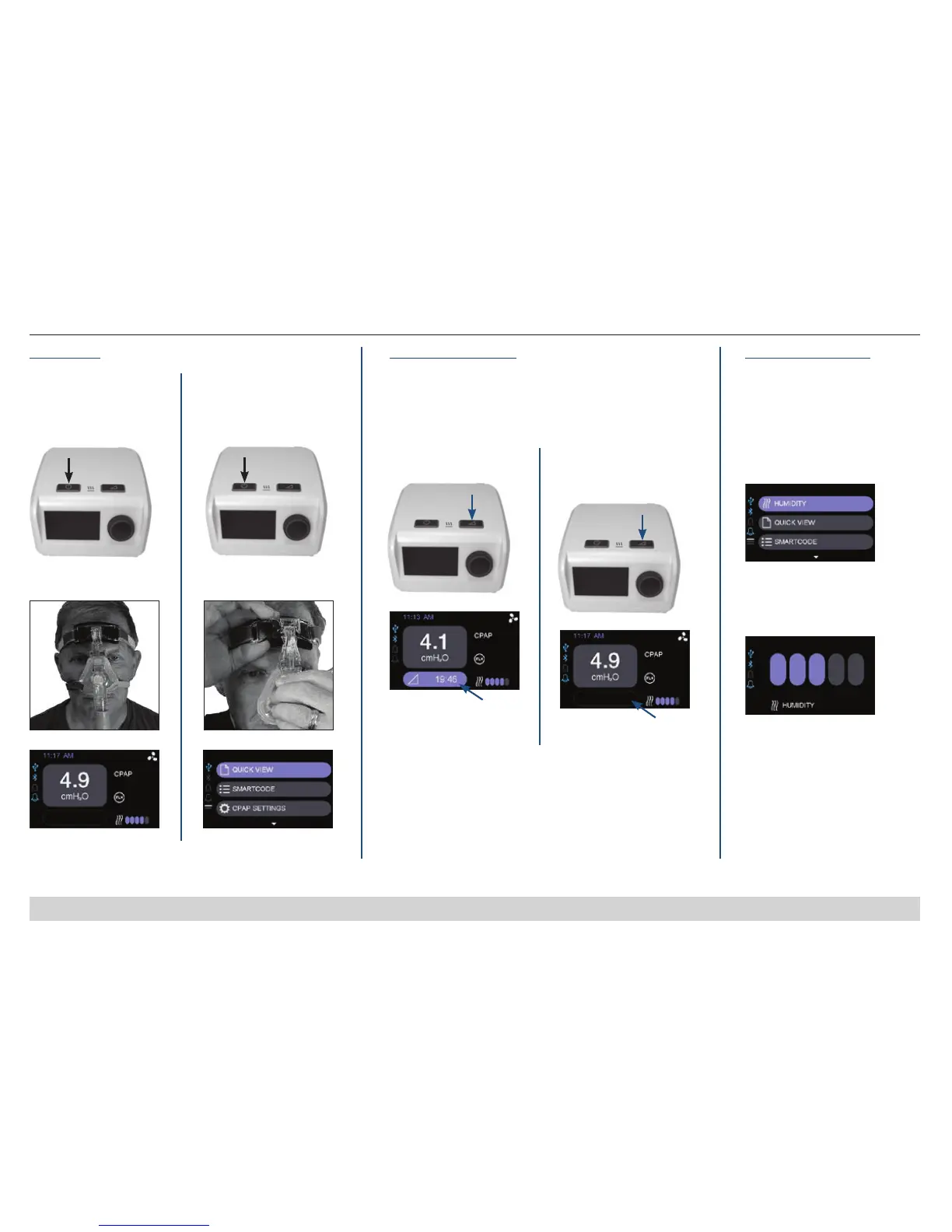
QUICK START – OPERATING YOUR CPAP
OPTION A
Press ON/OFF button OR
THERAPY
OPTION B
Breathe into mask**
Display
OPTION A
Press ON/OFF button OR
Stopping Therapy
To turn blower off:
OPTION B
Remove mask**
Display
**if Auto-START/STOP feature is activated
Press RAMP button
To start ramp:
Display
Press RAMP button again
To stop ramp: (begin
prescription pressure)
Display
Humidification
Clean, ll and install humidier
chamber daily. NOTE: Use distilled
water to avoid mineral deposit build
up inside the chamber.
To Set Humidication Controls:
1. Select Humidity.
2. Choose humidity setting
of OFF or 1 through 5 bars.
(NOTE- 5 bars is the
highest humidity)
Starting Therapy
To turn blower on:
PRESSURE RAMP HUMIDIFICATION
When activated, this feature gradually ramps up the device to
prescription pressure to help you fall asleep easier. Ramp time
can be set from 0-45 minutes; refer to Features & Settings for
details on adjusting length of time.
Ramp On
(Time
Remaining)
Ramp Off
NOTE – For models with heated
humidication option, please refer
to humidier guide for device set
up.













 To Next Page