EN - 44 SE-DV64-HE
CPAP Settings Menus
FEATURES AND SETTINGS
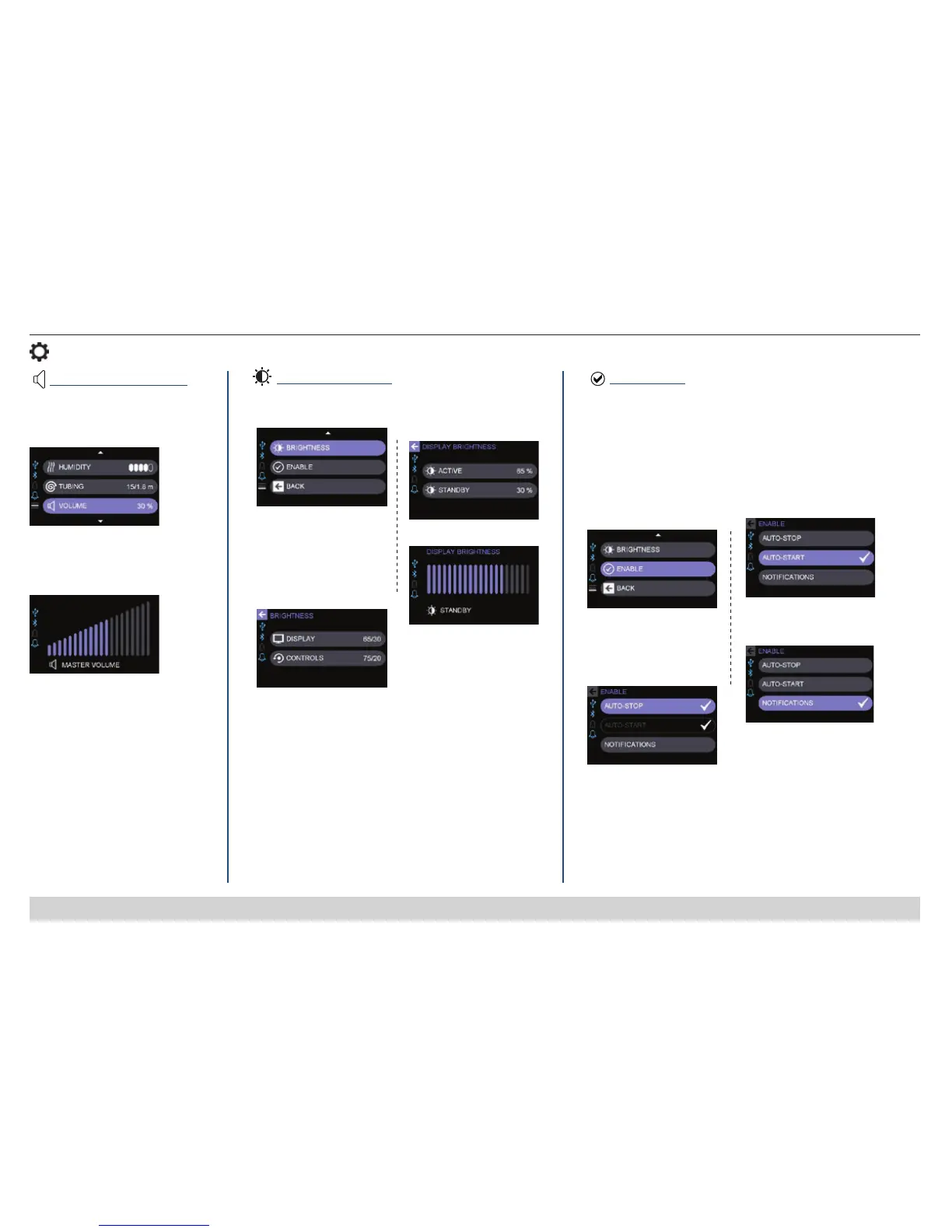
Brightness Settings
1. Select Brightness
2. Select Display
(brightness of display
area) or Controls
(brightness of top buttons,
heater-on indicator, and
rotary knob)
3. Select Active or
Standby
4. Select Brightness Level
Enable Menu
= Enabled (ACTIVATED)
1. Select Enable and then
select desired options
2. Auto-STOP NOTE-
If Auto-STOP is enabled,
Auto-START is
automatically enabled.
3. Auto-START
4. Noti cations
(Refer to
Patient Messages for details.)
Active = Brightness during user activity (when using
buttons or menus). Settings from 10% to 100% (must be
equal to or higher than Standby brightness)
Standby = Brightness when no user activity (idle).
Settings from 0% to Active (must be equal to or lower than
Active brightness)
Display and controls change to Standby brightness after 2
minutes of no activity.
NOTE – If Standby controls brightness is set to 0, the
heater on indicator remains on at a low level.
Allows adjustment of display and controls brightness.
Allows Auto-Start/Stop feature and Noti cations to be
activated or deactivated. Activating Auto-Start/Stop allows you
to start therapy by breathing into your mask and to stop
therapy by removing your mask. Activating Noti cations will
ensure they are displayed on your screen when generated.
Master Volume Settings
1. Select Volume
2. Set Master Volume
(sound level) from 0-100%
0 = Off (mute)
Allows adjustment of alert volume for
patient messages.













 To Next Page