EN - 42 SE-DV64-HE
FEATURES AND SETTINGS
CPAP Settings Menus
RX Pressure
Select Rx Pressure
View your prescription
pressure setting
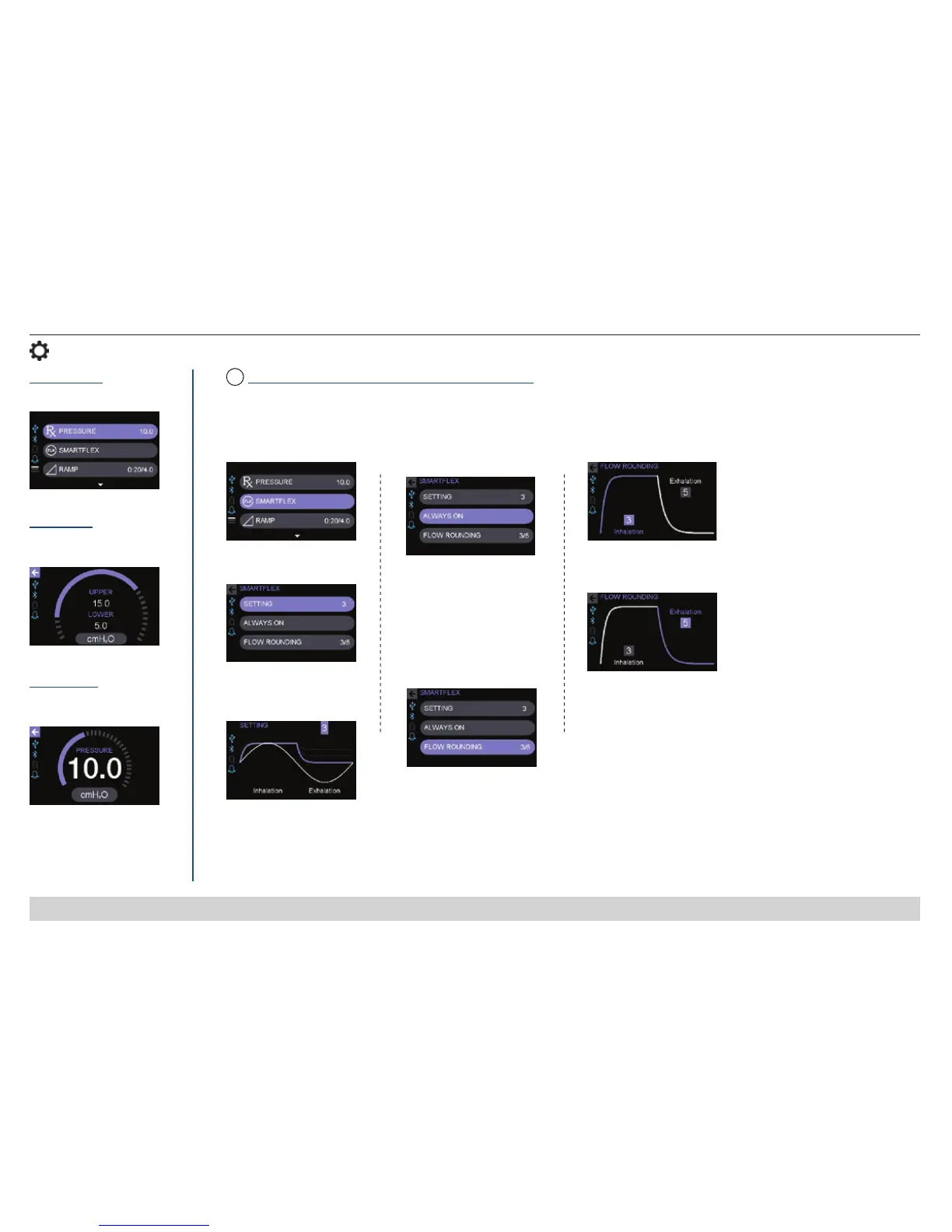
SmartFlex™ Pressure Relief Comfort Technology
1. Select SmartFlex
2. Select Setting
3. Choose 1-3 or OFF
NOTE – 1 is the least relief
and 3 is the most.
4. Press to choose
Always On or Ramp Only
5. Select Flow Rounding
6. Choose 0-5 for Inhalation
7. Choose 0-5 for Exhalation
NOTE – 0 is the least rounding and 5 is the most.
When activated, the SmartFlex pressure relief feature helps make it easier for you to exhale against your prescribed pressure by slightly
lowering the pressure during exhalation. If you experience a respiratory event when using the pressure relief function, the device will
automatically deactivate this function until normal breathing resumes.
Auto Mode
View your prescription
pressure setting
CPAP Mode
Always On = SmartFlex
pressure relief is active
throughout the night.
Ramp Only = SmartFlex
pressure relief is on
during ramp only.
FLX
(Flow Rounding determines the speed at which the
SmartFlex pressure relief changes.)













 To Next Page