7 • Smartphone Setup | Stelo Glucose Biosensor User Guide 47
Waking up your watch updates your Stelo Glucose Biosensor data from your phone.
There may be a brief delay before your watch app shows current information.
Go to stelo.com/compatibility to make sure your smartwatch works with the Stelo
Glucose Biosensor.
Apple Watch setup (iPhone)
To install the app, use the Watch app on your iPhone.
See your watch instructions for details about installing apps.
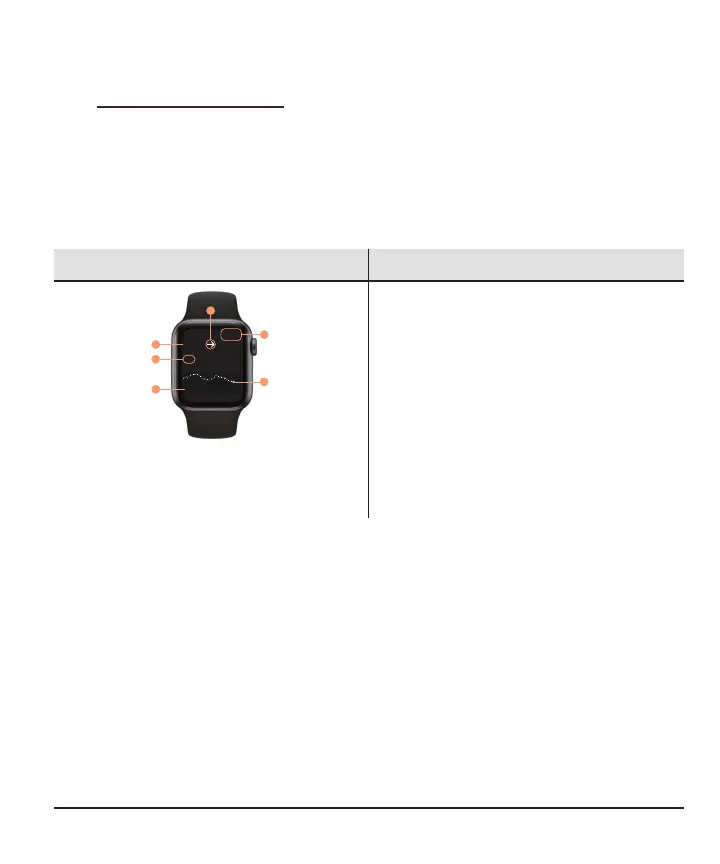
What you see What it means
3 HR
123
Stelo
10:09
250
70
1
5
3
4
6
2
mg/dL
Sensor reading and arrow
1. Sensor reading
2. Trend arrow
Trend graph
3. Target range
4. Current sensor reading
5. Shows past 3hours
6. Time
Tap the graph to change the number of hours shown: 1, 3, or 6 hours



 To Next Page