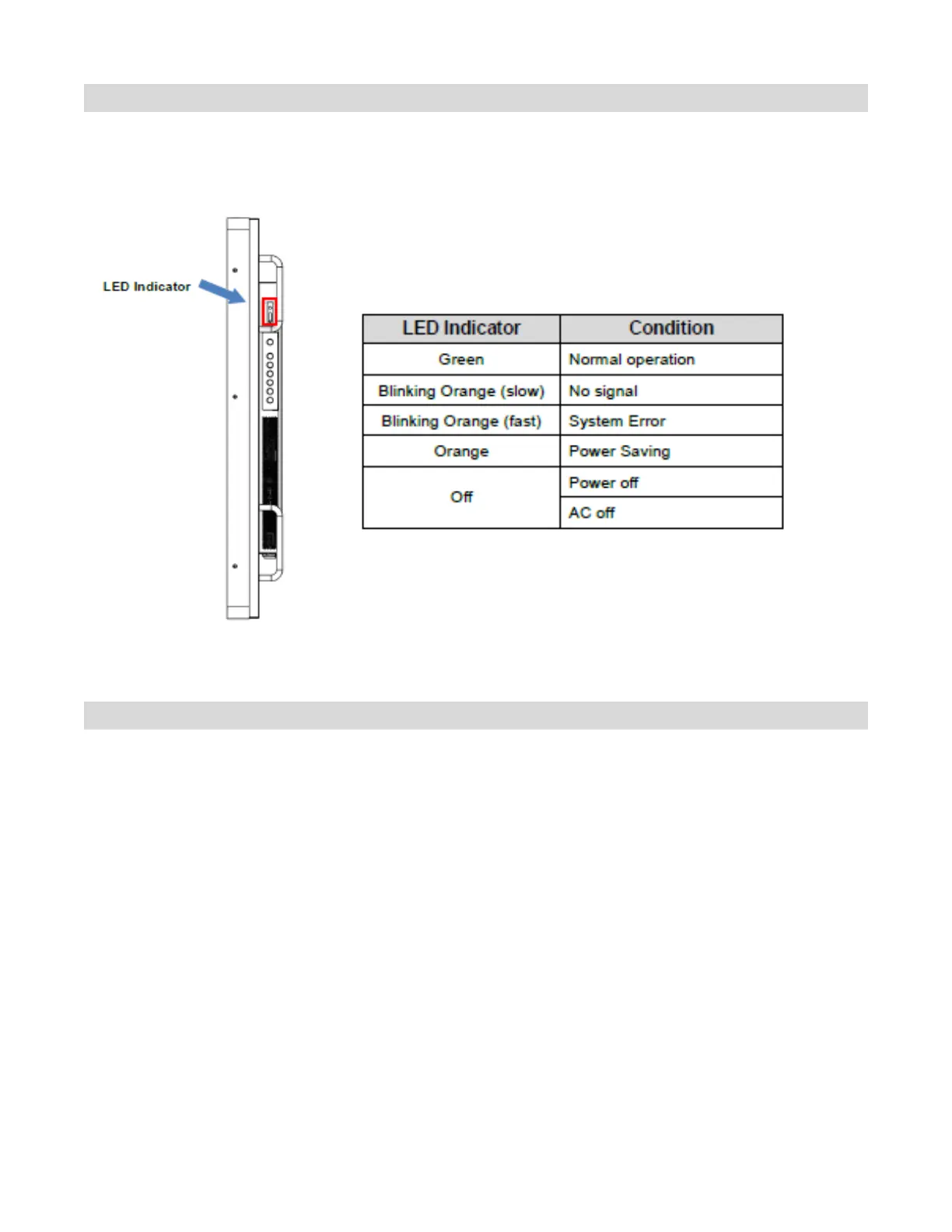
Reading the Status LED
The LED indicator light is located on the rear of the display near the keypad. The following table explains
what the different colors and blink patterns mean.
Note: If the LED is set to “Off” in the OSD menu, the status LED will not operate.
Avoiding Image Retention
Fixed images displayed over a long period of time may cause image “burn-in” or image retention. Image
retention is not covered under warranty.
Follow the recommendations below to avoid image retention.
Operate display within its rated ambient environment
• Operating temperature: 0°C to 40°C (0F to 104°F)
• Humidity: 35~85% RH (Max)
Avoid static content
During each 24-hour period, turn the display off for a continuous 6 hours.
Display dynamic (moving) images whenever possible.
Avoid displaying static (fixed) images for long periods of time.
Consider using a screen saver to avoid displaying static (fixed) video content continuously.
Set IRFM to ON
To help avoid image retention, it is recommended that the IRFM feature be set to “ON”. This feature can be
selected via the OSD (on screen display) under Adv. Setup – IRFM – ON.



 To Next Page