Error! Use the Home tab to apply Címsor 1 to the text that you want to appear
here.
44
2. After replacing any component, related to the process of dilution or measurement.
3. When quality control measurements show any systematic error (bias) or they are
outside predefined limits.
4. At regular time intervals (determined by the lab itself).
5. If you want to use the instrument in Pre-diluted mode.
Calibration can be performed in two ways:
1. User can enter calibration factors – without any calibration measurements – using
the numerical keypad.
2. 1-, 2-, 3-fold or more measurements of control blood or calibrator, with known
parameters. In this case, the instrument automatically calculates new factors using
the following formula:
Assigned value x Stored factor
Measured value(s) (or average of those)
CAUTION! New calibration will invalidate the previous factors.
Old values cannot be retrieved.
Maintenance
Calibration
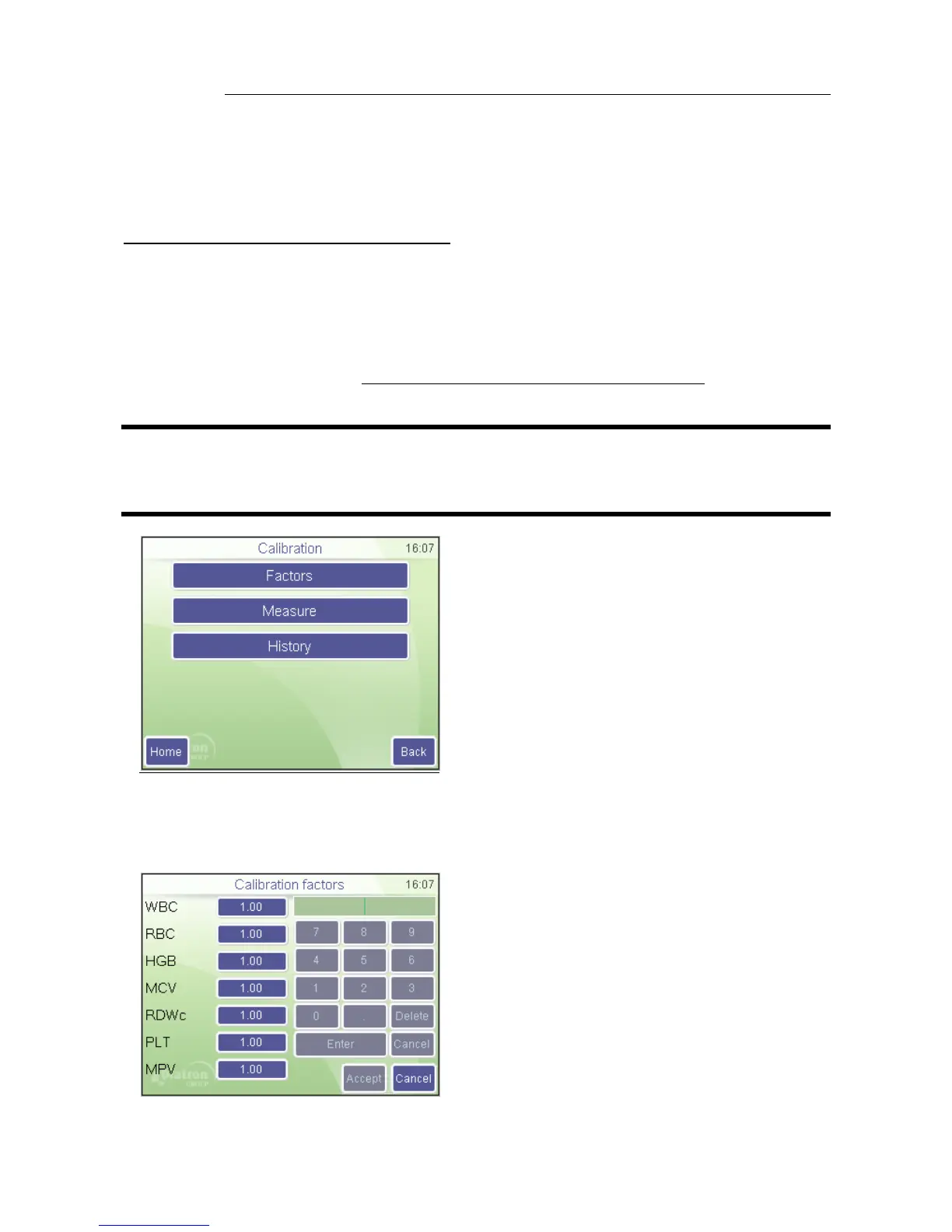
You can select the following functions:
Factors: enter calibration coefficients
manually
Measure: define target values and start
calibration measurements
History: display past calibration factors.
Press HOME to go to Main menu.
Press BACK to go back to previous menu.
7.2.1. Calibration with factors
Factor based calibration allows adjustment of primary parameters with a factor.
Maintenance
Calibration / Factors
Press white data field to modify calibration
factor. A numeric input screen will show up
so that you can enter values.
All values must be in the 0.8…1.2 range.
Press Accept to proceed with new
settings, or Cancel to keep values
unchanged.



 To Next Page