Connecting and Removing Cables and Adapters 5-5
Connecting Cables
Connecting the 10BASE-T (UTP) Cable
The DECserver 10BASE-T uses an 8-pin MJ connector. Select the appropriate cable
type, crossover or straight-through, to ensure that the server’s transmit/receive signals
connect correctly to the transmitter/receiver of the connected device. Before
connecting the cables to the server (Figure 5-3), note the following:
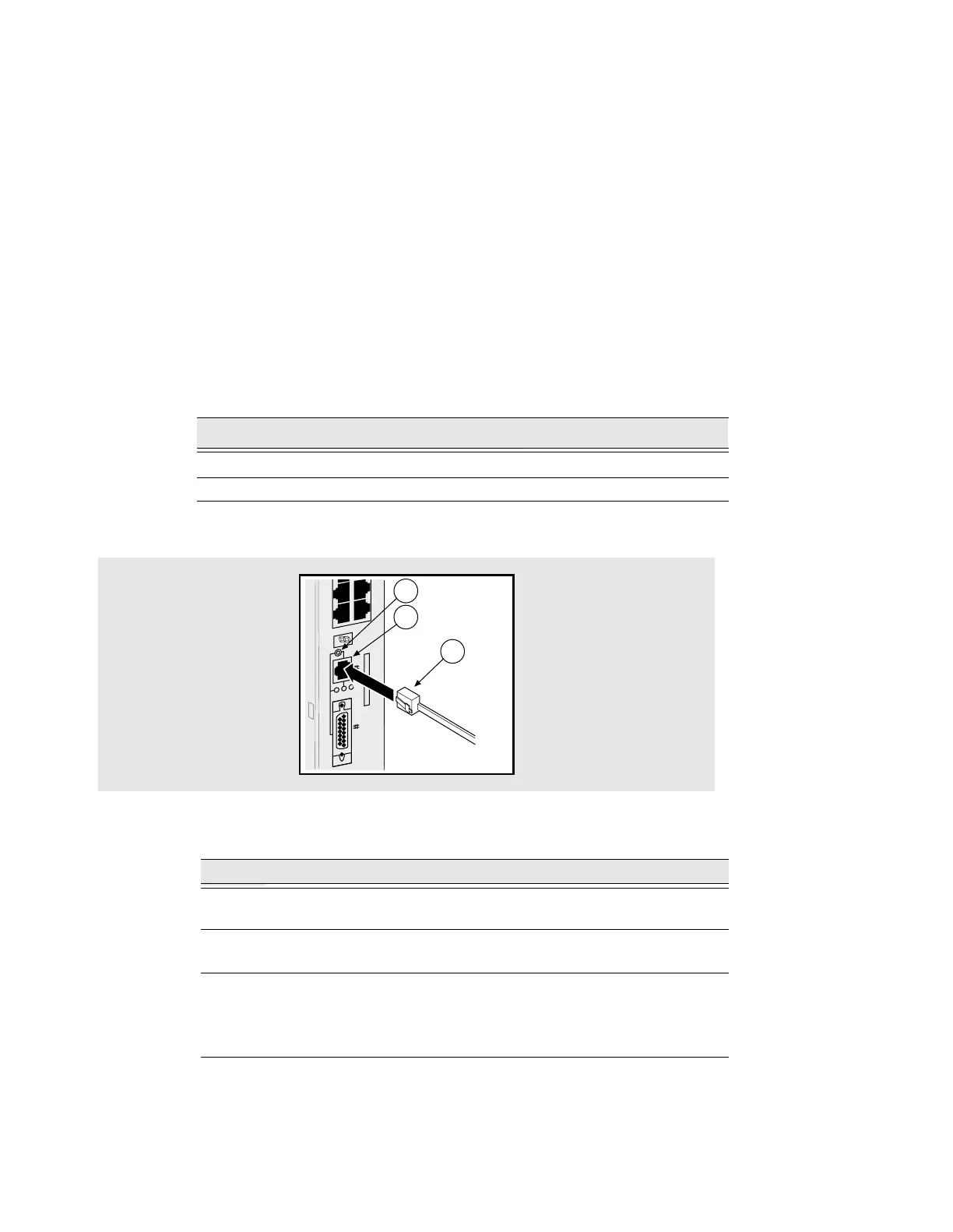
Figure 5-3: Connecting the 10BASE-T Cable
To connect the 10BASE-T cable, complete the following steps:
For cable lengths, refer to Chapter 4, Cabling Requirements. For information on
connectors, refer to Appendix B, Connector and Pin Assignments.
Device Cable
Crossover connectors
1
1. The sum of the crossovers must always equal an odd number.
Straight-through cables
Straight-through connectors Crossover cables
Step Action
1 Align the release tab on the cable plug (1), with 10BASE-T port
connector on the DECserver (2).
2 Insert the plug into the connector (2), ensuring that the release tab snaps
into the locked position.
3 Check the setting on the selection switch (3). This switch allows you to
switch between 10BASE-T and AUI ports on the server:
Up:10BASE-T port is selected.
Down: AUI port is selected.
3505-18
30 32
29 31
LNK
1
2
3



 To Next Page