22
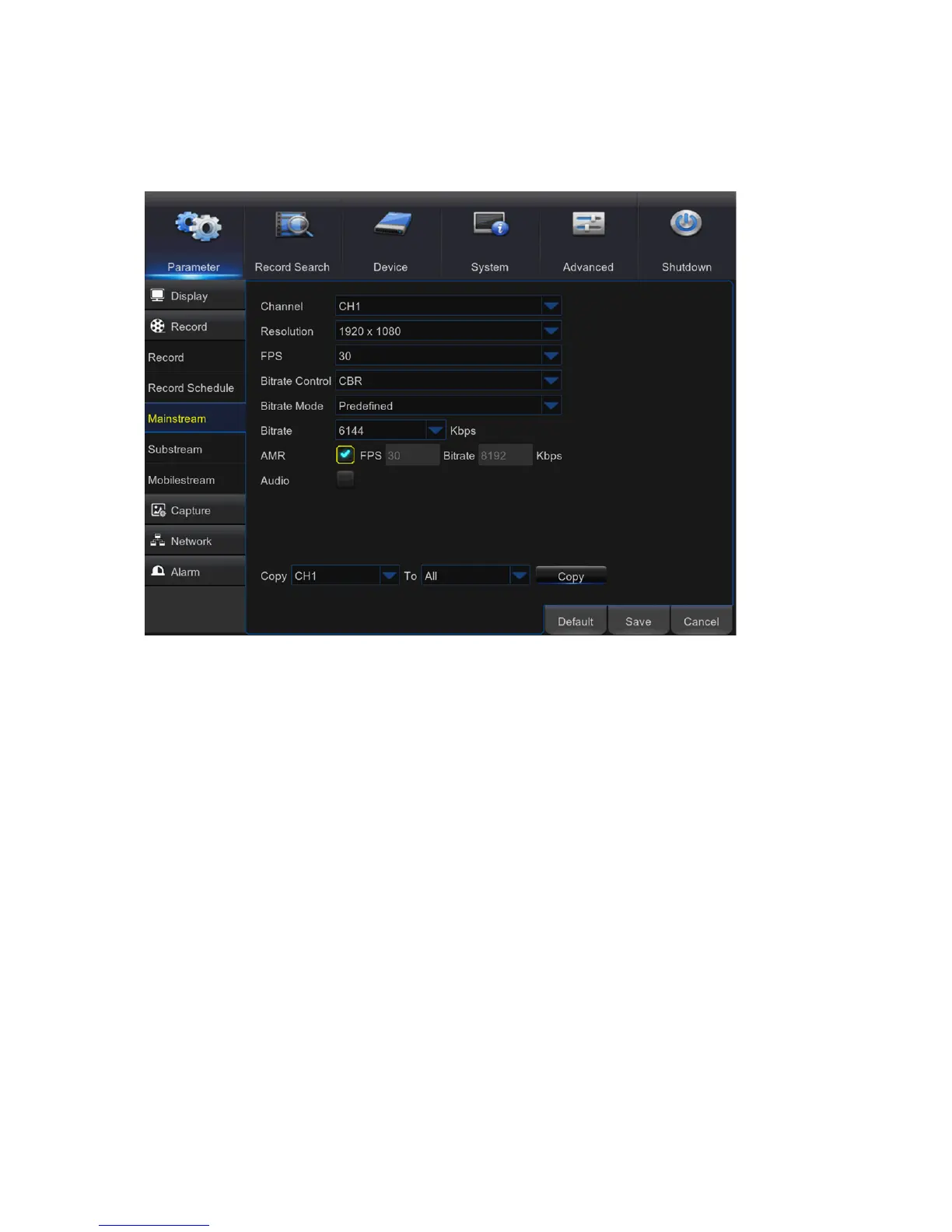
Mainstream
5.3.3
This menu allows you to configure the recorded video parameters. All the modifications you apply
to these settings will affect the recorded video saved into the HDD.
Channel: Select the channel to configure recording related information.
Resolution: This parameter defines, how large the recorded image will be.
FPS: This parameter defines the number of frames per second the DVR will record.
Bitrate Control: Select the bitrate level based on the complexity of the scene. For a simple scene,
such as a gray wall is suitable constant bitrate (CBR). For more complex scene, such as a busy
street is suitable variable bitrate (VBR).
Bitrate Mode: If you want to set the bitrate by yourself, then choose User-defined mode. If you
want to select the predefined bitrate, choose Predefined mode.
Bitrate: This parameter corresponds to the speed of data transfer that the DVR will use to record
video. Recordings that are encoded at higher bitrates, will be of better quality.
Audio: Select this option if you want to record audio along with video and have a microphone
connected to the DVR or using a camera with audio capability.



 To Next Page