41
Playback Video Recordings
5.7.4
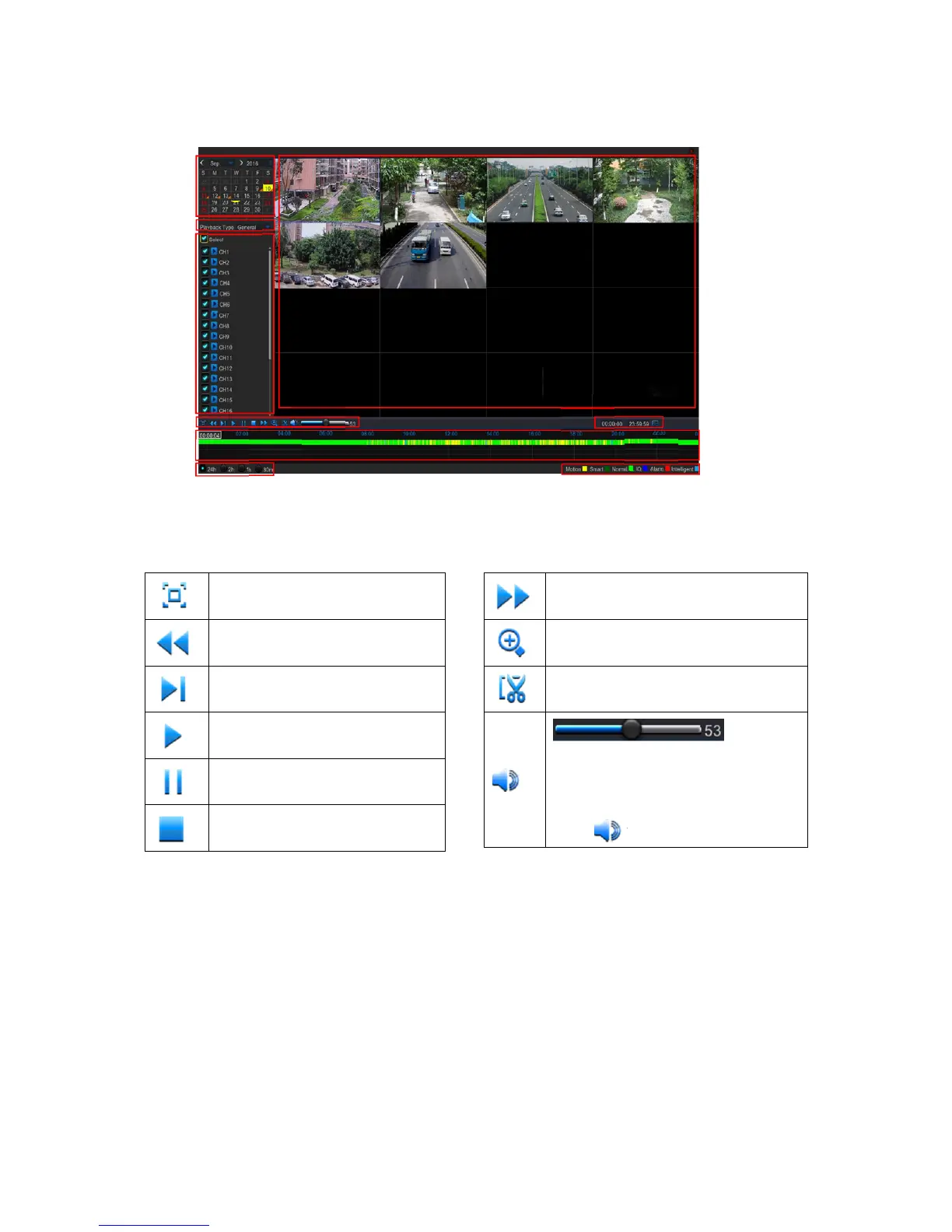
1. Recording Calendar: Dates marked with orange triangles have recordings.
2. Playback Type: Select the playback type among General, Events, Picture & Sub-periods
3. Channels: Check the channels to playback.
4. Playback Control Bar
Full Screen
Fast Rewind: x2, x4, x8 and x16
Slow Play: 1/2, 1/4 and
1/8 speed
Play & Pause
Pause, Play frame by frame
Stop
Fast Forward, x2, x4, x8 and x16
Digital Zoom: Click to zoom in
Trim Video: view 5.7.4.2 Trim Video
Volume Control: Slide the slider bar
to increase or decrease volume.
Click to mute audio.
5. Time Bar:
The color indicates the video recording type:
- Motion recording (Yellow)
- Smart recording (Dark Green)
- Normal recording (Green)
- I/O sensor recording (Blue)
- Alarm recording (Red)
6. Time Frame: Select Playback timeline. View 5.7.4.3 Time Frame
7. Smart Search: Please see more in 5.7.4.1 Smart Search
8. Recording Type Indicator: Motion, Smart, Normal, and IO & Alarm.
9. Recording Playback Screen: Video recordings from selected channels.
○
1
○
2
○
3
○
4
○
5
○
6
○
7
○
8
○
9



 To Next Page