48
Device
5.8
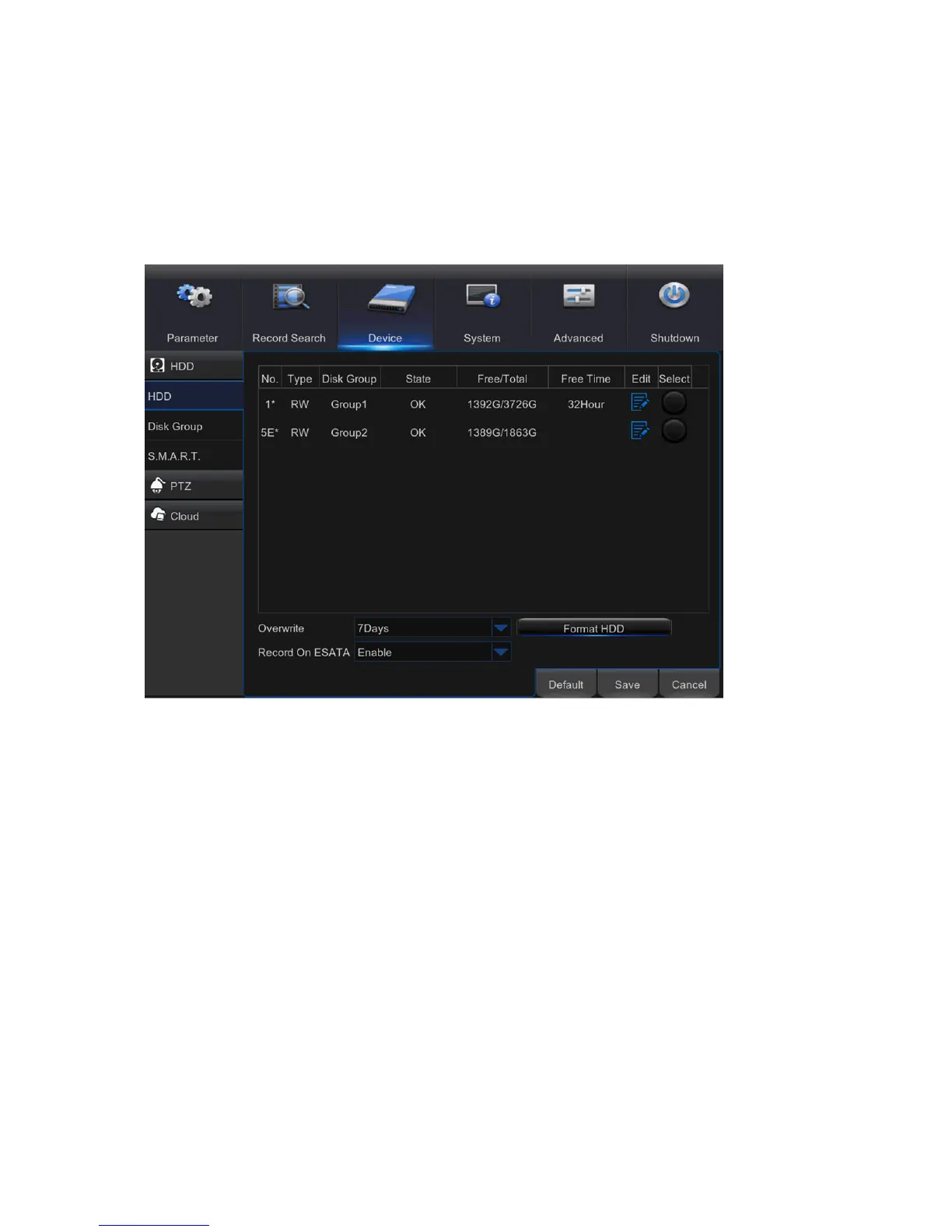
In this section, you can configure the internal HDD, PTZ setup & Cloud storage.
HDD
5.8.1
This menu allows you to check & configure the internal HDD that the DVR uses for saving the
recordings. You need to format the HDD only at the first startup and if you replace the HDD.
Format HDD: Select the HDD you want to format and then click Format HDD. To
start formatting, you need to enter your user name and password and then click OK to
confirm to continue formatting.
Overwrite: Use this option to overwrite the old recordings on the HDD when the HDD
is full. For example, if you choose the option 7 days then only the last 7 days
recordings are kept on the HDD. To prevent overwriting any old recordings, select
Disable. If you have disabled this function, please check the HDD status regularly, to
make sure the HDD is not full. Recording will be stopped if HDD is full.
Record on ESATA: This menu only displayed when your DVR is coming with an
e-SATA port on the rear panel. It will allow to record the video to external e-SATA
HDD to enhance your HDD capacity.
Note: If the eSATA recording function is enabled, eSATA backup function will be
disabled.



 To Next Page