EasyManua.ls Logo

Dinstar DAG2000 - Page 21

Dinstar DAG2000
41 pages
Print Icon
To Next Page IconTo Next Page
To Previous Page IconTo Previous Page
Loading...
DAG Series User Manual
18
Dinstar Technologies Co., Ltd.
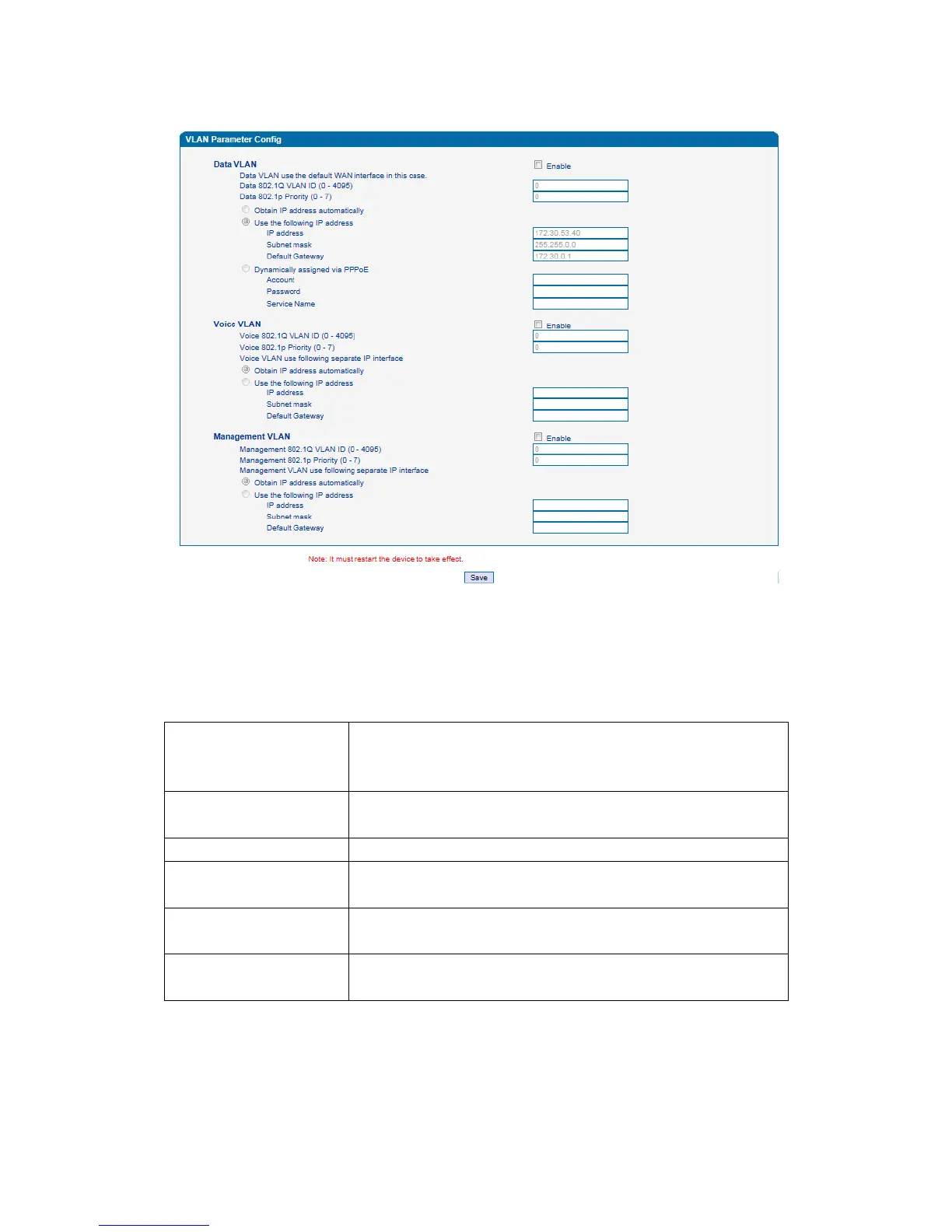
2. VLAN Parameter Config
Figure 3-3-6 VLAN Parameter Config
When a network has a very wide range of applications, in order to artificially divided into different
applications to different networks, to prevent them interfering with each other and to different
networks with different bandwidth, customer can use the VLAN.
VLAN parameter configuration can configure three VLAN as follows.
1Data VLAN
Data VLAN use the
default WAN interface in
this case
Selecting Enable will configure Data VLAN.
Data 802.1Q VLAN
ID(0-4095)
Fill out an ID to describe a D ata VLAN group.
Data 802.1p Priority(0-7)
802.1 protocol to control network traffic priority, Priority from 0-7.
Obtain IP address
automatically
Select this to automatically obtain the IP of VLAN group
Use the following IP
address
Fill in IP, Subnet mask and Default Gateway
Dynamically assigned via
PPPoE
Select this when the Internet through PPPOE and complete account
number and password

Related product manuals