Menus
DTR250SS10 23
3. Press the 1 button to mark the channel as a
favourite. A heart icon appears in the ‘Fav’
column. The channel can be unmarked by
pressing the 1 button again
4. Press the 2 button to lock a channel. A lock
icon appears in the ‘lock’ column next to the
channel name. Once a channel is locked, the
channel can only be viewed by entering the
password. For more information on
passwords, see Parental pin on page 28
5. Press the 3 button to skip a channel. A tick
icon appears in the ‘skip’ column next to the
channel name. Once you choose to skip a
channel, you can no longer select it using the
P+ and P- buttons. The ‘skip’ feature can be
cleared by pressing the 3 button again
6. Press the 4 button to choose a channel to
delete. A cross icon appears in the ‘delete’
column next to the channel name. Press the
OK button to delete the channels marked for
deletion. Press the BACK button to exit
Channel organiser without deleting the
channels
Note: You must re-tune in menu to
restore deleted channels. See
Channel tune on page 24
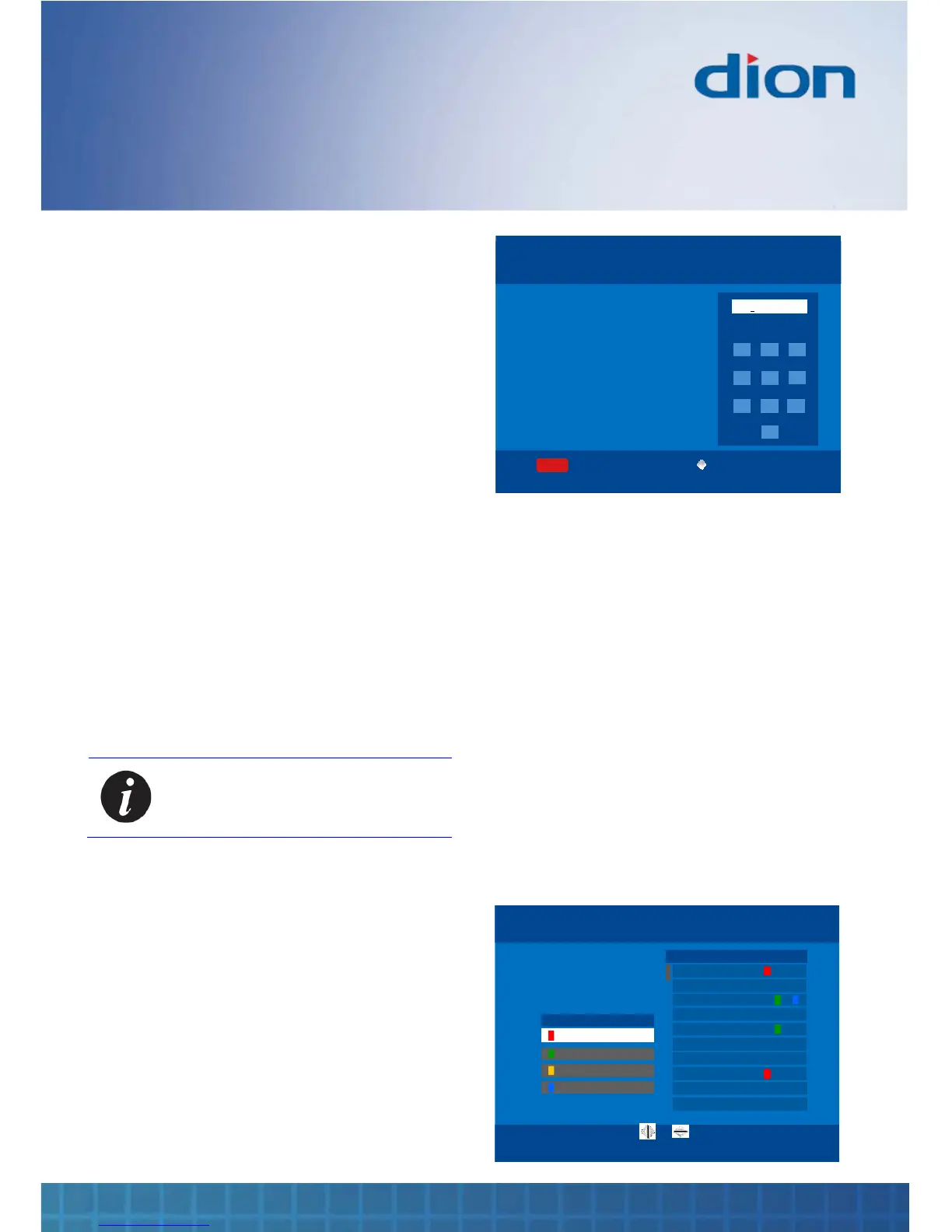
7. Press the 5 button to rename a channel. A
multi-tap menu (similar to a mobile phone) is
displayed
8. Press the ► and ◄ buttons to move the
cursor and the NUMERIC buttons to enter a
character
9. You can delete the character over the cursor
by pressing the red COLOURED button
NAME GROUP OF CHANNELS
Mon, 24 Sep 16:25
Sue
Press a key multiple times to find the
character you want.
E.g. pressing 2 gives: A B C a b c 2
ABC DEF
GHI
JKL
MNO
PQRS
TUV
WXYZ
1 2
6
54
3
7 8
9
0
space
BT CONFIDENTIAL
BACKOK:Save
Delete
0 - 9
RENAME CHANNEL
Mon, 24 Sep 16:25
Sue
Press a key multiple times to find the
character you want.
E.g. pressing 2 gives: A B C a b c 2
ABC DEF
GHI
JKL
MNO
PQRS
TUV
WXYZ
1 2
6
54
3
7 8
9
0
space
BT CONFIDENTIAL
BACKOK:Save
Delete
0 - 9
10. Press the OK button to accept the new
channel name and return to the previous
menu. Alternatively, press the BACK button if
you want to exit to the previous menu without
changing the channel name
Channel groups
You can create groups of channels by a common
theme (e.g. ‘news’, ‘children’, ‘movies’) or by
interest to a user (e.g. ‘Sue’, ‘Michelle’, ‘Dad’)
1. Press the MENU button, then press the ▼ /
▲ / ► and ◄ buttons to navigate to the
‘Groups’ label under the ‘Channels’ section in
Menu
2. Press the OK button
5.
BACK
GROUP CHANNELS Tue, 15 Aug 15:07
Group Name
Press 0 to name a group
of channels.
e.g. “Mum’s channels” or “news”
1 BBC One
2 BBC Two
3 ITV
4 Channel Four
5 Five
6 ITV2
7 BBC HD
8 Sky News
9 Five
Group
10 ITV3
Sue
0:Name OK:Save


 To Next Page