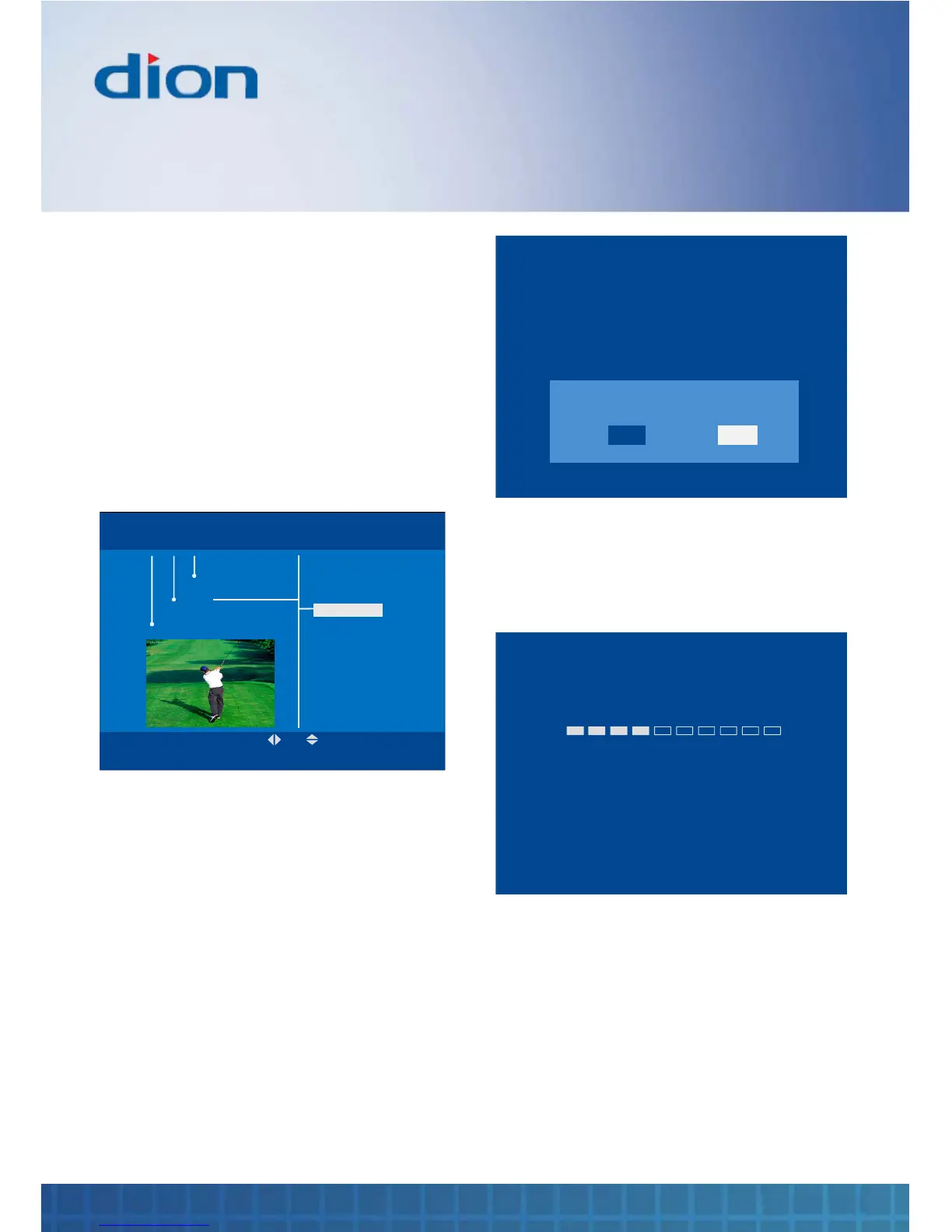
Version
The Version option provides hardware and
software information
To see the version number:
1. Press the MENU button, then press the ▼ /
▲ / ► and ◄ buttons to navigate to the
‘Version’ label under the ‘Install’ section in
Menu
2. The version number is displayed beneath the
‘Version’ label
OK BACK
MENU Tue, 15 Aug 15:07
Install
Settings
Channels
Tune
Factory reset
Version
Format hard drive
H/W 1.0
S/W A3JST10_12_0105
Build 00
Format hard drive
If your unit loses power when recording, the
internal hard drive may become corrupted. If this
happens you can select “Format hard drive” and
press OK button.
1. Press the MENU button, then press the ▼ /
▲ / ► and ◄ buttons to navigate to the
‘Format hard drive’ label under the ‘Install’
section in Menu
Message C
FORMATTING YOUR HARD DRIVE WILL CAUSE
ALL RECORDED PROGRAMMES TO BE LOST.
Are you sure?
YES
NO
2. Select “YES” and press OK button to format
hard drive
OR
3. Select “NO” and press OK button to exit.
Message C
Formatting hard drive.…
This can take several minutes.
DO NOT SWITCH OFF YOUR RECEIVER
DURING THIS TIME.


 To Next Page