3
© 2015 Directed. All rights reserved.
LCD 2-way Remote Control
Feature Description
Internal Antenna Used for transmitting and receiving information.
Display Displays command response feedback and system states.
Command buttons (4)
Used to perform arming/locking, disarming/unlocking, aux-
iliary channel* and remote start** commands.
Programming button
Located on the back of the remote control, selects the vehicle
to control and also provides user selection of LCD remote
control response options.
* On some remote controls, the icon may exist instead of the
icon. This guide uses the icon throughout, but function-
ality is the same regardless of which one of these icons is used
with your system.
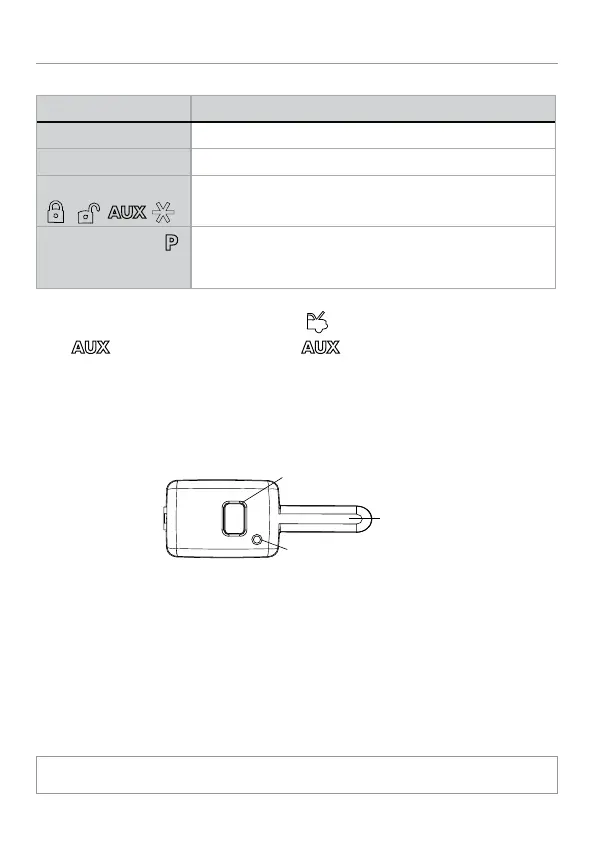
Control Center
Button
LED
Antenna
The Control Center, typically located on the upper part of the front
windshield sends and receives commands or messages to and from
your system. It consists of:
• The In-vehicle system antenna: for two way communication.
• The control center LED: a visual indicator of the system’s status.
• The control center button: for placing the system into Valet Mode*
and to perform the Emergency Override* operation.
* See "Remote and System Operations" on page 13 for details.


 To Next Page