5
© 2015 Directed. All rights reserved.
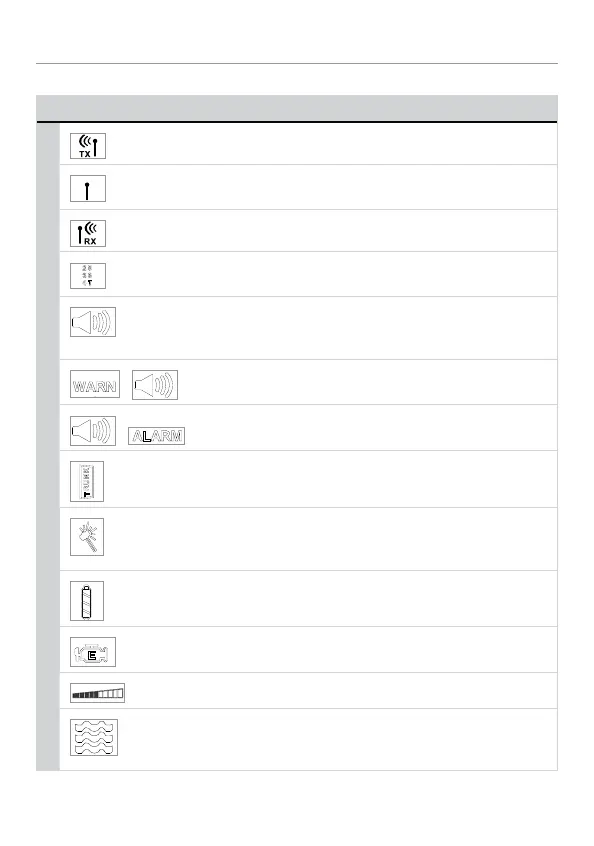
LCD Icon Description
Icon Description
On during remote command transmission to the vehicle.
On during remote command transmission to vehicle, but
command page is not received.
On during receipt of page from the vehicle to the remote.
Displays which auxiliary channel or alarm trigger zone is
active.
Alarm icon displays when beep notification is turned on
and disappears when beep notification is turned off (see
"Programming the LCD Remote Control" on page 24 ).
+
Displays when a security feature is tripped, but not to full
alarm.
+
Displays when a security feature is tripped to a full alarm
state.
Trunk icon flashes a few seconds during full alarm and then
remains displayed until page is cleared.
Shock sensor icon flashes a few seconds during Warn
Away and full alarm, and then remains displayed until page
is cleared.
Battery icon displays current charge capacity of the remote’s
battery.
Displays when remote start is active, engine is running.
Bar indicates remote is sending.
Vibrator icon displays if remote is programmed for vibrator
notification (see "Programming the LCD Remote Control" on
page 24 ).


 To Next Page